








在junit结合maven或gradle构建时,设置覆盖率最低要求主要通过集成jacoco插件并在其配置中指定阈值来实现。以maven为例,需在pom.xml中添加jacoco-maven-plugin,使用
Maven项目中如何配置JaCoCo的覆盖率阈值?
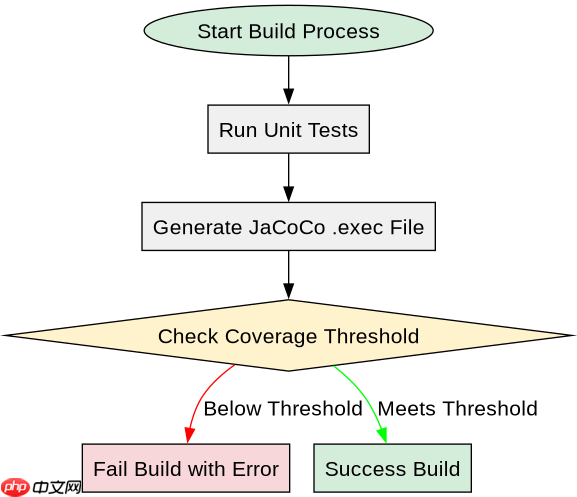
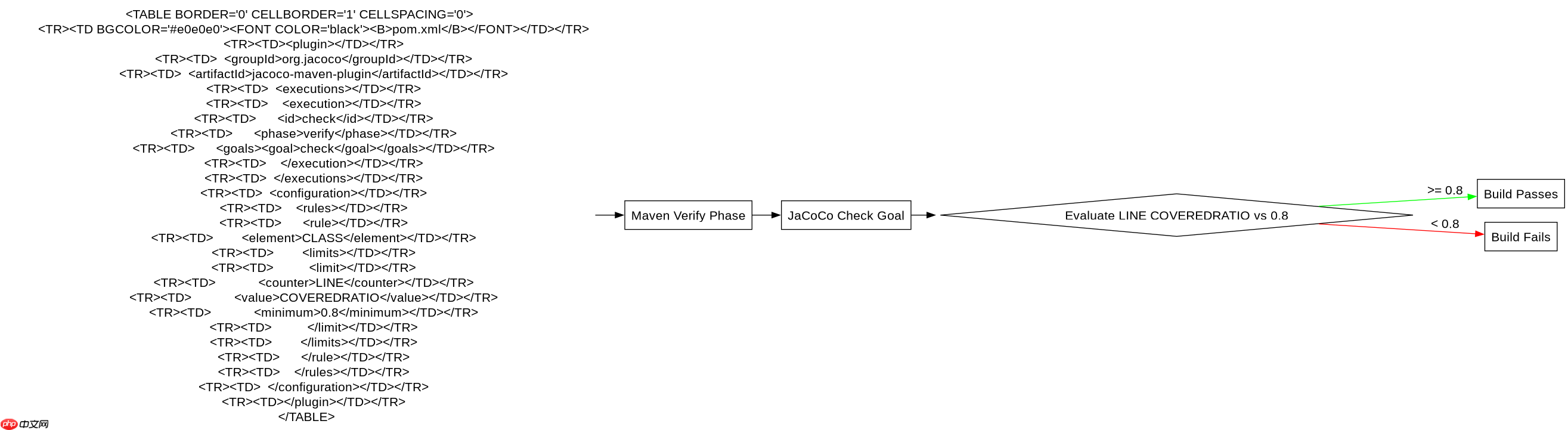
在Maven项目中,可以通过在pom.xml中配置jacoco-maven-plugin来设置覆盖率最低要求。具体做法是在plugin配置中添加一个execution,将其phase设置为verify,然后在configuration中定义rules和limits。例如,可以设置整体代码行覆盖率的最低要求为80%。如果运行测试后生成的覆盖率报告低于这个阈值,Maven构建就会失败。
<?xml version="1.0" encoding="UTF-8"?>
<project xmlns="http://maven.apache.org/POM/4.0.0"
         xmlns:xsi="http://www.w3.org/2001/XMLSchema-instance"
         xsi:schemaLocation="http://maven.apache.org/POM/4.0.0 http://maven.apache.org/xsd/maven-4.0.0.xsd">
    <modelVersion>4.0.0</modelVersion>

    <groupId>com.example</groupId>
    <artifactId>junit-coverage-demo</artifactId>
    <version>1.0-SNAPSHOT</version>

    <properties>
        <maven.compiler.source>17</maven.compiler.source>
        <maven.compiler.target>17</maven.compiler.target>
    </properties>

    <dependencies>
        <dependency>
            <groupId>junit</groupId>
            <artifactId>junit</artifactId>
            <version>4.13.2</version>
            <scope>test</scope>
        </dependency>
    </dependencies>

    <build>
        <plugins>
            <plugin>
                <groupId>org.jacoco</groupId>
                <artifactId>jacoco-maven-plugin</artifactId>
                <version>0.8.11</version>
                <executions>
                    <execution>
                        <id>prepare-agent</id>
                        <goals>
                            <goal>prepare-agent</goal>
                        </goals>
                    </execution>
                    <execution>
                        <id>check</id>
                        <phase>verify</phase>
                        <goals>
                            <goal>check</goal>
                        </goals>
                        <configuration>
                            <rules>
                                <rule>
                                    <element>CLASS</element>
                                    <limits>
                                        <limit>
                                            <counter>LINE</counter>
                                            <value>COVEREDRATIO</value>
                                            <minimum>0.8</minimum>
                                        </limit>
                                    </limits>
                                </rule>
                            </rules>
                        </configuration>
                    </execution>
                </executions>
            </plugin>
        </plugins>
    </build>
</project>
上述配置中,
Gradle项目中如何实现类似的覆盖率检查?
在Gradle项目中,可以使用官方的JaCoCo插件或第三方插件如com.diffplug.gradle:goomph来实现覆盖率检查。以官方插件为例,需要在build.gradle文件中应用jacoco插件,并在test任务之后添加一个自定义任务来检查覆盖率。可以通过读取JaCoCo生成的.exec文件,解析其中的覆盖率数据,并与设定的阈值进行比较。如果低于阈值,则抛出异常终止构建。

plugins {
    id 'java'
    id 'jacoco'
}

group = 'com.example'
version = '1.0-SNAPSHOT'

repositories {
    mavenCentral()
}

dependencies {
    testImplementation 'junit:junit:4.13.2'
}

test {
    finalizedBy jacocoTestReport // report is always generated by tests run
}

jacocoTestReport {
    dependsOn test // tests are required to run before generating the report
    reports {
        xml.required = false
        html.required = true
    }
}

task checkCoverage(type: JacocoCoverageCheck) {
    executionData fileTree(dir: buildDir, includes: ['jacoco/test.exec'])
    rule { // Define a simple rule for line coverage
        element = 'CLASS'
        limit { // Configure the limit
            counter = 'LINE'
            value = 'COVEREDRATIO'
            minimum = 0.8 // Set minimum coverage to 80%
        }
    }
}

// Add the check task to the build lifecycle
check.dependsOn checkCoverage
注意:上述Gradle示例中使用了假设的JacocoCoverageCheck任务类型,实际上Gradle官方插件并不直接提供此类任务。更常见的做法是使用第三方插件如com.diffplug.gradle:goomph中的GoomphJacocoPlugin,或者编写Groovy脚本手动解析.exec文件。这里为了演示目的,展示了概念性的配置结构。在实际使用中,推荐查阅相关插件文档获取准确配置。
当覆盖率不满足最低要求时,构建过程会发生什么?
当覆盖率不满足最低要求时,构建过程会立即失败,并输出详细的错误信息。这些信息通常包括哪些类、包或整体模块的覆盖率低于预期,以及具体的数值对比。这有助于开发者快速定位问题所在,并采取相应措施提高测试覆盖率。例如,在Maven中,控制台会显示类似“Coverage ratio for class com.example.MyClass is 0.5, expected at least 0.8”的错误消息,并终止后续构建步骤。














