在maven项目中配置junit测试资源目录,核心是修改 pom.xml 中的 build 节点,将 src/test/resources 加入 testresources 列表。这样设置后,maven会在执行 mvn test 时自动将该目录下的文件复制到 target/test-classes,确保测试类能正确加载配置文件或数据。

Maven默认资源路径与结构是怎样的
Maven遵循约定优于配置的原则,默认将 src/main/resources 用于生产资源,src/test/resources 用于测试资源。如果项目结构符合这一规范,无需额外配置即可直接使用。若需自定义路径,可通过 testResources 元素指定新的目录位置。
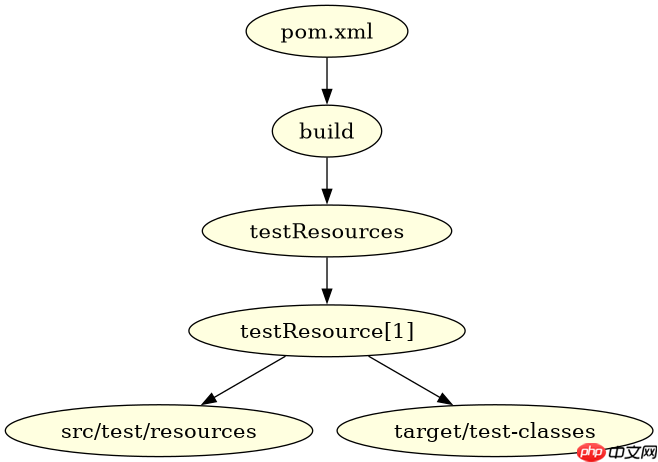
<?xml version="1.0" encoding="UTF-8"?>
<project xmlns="http://maven.apache.org/POM/4.0.0"
         xmlns:xsi="http://www.w3.org/2001/XMLSchema-instance"
         xsi:schemaLocation="http://maven.apache.org/POM/4.0.0 http://maven.apache.org/xsd/maven-4.0.0.xsd">
    <modelVersion>4.0.0</modelVersion>

    <groupId>com.example</groupId>
    <artifactId>junit-resource-demo</artifactId>
    <version>1.0-SNAPSHOT</version>

    <properties>
        <maven.compiler.source>17</maven.compiler.source>
        <maven.compiler.target>17</maven.compiler.target>
        <project.build.sourceEncoding>UTF-8</project.build.sourceEncoding>
    </properties>

    <dependencies>
        <dependency>
            <groupId>junit</groupId>
            <artifactId>junit</artifactId>
            <version>4.13.2</version>
            <scope>test</scope>
        </dependency>
    </dependencies>

    <build>
        <resources>
            <resource>
                <directory>src/main/resources</directory>
            </resource>
        </resources>
        <testResources>
            <testResource>
                <directory>src/test/resources</directory>
            </testResource>
        </testResources>
    </build>
</project>
上述代码展示了标准的 pom.xml 配置。其中 <testresources></testresources> 部分明确指定了测试资源的来源目录。运行 mvn clean compile 后,检查 target/test-classes 目录,可以看到 src/test/resources 下的内容已被复制过来。

Java Maven 项目审查工作流的通用输入处理。当 Java Maven 项目以 ZIP压缩包或 GitLab 仓库 URL 形式提供且需要...时使用。
如何自定义非标准测试资源目录
当测试资源不在默认的 src/test/resources 时,例如放在 src/test/fixtures,必须显式声明该路径。通过添加一个新的 <testresource></testresource> 块并指定 <directory></directory>,Maven会将其纳入构建过程。同时可以保留默认目录,实现多目录合并。
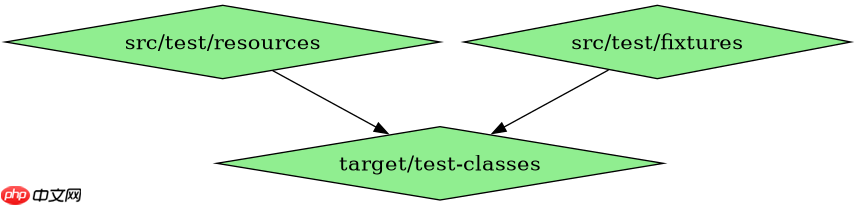
<?xml version="1.0" encoding="UTF-8"?>
<project xmlns="http://maven.apache.org/POM/4.0.0"
         xmlns:xsi="http://www.w3.org/2001/XMLSchema-instance"
         xsi:schemaLocation="http://maven.apache.org/POM/4.0.0 http://maven.apache.org/xsd/maven-4.0.0.xsd">
    <modelVersion>4.0.0</modelVersion>

    <groupId>com.example</groupId>
    <artifactId>junit-custom-resource-demo</artifactId>
    <version>1.0-SNAPSHOT</version>

    <build>
        <testResources>
            <testResource>
                <directory>src/test/resources</directory>
            </testResource>
            <testResource>
                <directory>src/test/fixtures</directory>
            </testResource>
        </testResources>
    </build>
</project>
此配置允许项目同时使用两个资源目录。在测试代码中,可以通过 getClass().getResourceAsStream("/data.json") 访问 src/test/resources 下的文件,或通过相对路径访问 src/test/fixtures 下的文件(需注意类路径根目录为 target/test-classes)。
测试资源目录配置错误会导致什么结果
如果未在 pom.xml 中正确配置 testResources,或者指定的目录不存在,Maven构建不会报错,但测试运行时会出现 java.lang.NullPointerException。这是因为 getResourceAsStream 返回 null,导致后续操作失败。例如,尝试从 src/test/config 加载文件但未在 pom.xml 中声明该目录,测试将无法找到资源。