在junit中给http请求添加查询参数,最直接的方式是使用spring test提供的mockmvc或resttemplate/restclient,通过构建带有参数的url或使用专门的api方法来实现。对于多参数接口测试,关键在于正确拼接参数键值对并验证响应状态码及返回数据。本文将分别展示使用mockmvc进行单元测试和使用resttemplate进行集成测试的具体做法,重点解决参数传递和结果断言的问题。

MockMvc如何构建带多参数的GET请求
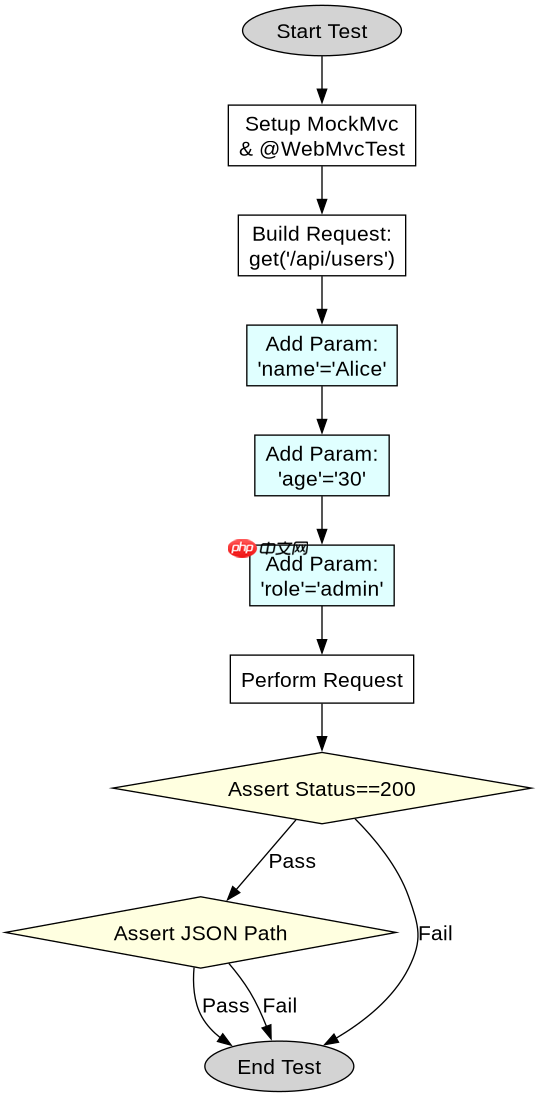
使用MockMvc时,可以通过`param()`链式调用或者直接在URI模板中传入变量来添加多个查询参数。核心在于利用`MockHttpServletRequestBuilder`的`param(String name, String... values)`方法,它可以接受可变数量的参数值,适合处理单键多值的情况;对于单键单值的多参数,连续调用`param()`即可。这样做能确保参数被正确编码并附加到请求URL上,从而模拟真实的浏览器或客户端行为。
import org.junit.jupiter.api.Test;
import org.springframework.beans.factory.annotation.Autowired;
import org.springframework.boot.test.autoconfigure.web.servlet.WebMvcTest;
import org.springframework.test.web.servlet.MockMvc;
import static org.springframework.test.web.servlet.request.MockMvcRequestBuilders.get;
import static org.springframework.test.web.servlet.result.MockMvcResultMatchers.status;
import static org.springframework.test.web.servlet.result.MockMvcResultMatchers.jsonPath;

@WebMvcTest(UserController.class)
public class UserControllerTest {

    @Autowired
    private MockMvc mockMvc;

    @Test
    public void testGetUsersWithMultipleParams() throws Exception {
        // 直接通过链式调用添加多个查询参数
        mockMvc.perform(get("/api/users")
                .param("name", "Alice")
                .param("age", "30")
                .param("role", "admin"))
            .andExpect(status().isOk())
            .andExpect(jsonPath("$.data[0].name").value("Alice"));
    }
}
上述代码展示了如何在`@WebMvcTest`环境下,针对`UserController`中的`/api/users`端点发起GET请求。通过连续调用`.param("key", "value")`,我们成功添加了`name`、`age`和`role`三个查询参数。执行后,MockMvc会模拟Servlet容器处理该请求,并返回预期的JSON响应。断言部分验证了HTTP状态码为200,且返回数据中包含名为“Alice”的用户记录。这种方法无需启动完整的Web服务器,测试速度快,适合纯逻辑验证。
RestTemplate如何发送带复杂查询参数的POST请求
当需要测试POST请求且携带大量查询参数或表单数据时,`RestTemplate`提供了更灵活的方式。可以使用`HttpEntity`结合`MultiValueMap`来封装参数,或者直接使用`UriComponentsBuilder`构建带有查询参数的完整URL。对于复杂的对象参数,通常建议将其放在请求体中,但若业务要求作为查询参数传递,则需手动序列化。这里演示如何使用`UriComponentsBuilder`动态构建URL并发送请求,这种方式能清晰分离路径与参数,便于调试。

import org.junit.jupiter.api.Test;
import org.springframework.beans.factory.annotation.Autowired;
import org.springframework.boot.test.context.SpringBootTest;
import org.springframework.core.ParameterizedTypeReference;
import org.springframework.http.HttpMethod;
import org.springframework.http.ResponseEntity;
import org.springframework.web.client.RestTemplate;
import org.springframework.web.util.UriComponentsBuilder;
import java.net.URI;
import java.util.Map;

@SpringBootTest
public class UserIntegrationTest {

    @Autowired
    private RestTemplate restTemplate;

    @Test
    public void testPostUserWithQueryParams() {
        // 构建带有查询参数的URI
        URI uri = UriComponentsBuilder.fromHttpUrl("http://localhost:8080/api/users/create")
                .queryParam("source", "mobile")
                .queryParam("version", "v1")
                .build()
                .encode()
                .toUri();

        // 发送POST请求,参数在URL中,主体为空或包含其他数据
        ResponseEntity<Map> response = restTemplate.exchange(
                uri,
                HttpMethod.POST,
                null,
                new ParameterizedTypeReference<Map>() {}
        );

        // 验证响应
        assert response.getStatusCode().is2xxSuccessful();
        assert response.getBody().containsKey("id");
    }
}
这段代码展示了在集成测试场景下,如何使用`RestTemplate`向本地运行的服务发送请求。首先,利用`UriComponentsBuilder`创建基础URL,并通过`queryParam`依次添加`source`和`version`两个查询参数。随后调用`encode()`确保特殊字符被正确转义,最后转换为`URI`对象。在`exchange`方法中,指定HTTP方法为POST,并将构建好的URI传入。虽然POST请求通常将数据放在Body中,但本例演示了将特定标识作为查询参数传递的场景。测试结束后,验证响应状态是否成功以及返回数据中是否包含预期的字段,如`id`。这种方式适用于需要验证真实网络交互或服务间调用的情况。
当查询参数包含特殊字符时如何处理编码问题
在实际开发中,查询参数往往包含空格、中文或特殊符号(如`&`, `=`, `+`等),如果未正确处理会导致服务端解析错误或400 Bad Request。在使用MockMvc或RestTemplate时,必须确保参数值经过正确的URL编码。MockMvc的`param`方法内部会自动处理基本编码,但对于复杂场景,建议使用`URLEncoder`预处理。而在RestTemplate中,`UriComponentsBuilder`默认会进行编码,但如果手动拼接字符串则极易出错。因此,始终优先使用框架提供的构建器方法来处理参数,避免手动拼接URL字符串。