junit 5 使用 @valuesource 注解为测试方法提供单参数数据,只需在测试方法上添加该注解并指定数据类型及具体值即可。例如通过 strings = {"a", "b"} 配置字符串输入,框架会自动将每个值作为参数传入方法执行多次测试。此方式适用于简单类型或枚举值的参数化测试场景。

@ValueSource支持哪些数据类型
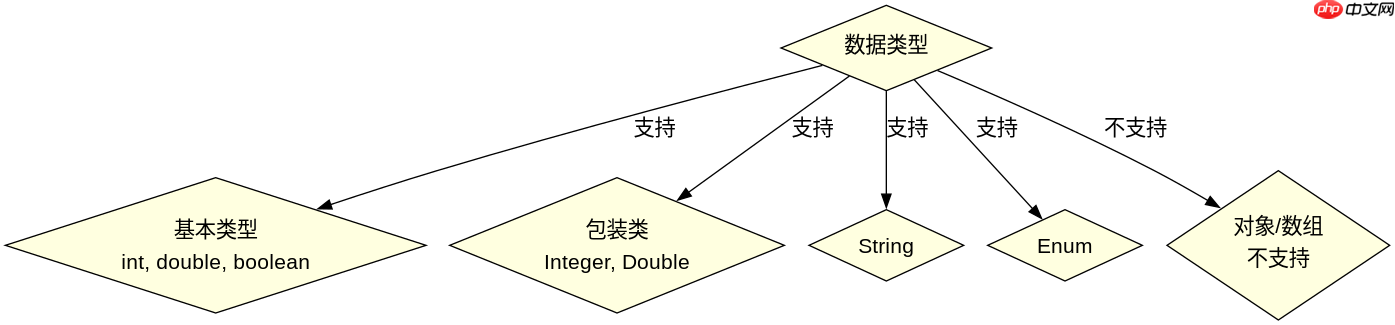
@ValueSource 支持基本类型、包装类、String 和 Enum 等单一数据类型。它不能直接用于对象数组或复杂结构,需配合 @MethodSource 或 @CsvSource 处理更复杂的输入。每种类型需在注解中明确声明对应的属性名,如 ints、doubles 等。
import org.junit.jupiter.params.ParameterizedTest;
import org.junit.jupiter.params.provider.ValueSource;

import static org.junit.jupiter.api.Assertions.assertTrue;

public class StringLengthTest {
    @ParameterizedTest
    @ValueSource(strings = {"hello", "world", "test"})
    void testStringLength(String input) {
        assertTrue(input.length() > 0);
    }
}
如何处理多个不同参数的组合测试
当需要测试多参数组合时,@ValueSource 不再适用,应改用 @CsvSource 或 @MethodSource。@CsvSource 允许以逗号分隔的方式定义多列数据,每行代表一组参数输入。这种方式更适合表格化数据的测试用例管理,且支持自动类型转换。

import org.junit.jupiter.params.ParameterizedTest;
import org.junit.jupiter.params.provider.CsvSource;

import static org.junit.jupiter.api.Assertions.assertEquals;

public class MathOperationTest {
    @ParameterizedTest
    @CsvSource({"1, 2, 3", "10, 20, 30", "-1, -2, -3"})
    void testAdd(int a, int b, int expected) {
        assertEquals(expected, a + b);
    }
}
当输入包含特殊字符时会发生什么
若输入字符串包含引号、逗号或换行符等特殊字符,@ValueSource 会将其视为普通文本内容,不会触发解析错误。但在使用 @CsvSource时,这些字符可能干扰字段分割,需用双引号包裹整个字段或使用转义机制。建议在涉及复杂文本时使用 @MethodSource 手动构造测试数据以避免歧义。