








java 中处理 zip 压缩和解压文件主要依赖 java.util.zip 包下的 zipoutputstream 和 zipinputstream。核心做法是创建对应的流对象,通过循环读取源文件或目录中的条目,将数据写入目标流或从目标流读取到本地文件,并在操作完成后关闭资源。对于包含子目录的文件夹,需要递归遍历并记录路径前缀,以确保解压后目录结构正确。

如何压缩单个文件或整个目录为ZIP
压缩单个文件时,直接读取文件字节流并写入 ZipOutputStream 即可;压缩整个目录则需要递归遍历所有文件和子文件夹,为每个条目设置正确的 ZipEntry 名称以保留目录结构。关键步骤是使用缓冲区(如 4KB 数组)高效传输数据,并确保在写入每个条目后调用 finish() 方法提交压缩数据。
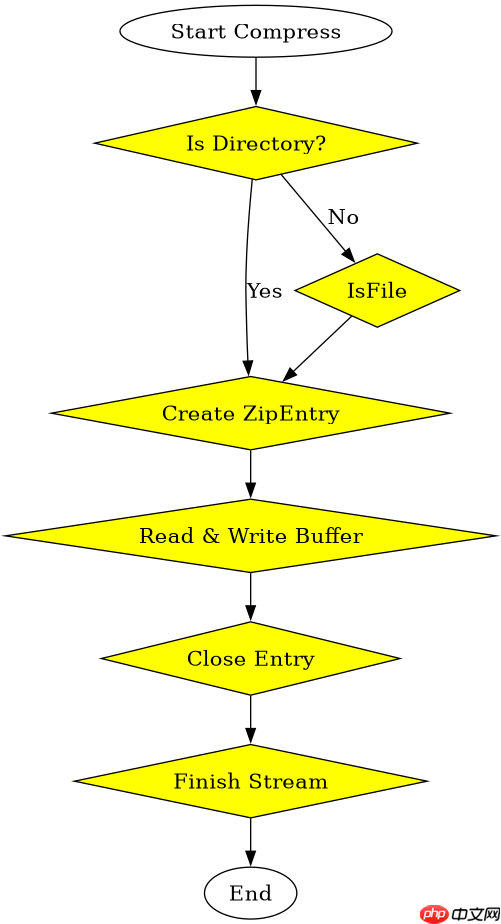
import java.io.*;
import java.util.zip.*;

public class ZipCompressor {
    public static void compress(String srcPath, String destZipPath) throws IOException {
        try (FileInputStream fis = new FileInputStream(srcPath);
             FileOutputStream fos = new FileOutputStream(destZipPath);
             ZipOutputStream zos = new ZipOutputStream(fos)) {

            byte[] buffer = new byte[4096];
            int length;

            // 如果是文件,直接写入
            if (new File(srcPath).isFile()) {
                ZipEntry entry = new ZipEntry(new File(srcPath).getName());
                zos.putNextEntry(entry);
                while ((length = fis.read(buffer)) > 0) {
                    zos.write(buffer, 0, length);
                }
                zos.closeEntry();
            } else {
                // 如果是目录,递归处理
                compressDirectory(srcPath, srcPath, zos, buffer);
            }
            zos.finish();
        }
    }

    private static void compressDirectory(String baseDir, String currentPath, ZipOutputStream zos, byte[] buffer) throws IOException {
        File file = new File(currentPath);
        if (file.isDirectory()) {
            File[] files = file.listFiles();
            if (files != null) {
                for (File f : files) {
                    String relativePath = f.getAbsolutePath().substring(baseDir.length() + 1);
                    if (f.isDirectory()) {
                        // 目录条目必须以 / 结尾
                        zos.putNextEntry(new ZipEntry(relativePath + "/"));
                        zos.closeEntry();
                        compressDirectory(baseDir, f.getAbsolutePath(), zos, buffer);
                    } else {
                        try (FileInputStream fis = new FileInputStream(f)) {
                            zos.putNextEntry(new ZipEntry(relativePath));
                            int length;
                            while ((length = fis.read(buffer)) > 0) {
                                zos.write(buffer, 0, length);
                            }
                            zos.closeEntry();
                        }
                    }
                }
            }
        }
    }
}
如何解压ZIP文件到指定目录
解压 ZIP 文件时,使用 ZipInputStream 逐个读取 ZipEntry。对于目录条目,需要在本地创建相应的文件夹;对于文件条目,则创建输出流并将数据写入本地磁盘。必须注意处理嵌套目录,确保父目录存在后再写入文件,同时避免覆盖意外情况。

在架构漂移扩散之前,使用 dependency-cruiser 强制执行 JavaScript 和 TypeScript 依赖规则
下载
在代码库出现结构漂移之前,扫描JS或TS代码库中的禁止导入、循环依赖、孤立模块和其他依赖规则违规情况。
立即学习“Java免费学习笔记(深入)”;
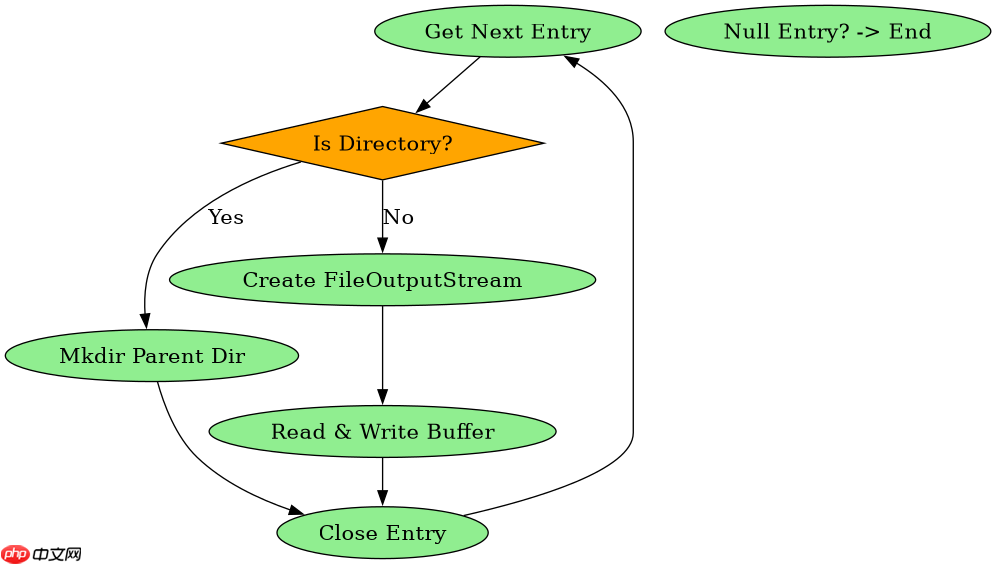
import java.io.*;
import java.util.zip.*;

public class ZipDecompressor {
    public static void decompress(String zipPath, String destDir) throws IOException {
        try (FileInputStream fis = new FileInputStream(zipPath);
             ZipInputStream zis = new ZipInputStream(fis)) {

            ZipEntry entry;
            while ((entry = zis.getNextEntry()) != null) {
                File destFile = new File(destDir, entry.getName());

                if (entry.isDirectory()) {
                    destFile.mkdirs();
                } else {
                    // 确保父目录存在
                    File parent = destFile.getParentFile();
                    if (parent != null && !parent.exists()) {
                        parent.mkdirs();
                    }
                    try (FileOutputStream fos = new FileOutputStream(destFile)) {
                        byte[] buffer = new byte[4096];
                        int length;
                        while ((length = zis.read(buffer)) > 0) {
                            fos.write(buffer, 0, length);
                        }
                    }
                }
                zis.closeEntry();
            }
        }
    }
}
当ZIP中包含同名文件时会发生什么
当 ZIP 文件中存在同名文件时,ZipInputStream 会按顺序依次处理这些条目。在解压过程中,后出现的同名文件会直接覆盖先前的文件内容,因为 FileOutputStream 默认会截断已存在的文件。程序不会抛出异常,而是静默完成覆盖操作,最终本地磁盘上保留的是 ZIP 中最后出现的那个同名文件的内容。



















