








在 javascript 中,使用 fetch api 获取响应头信息,最直接的方法是在请求成功后的回调函数中访问 response 对象提供的 headers 属性。这个属性是一个标准的 headers 实例,你可以调用其 .get() 方法来获取指定名称的单个响应头值,或者使用 .foreach() 遍历所有响应头。需要注意的是,出于安全考虑,浏览器默认只允许脚本访问部分简单的响应头(如 cache-control、content-language、content-type、expires、last-modified、pragma),其他复杂或敏感的头部信息(如 set-cookie)通常被屏蔽,除非服务器明确配置了 cors 白名单。

如何获取单个指定的响应头字段?
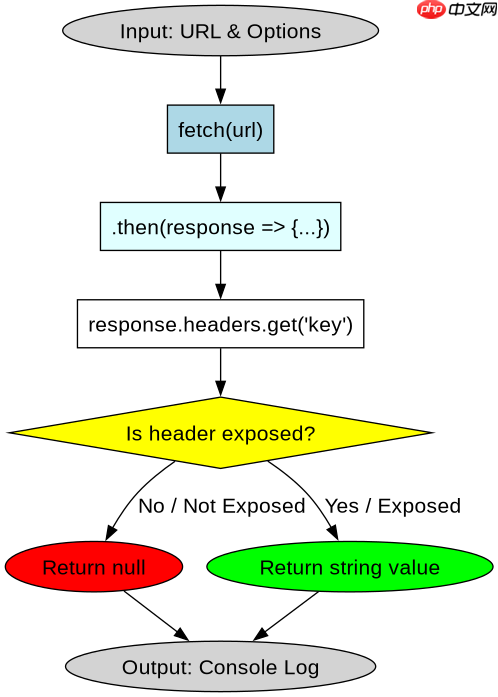
要获取单个响应头,例如 Content-Type 或自定义的 X-Custom-Header,应使用 response.headers.get(name) 方法。该方法接受一个字符串参数,表示要获取的头部名称,不区分大小写。如果该头部不存在,它将返回 null。这是最常用且最高效的方式,适用于只需要检查特定元数据的场景。
fetch('https://api.example.com/data')
  .then(response => {
    // 获取特定的响应头
    const contentType = response.headers.get('content-type');
    const customHeader = response.headers.get('x-custom-header');

    console.log('Content-Type:', contentType);
    console.log('Custom Header:', customHeader);

    return response.json();
  })
  .then(data => {
    console.log('Data received:', data);
  })
  .catch(error => {
    console.error('Fetch error:', error);
  });
如何遍历并查看所有可用的响应头?
当需要检查所有返回的头部信息时,可以使用 response.headers.forEach(callback) 方法。它会遍历 Headers 对象中的每一对键值,并将键和值作为参数传递给回调函数。这对于调试或记录完整的响应元数据非常有用。同样,受 CORS 策略限制,你只能看到那些被服务器允许暴露给前端的头部。

FilePond 是一个 JavaScript 文件上传库,支持通过拖拽、粘贴和 API 方式处理文件、目录、URL 和 Data URI。它包含内置的图像优化功能、异步分块上传功能,并提供了适用于 React、Vue、Angular 和 Svelte 的适配器。
立即学习“Java免费学习笔记(深入)”;

fetch('https://api.example.com/data')
  .then(response => {
    console.log('All accessible headers:');
    response.headers.forEach((value, key) => {
      console.log(`${key}: ${value}`);
    });
    return response.text();
  })
  .then(text => {
    console.log('Response body:', text);
  })
  .catch(error => {
    console.error('Fetch error:', error);
  });
为什么某些响应头(如 Set-Cookie)无法通过 JS 获取?
当你尝试获取 Set-Cookie 或其他非简单响应头时,response.headers.get() 会返回 null,即使服务器确实发送了这些头部。这是因为浏览器的 CORS 规范规定,默认情况下,JavaScript 只能访问“简单响应头”。如果服务器希望前端能访问其他头部,必须在响应中设置 Access-Control-Expose-Headers 头,列出允许暴露的头部名称。例如,服务器需发送 Access-Control-Expose-Headers: Set-Cookie, X-Custom-Header,前端才能通过 JS 读取这些值。这是为了防止敏感信息泄露,确保跨域请求的安全性。


















