使用 microsoft.office.interop.excel 库的 sheets 集合可以获取 excel 中的全部工作表名称。具体做法是打开工作簿后,遍历 workbook.sheets 或 worksheet.worksheets 集合,读取每个对象的 name 属性并收集到列表中。

如何区分只读模式与读写模式下的工作表访问?
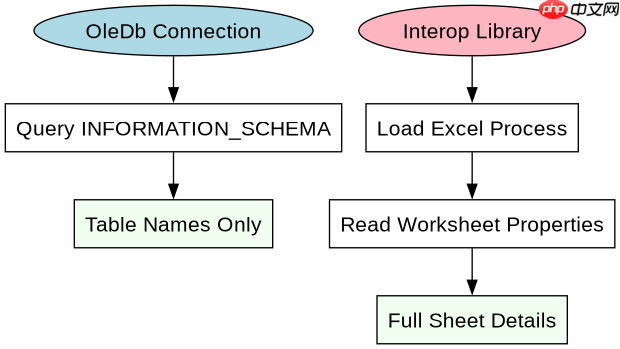
在只读模式下,通常使用 OleDb 连接字符串查询 INFORMATION_SCHEMA.TABLES 来获取表名;而在需要读写或精确控制时,使用 Interop 库直接操作 Sheets 对象。两者的核心区别在于是否加载 Excel 进程以及是否能获取隐藏的工作表。

using System;
using System.Collections.Generic;
using Microsoft.Office.Interop.Excel;

namespace ExcelSheetNameFetcher
{
    class Program
    {
        static void Main(string[] args)
        {
            string filePath = @"C:\temp\test.xlsx";
            List<string> sheetNames = GetSheetNames(filePath);
            foreach (var name in sheetNames)
            {
                Console.WriteLine(name);
            }
        }

        static List<string> GetSheetNames(string filePath)
        {
            var names = new List<string>();
            Application excelApp = new Application();
            Workbook workbook = null;
            try
            {
                workbook = excelApp.Workbooks.Open(filePath, ReadOnly: true);
                Sheets sheets = workbook.Sheets;
                foreach (Worksheet sheet in sheets)
                {
                    names.Add(sheet.Name);
                }
            }
            finally
            {
                if (workbook != null) workbook.Close();
                excelApp.Quit();
                System.Runtime.InteropServices.Marshal.ReleaseComObject(excelApp);
            }
            return names;
        }
    }
}
如何处理隐藏的工作表名称?
默认情况下,Interop 遍历 Sheets 集合时会包含所有可见和隐藏的工作表。如果需要过滤掉隐藏的工作表,可以在遍历时检查 Worksheet.Visible 属性。隐藏的工作表依然存在于集合中,只是其 Visible 属性为 false。

using System;
using System.Collections.Generic;
using Microsoft.Office.Interop.Excel;

namespace ExcelSheetNameFetcher
{
    class Program
    {
        static void Main(string[] args)
        {
            string filePath = @"C:\temp\test.xlsx";
            List<string> visibleSheetNames = GetVisibleSheetNames(filePath);
            foreach (var name in visibleSheetNames)
            {
                Console.WriteLine(name);
            }
        }

        static List<string> GetVisibleSheetNames(string filePath)
        {
            var names = new List<string>();
            Application excelApp = new Application();
            Workbook workbook = null;
            try
            {
                workbook = excelApp.Workbooks.Open(filePath, ReadOnly: true);
                Sheets sheets = workbook.Sheets;
                foreach (Worksheet sheet in sheets)
                {
                    if (sheet.Visible == XlSheetVisibility.xlSheetVisible)
                    {
                        names.Add(sheet.Name);
                    }
                }
            }
            finally
            {
                if (workbook != null) workbook.Close();
                excelApp.Quit();
                System.Runtime.InteropServices.Marshal.ReleaseComObject(excelApp);
            }
            return names;
        }
    }
}