








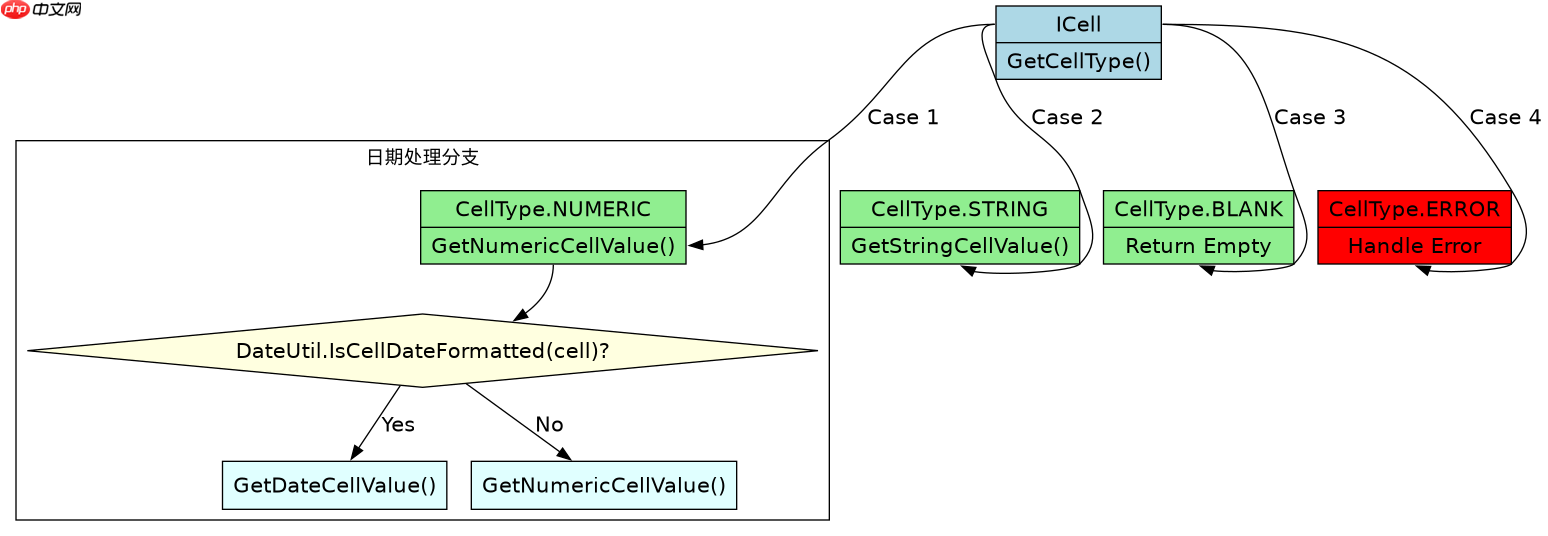
使用npoi库读取excel单元格时,处理不同数据类型的核心做法是调用 icell.getcelltype() 获取枚举值,然后针对 numeric、string 和 blank 分别调用 getnumericcellvalue()、getstringcellvalue() 或进行空值判断。这样做能确保数值被正确解析为浮点数,文本保持原样,而不会因类型不匹配抛出异常。若单元格包含日期,其底层类型为 numeric,需额外检查 cellutil.isdatecell() 以区分普通数字和日期格式。

NPOI中如何根据单元格类型安全获取值?
在NPOI中,必须显式检查 CellType 枚举来路由不同的取值逻辑。对于数值型单元格,直接调用 GetNumericCellValue() 返回 double;对于字符串型,调用 GetStringCellValue() 返回 string;对于空白单元格,应跳过或返回默认值。这种分支结构避免了 InvalidCastException,因为 ICell 接口没有统一的 Value 属性。

using System;
using NPOI.SS.UserModel;
using NPOI.XSSF.UserModel;
using System.IO;

class Program
{
    static void Main()
    {
        // 假设已创建 workbook 和 sheet
        IWorkbook workbook = new XSSFWorkbook();
        ISheet sheet = workbook.CreateSheet("Data");
        IRow row = sheet.CreateRow(0);

        // 设置不同类型的数据
        row.CreateCell(0).SetCellValue(123.45); // Numeric
        row.CreateCell(1).SetCellValue("Hello"); // String
        row.CreateCell(2).SetCellValue(""); // Blank

        for (int i = 0; i < 3; i++)
        {
            ICell cell = row.GetCell(i);
            if (cell == null)
            {
                Console.WriteLine($"Cell {i}: Null");
                continue;
            }

            switch (cell.CellType)
            {
                case CellType.Numeric:
                    // 检查是否为日期
                    if (DateUtil.IsCellDateFormatted(cell))
                    {
                        Console.WriteLine($"Cell {i}: Date {cell.DateCellValue}");
                    }
                    else
                    {
                        Console.WriteLine($"Cell {i}: Number {cell.NumericCellValue}");
                    }
                    break;
                case CellType.String:
                    Console.WriteLine($"Cell {i}: String {cell.StringCellValue}");
                    break;
                case CellType.Blank:
                    Console.WriteLine($"Cell {i}: Blank");
                    break;
                default:
                    Console.WriteLine($"Cell {i}: Other Type {cell.CellType}");
                    break;
            }
        }
    }
}
如何处理混合数据类型导致的解析错误?
当Excel单元格格式设置为“文本”但输入了数字时,NPOI可能将其识别为 STRING 而非 NUMERIC。此时调用 GetNumericCellValue() 会失败,必须先通过 GetStringCellValue() 获取字符串,再尝试转换。反之,若单元格格式为“常规”但内容为纯数字文本,也可能被读作字符串。因此,稳健的做法是先判断类型,若为字符串且内容符合数字格式,则手动解析。

using System;
using NPOI.SS.UserModel;

class Program
{
    static void Main()
    {
        ICell cell = null; // 模拟从Sheet获取的单元格
        // 假设 cell 已被初始化并指向一个值为 "123" 的字符串单元格
        // 即使它是数字,如果格式设为文本,CellType 可能是 STRING

        object value = GetSafeCellValue(cell);
        Console.WriteLine($"Value: {value}, Type: {value?.GetType().Name}");
    }

    static object GetSafeCellValue(ICell cell)
    {
        if (cell == null) return null;

        switch (cell.CellType)
        {
            case CellType.Numeric:
                if (DateUtil.IsCellDateFormatted(cell))
                    return cell.DateCellValue;
                return cell.NumericCellValue;
            case CellType.String:
                string strVal = cell.StringCellValue;
                // 尝试将字符串解析为数字,以处理格式为文本的数字
                if (double.TryParse(strVal, out double num))
                    return num;
                return strVal;
            case CellType.Blank:
                return null;
            default:
                return cell.ToString();
        }
    }
}
当单元格为空或包含公式时,程序行为是什么?
如果单元格未定义(即 GetCell 返回 null),直接访问属性会引发 NullReferenceException。因此,第一步必须是空值检查。如果单元格包含公式(CellType.Formula),NPOI会根据公式的计算结果返回相应的类型(如 NUMERIC 或 STRING),而不是返回公式字符串本身。这意味着在处理公式单元格时,无需特殊处理公式语法,只需按计算后的结果类型处理即可。若公式结果为错误(如 #DIV/0!),CellType 将为 ERROR,此时应捕获该情况以避免崩溃。

















