File.ReadLinesAsync 或 StreamReader.ReadLineAsync 逐行读取文本文件
在 c# 中异步逐行读取文本文件,推荐使用 system.io.file.readlinesasync(.net 8+)或 system.io.streamreader.readlineasync。前者返回可枚举的行集合,适合简单遍历;后者基于流,适合需要精细控制缓冲或处理大文件的场景。核心做法是调用对应方法并配合 await 关键字,避免阻塞 ui 或线程池。

using System;
using System.IO;
using System.Threading.Tasks;

class Program
{
    static async Task Main()
    {
        string filePath = "example.txt";

        // 方法一:使用 File.ReadLinesAsync (.NET 8+)
        await foreach (var line in File.ReadLinesAsync(filePath))
        {
            Console.WriteLine(line);
        }

        // 方法二:使用 StreamReader.ReadLineAsync (通用)
        using var reader = new StreamReader(filePath);
        string? line;
        while ((line = await reader.ReadLineAsync()) != null)
        {
            Console.WriteLine(line);
        }
    }
}
运行上述代码,控制台将逐行输出 example.txt 的内容。若文件不存在,ReadLinesAsync 会抛出 FileNotFoundException,而 StreamReader 也会抛出类似异常,需根据实际需求添加 try-catch 处理。
如何处理读取过程中的异常与资源释放?
异步逐行读取时,必须确保文件句柄正确释放,尤其是使用 StreamReader 时。推荐通过 using 语句或 await using 自动管理资源。对于异常,建议在循环外包裹 try-catch,捕获 IOException 或 UnauthorizedAccessException 等具体类型,避免吞掉错误。

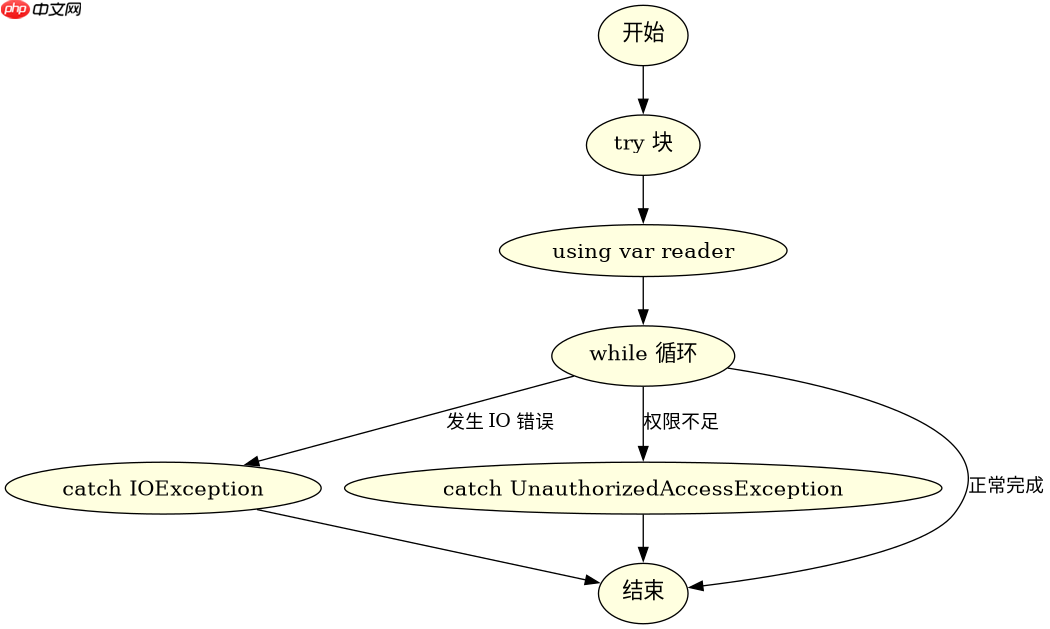
using System;
using System.IO;
using System.Threading.Tasks;

class Program
{
    static async Task Main()
    {
        string filePath = "example.txt";

        try
        {
            using var reader = new StreamReader(filePath);
            string? line;
            while ((line = await reader.ReadLineAsync()) != null)
            {
                Console.WriteLine(line);
            }
        }
        catch (IOException ex)
        {
            Console.WriteLine($"IO 错误: {ex.Message}");
        }
        catch (UnauthorizedAccessException ex)
        {
            Console.WriteLine($"权限不足: {ex.Message}");
        }
    }
}
此代码在读取失败时会打印具体错误信息,而非崩溃。若使用 File.ReadLinesAsync,同样建议用 try-catch 包裹 await foreach 块,因为枚举器内部可能抛出异常。
当文件包含空行或特殊字符时,结果如何表现?
无论是 ReadLinesAsync 还是 ReadLineAsync,都会如实返回每行的内容,包括空字符串(对应空行)和特殊字符(如换行符已被剥离)。例如,若文件内容为:
line1<br><br>line3
则读取结果依次为
"line1"、""、"line3"。开发者需在业务逻辑中自行判断是否跳过空行或处理编码问题(如 UTF-8 BOM)。