








使用npoi库读取excel时,统一处理文本格式日期的核心做法是:在获取单元格值之前,先检查其数据类型是否为字符串(string),如果是,则手动解析该字符串为datetime对象。具体而言,通过 cell.celltype 判断类型,若为 celltype.string,则调用 cell.stringcellvalue 获取文本,并使用 datetime.tryparseexact 结合常见日期格式进行转换;若解析失败或单元格为空,则返回默认值或null。这种方法能确保无论excel中日期是以标准日期格式还是文本格式存储,程序都能正确读取并转换为统一的 datetime 类型,避免抛出异常或得到错误数据。

NPOI如何识别并转换文本型日期单元格?
NPOI通过 ICell.CellType 属性区分单元格内容类型,当类型为 CellType.String 时,表示内容为文本,需手动解析。转换过程使用 DateTime.TryParseExact 方法,传入可能的日期格式数组(如 "yyyy-MM-dd"、"yyyy/MM/dd")进行尝试匹配,成功则返回 true 并填充 DateTime 变量,失败则返回 false。此方法避免了因格式不匹配导致的异常,确保了转换的健壮性。
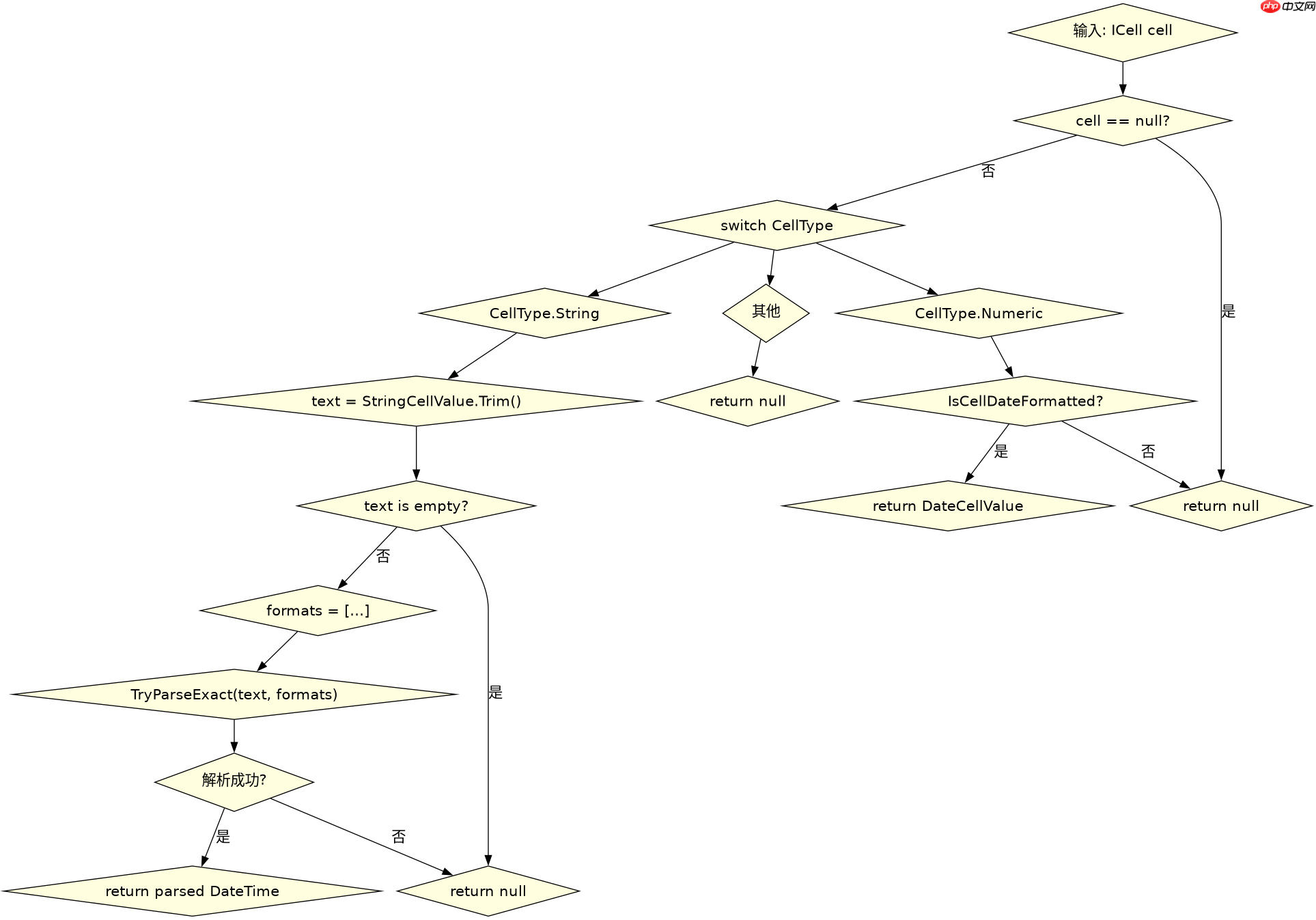
using System;
using System.IO;
using System.Collections.Generic;
using NPOI.SS.UserModel;
using NPOI.XSSF.UserModel;

class Program
{
    static void Main()
    {
        string filePath = "data.xlsx";
        var results = ReadDates(filePath);
        foreach (var dt in results)
        {
            Console.WriteLine(dt.HasValue ? dt.Value.ToString("yyyy-MM-dd") : "Null");
        }
    }

    static List<DateTime?> ReadDates(string path)
    {
        var dates = new List<DateTime?>();
        using (var fs = new FileStream(path, FileMode.Open, FileAccess.Read))
        {
            IWorkbook workbook = new XSSFWorkbook(fs);
            ISheet sheet = workbook.GetSheetAt(0);
            IRow row;
            for (int i = 1; i <= sheet.LastRowNum; i++) // 假设第0行为标题
            {
                row = sheet.GetRow(i);
                if (row == null) { dates.Add(null); continue; }
                ICell cell = row.GetCell(0); // 假设第一列为日期列
                dates.Add(ParseDateCell(cell));
            }
        }
        return dates;
    }

    static DateTime? ParseDateCell(ICell cell)
    {
        if (cell == null) return null;
        switch (cell.CellType)
        {
            case CellType.Numeric:
                if (DateUtil.IsCellDateFormatted(cell))
                    return cell.DateCellValue;
                else
                    return null; // 非日期数字
            case CellType.String:
                string text = cell.StringCellValue.Trim();
                if (string.IsNullOrEmpty(text)) return null;
                string[] formats = { "yyyy-MM-dd", "yyyy/MM/dd", "M/d/yyyy", "d-MMM-yyyy" };
                if (DateTime.TryParseExact(text, formats, System.Globalization.CultureInfo.InvariantCulture, System.Globalization.DateTimeStyles.None, out DateTime result))
                    return result;
                return null; // 解析失败
            default:
                return null;
        }
    }
}
上述代码定义了 ReadDates 方法用于遍历Excel文件的第一列,并调用 ParseDateCell 对每个单元格进行解析。ParseDateCell 首先检查单元格是否为空,然后根据 CellType 分支处理:对于数值型单元格,使用 DateUtil.IsCellDateFormatted 判断是否为Excel内部日期格式,若是则直接获取 DateCellValue;对于字符串型单元格,提取文本后使用 DateTime.TryParseExact 尝试多种常见格式进行解析。若所有尝试均失败,则返回 null。运行此代码前,需确保 data.xlsx 文件存在且包含至少一列混合格式的日期数据。

如何处理不同日期格式字符串的解析差异?
不同地区或系统生成的Excel可能使用不同的日期字符串格式,如 "yyyy-MM-dd"、"yyyy/MM/dd" 或 "M/d/yyyy"。为统一处理,应在 DateTime.TryParseExact 中传入一个包含所有预期格式的字符串数组。该方法会按顺序尝试匹配,一旦成功即停止并返回结果。这种策略无需预先知道具体使用哪种格式,只需覆盖常见情况即可。若遇到未预期的格式,解析将失败并返回 null,此时可根据业务需求记录日志或提供默认值。

using System;
using System.Globalization;

class DateParser
{
    public static DateTime? TryParseFlexible(string input)
    {
        if (string.IsNullOrWhiteSpace(input)) return null;
        string trimmed = input.Trim();
        string[] commonFormats =
        {
            "yyyy-MM-dd",
            "yyyy/MM/dd",
            "M/d/yyyy",
            "d-MMM-yyyy",
            "dd.MM.yyyy"
        };
        if (DateTime.TryParseExact(trimmed, commonFormats, CultureInfo.InvariantCulture, DateTimeStyles.None, out DateTime parsed))
        {
            return parsed;
        }
        return null;
    }
}

class Program
{
    static void Main()
    {
        string[] testInputs = { "2023-10-01", "2023/10/01", "10/1/2023", "01-Oct-2023", "invalid" };
        foreach (var input in testInputs)
        {
            var result = DateParser.TryParseFlexible(input);
            Console.WriteLine($"Input: '{input}' -> Result: {result?.ToString("yyyy-MM-dd") ?? "Null"}");
        }
    }
}
该示例展示了 TryParseFlexible 方法,它接收一个字符串输入,去除首尾空格后,尝试用预定义的多种日期格式进行解析。测试用例包括有效的不同格式和无效字符串。运行结果显示,有效格式均被正确解析为 DateTime 对象,而无效字符串返回 null。这验证了多格式并行尝试的有效性。在实际应用中,可根据目标用户群体的常见习惯调整 commonFormats 数组的内容,以提高解析成功率。
当单元格值为空或无法解析时,程序应返回什么?
当单元格为空或其中的文本无法匹配任何预设日期格式时,ParseDateCell 方法应返回 null(即 DateTime? 类型的 null)。这是因为 DateTime 是值类型,不能表示“无值”状态,因此使用可空类型 DateTime? 作为返回值是最佳实践。调用方在接收到 null 时,可以明确知道该单元格没有有效日期数据,从而进行相应处理,如跳过该行、填充默认值或记录错误。这种设计保持了数据的一致性,避免了因强制转换或默认值掩盖问题而导致后续逻辑错误。


















