在 ansible playbook 中,使用 handler 触发服务重启的核心做法是在任务中使用 notify 参数指定 handler 名称,并在 handlers: 块中定义该 handler 执行 service 或 systemd 模块并设置 state: restarted。只有当 notify 关联的任务状态变为 changed 时,handler 才会被触发执行一次,从而实现配置变更后的服务重载或重启。

如何编写触发重启的 Handler 定义
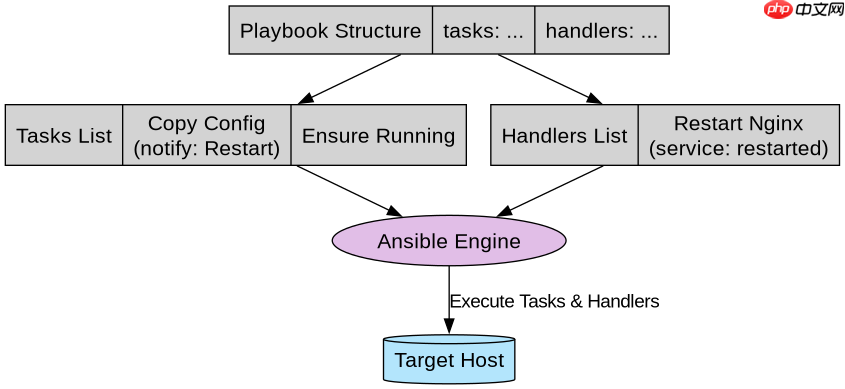
Handler 是 Playbook 中特殊的任务列表,它们必须通过名称引用,且仅在通知它们的任务发生更改时运行。要定义一个重启服务的 handler,需使用 service 模块(或 systemd 模块)并将 state 设置为 restarted。以下是一个完整的 Playbook 示例,展示了如何定义 nginx 的配置更新任务以及对应的重启 handler。
---
- name: Manage Nginx Service
  hosts: webservers
  become: yes
  tasks:
    - name: Copy custom nginx config
      copy:
        src: ./nginx.conf
        dest: /etc/nginx/nginx.conf
        notify: Restart Nginx
      tags: [config]

    - name: Ensure nginx is running
      service:
        name: nginx
        state: started
        enabled: yes
      tags: [service]

  handlers:
    - name: Restart Nginx
      service:
        name: nginx
state: restarted在上述代码中,copy 任务负责将新的配置文件复制到目标主机。如果文件内容发生变化,Ansible 会标记该任务为 changed,并收集 Restart Nginx 这个通知。随后,Playbook 执行 service 任务确保服务处于启动状态。在所有任务执行完毕后,Ansible 检查是否有待处理的 handler 通知,如果有,则按顺序执行 Restart Nginx handler,调用 service 模块重启 nginx 进程。这种机制确保了只有在配置真正改变时才进行重启,避免了不必要的服务中断。
如何处理多个任务通知同一个 Handler
在实际场景中,可能有多个不同的任务(如修改配置文件、调整环境变量等)都需要在服务重启后生效。Ansible 的 handler 机制天然支持去重:即使多个任务都 notify 了同一个 handler,该 handler 在每个 Play 阶段也只会执行一次。这简化了逻辑,无需手动判断是否需要重启。下面展示一个包含多个通知源的 Playbook 结构,验证这一行为。

---
- name: Multi-source Notification Test
  hosts: localhost
  connection: local
  gather_facts: no
  tasks:
    - name: Task A that changes something
      lineinfile:
        path: /tmp/test.txt
        line: "Line from Task A"
        create: yes
      notify: Reload App

    - name: Task B that also changes something
      lineinfile:
        path: /tmp/test.txt
        line: "Line from Task B"
        insertafter: EOF
        create: yes
      notify: Reload App

    - name: Task C that does not change
      debug:
        msg: "No change here"
      notify: Reload App

  handlers:
    - name: Reload App
      command: echo "App reloaded at $(date)" >> /tmp/reload.log
运行此 Playbook 时,Task A 和 Task B 都会创建或修改 /tmp/test.txt 文件,因此它们的状态均为 changed,并向 Reload App 发送通知。Task C 仅打印消息,状态为 ok,不会触发通知。尽管有两个任务触发了通知,Reload App handler 仍然只执行一次,在 /tmp/reload.log 中追加一行记录。这证明了 handler 的去重特性,开发者可以放心地在不同任务中复用相同的 handler 名称,而无需担心重复执行导致的副作用。
Handler 在什么条件下不会被触发
理解 handler 不触发的条件对于排查问题至关重要。Handler 仅在 notify 它的任务返回 changed 状态时才会执行。如果任务返回 ok(表示无变化)或 failed(表示失败),handler 都不会被触发。此外,如果 Playbook 在执行过程中因严重错误而中止,剩余的 handler 可能不会运行,除非使用了 meta: flush_handlers 强制刷新。以下代码演示了如何利用 ignore_errors 和条件判断来控制 handler 的触发行为。
---
- name: Conditional Handler Trigger
  hosts: localhost
  connection: local
  gather_facts: no
  tasks:
    - name: Check if file exists
      stat:
        path: /tmp/nonexistent_file
      register: file_stat

    - name: Notify handler only if file exists
      debug:
        msg: "File exists, notifying handler"
      notify: Handle File Change
      when: file_stat.stat.exists

    - name: Force handler execution regardless of task status
      meta: flush_handlers

  handlers:
    - name: Handle File Change
      debug:
msg: "Handler executed because file existed"在这个例子中,stat 模块检查一个不存在的文件,file_stat.stat.exists 将为假。因此,debug 任务中的 when 条件不满足,任务跳过,不会发送通知。即使后续有 meta: flush_handlers,由于没有待处理的 handler,也不会执行任何操作。如果我们将 path 改为一个实际存在的文件,debug 任务将执行并通知 handler,flush_handlers 会立即触发它。这展示了如何通过条件逻辑精确控制 handler 的执行时机,确保只在特定状态下才进行服务重启或其他操作。