使用 npoi 库读取 excel 单元格批注,核心在于通过 isheet 获取 icell 对象后检查其 cellcomment 属性。如果该属性不为空,则直接访问其文本内容;若为空,说明该单元格无批注。此方法适用于处理 .xlsx 格式文件,且能准确区分有/无批注的单元格。

如何定位包含批注的具体单元格?
要定位具体单元格,需遍历工作表中的行和列,对每个 ICell 实例调用 GetCellComment() 方法。该方法返回 ICellComment 接口对象,若存在批注则返回非空引用,否则返回 null。通过判断返回值即可确定哪些单元格拥有批注,并进一步提取作者和内容。

using System;
using NPOI.SS.UserModel;
using NPOI.XSSF.UserModel;
using System.IO;

class Program
{
    static void Main()
    {
        string filePath = "example.xlsx";
        using (FileStream fs = new FileStream(filePath, FileMode.Open, FileAccess.Read))
        {
            IWorkbook workbook = new XSSFWorkbook(fs);
            ISheet sheet = workbook.GetSheetAt(0);
            for (int rowIdx = 0; rowIdx <= sheet.LastRowNum; rowIdx++)
            {
                IRow row = sheet.GetRow(rowIdx);
                if (row == null) continue;
                for (int colIdx = 0; colIdx < row.LastCellNum; colIdx++)
                {
                    ICell cell = row.GetCell(colIdx);
                    if (cell != null)
                    {
                        ICellComment comment = cell.CellComment;
                        if (comment != null)
                        {
                            Console.WriteLine($"Row {rowIdx}, Col {colIdx}: Author={comment.Author}, Text={comment.String}");
                        }
                    }
                }
            }
        }
    }
}
如何处理不同版本 Excel 文件的批注读取差异?
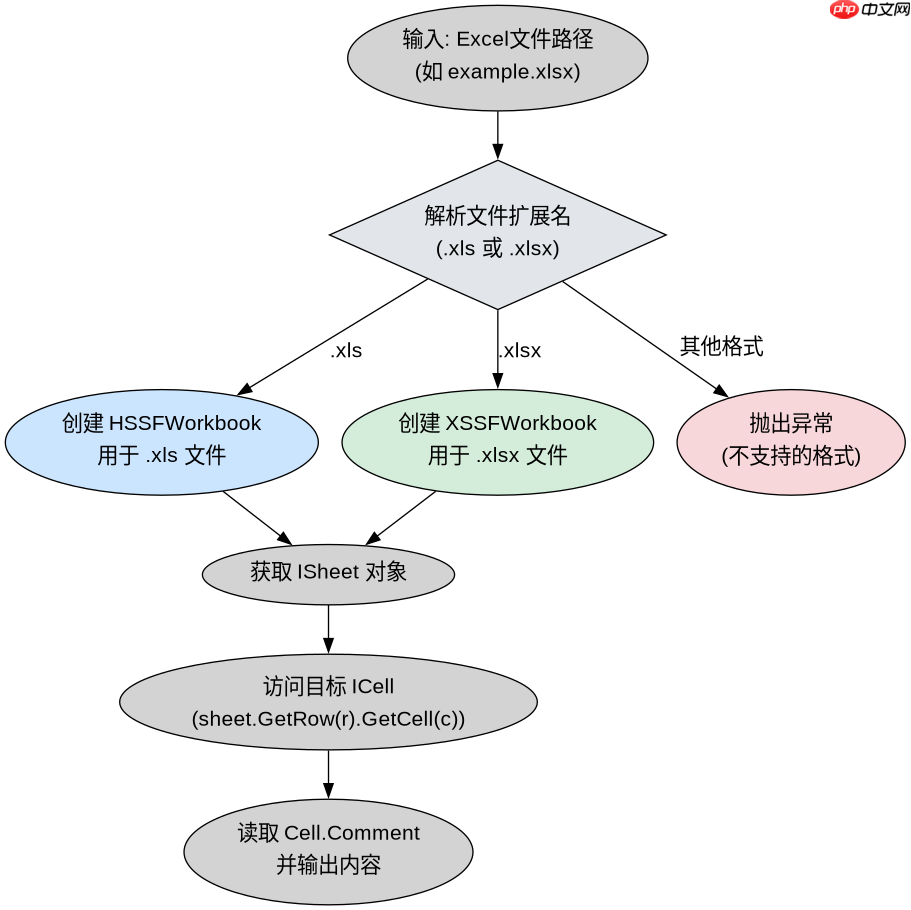
.xls 与 .xlsx 格式在底层存储结构上不同,因此需分别使用 HSSFWorkbook 和 XSSFWorkbook 进行初始化。两者均支持通过 ICell.CellComment 获取批注,但 HSSF 仅适用于旧版二进制格式,而 XSSF 适用于 Office Open XML 格式。确保根据文件扩展名选择正确的 Workbook 实现类,以避免解析失败或类型不匹配错误。

using System;
using NPOI.HSSF.UserModel;
using NPOI.SS.UserModel;
using NPOI.XSSF.UserModel;
using System.IO;

class Program
{
    static void Main()
    {
        string filePath = "data.xls"; // 或 data.xlsx
        IWorkbook workbook;
        using (FileStream fs = new FileStream(filePath, FileMode.Open, FileAccess.Read))
        {
            if (filePath.EndsWith(".xls"))
                workbook = new HSSFWorkbook(fs);
            else if (filePath.EndsWith(".xlsx"))
                workbook = new XSSFWorkbook(fs);
            else
                throw new ArgumentException("Unsupported file format");

            ISheet sheet = workbook.GetSheetAt(0);
            ICell cell = sheet.GetRow(0).GetCell(0);
            if (cell?.CellComment != null)
                Console.WriteLine(cell.CellComment.String);
        }
    }
}
当单元格批注内容为空字符串时程序行为如何?
若单元格存在批注对象但其文本内容为空(即用户添加了空白批注),comment.String 将返回空字符串 "",而非 null。此时 cell.CellComment 仍为非空引用,因此条件判断 if (comment != null) 依然成立,程序会进入分支并输出空值。开发者需注意区分“无批注”与“有空批注”两种情况,前者 CellComment 为 null,后者为有效对象但内容为空。