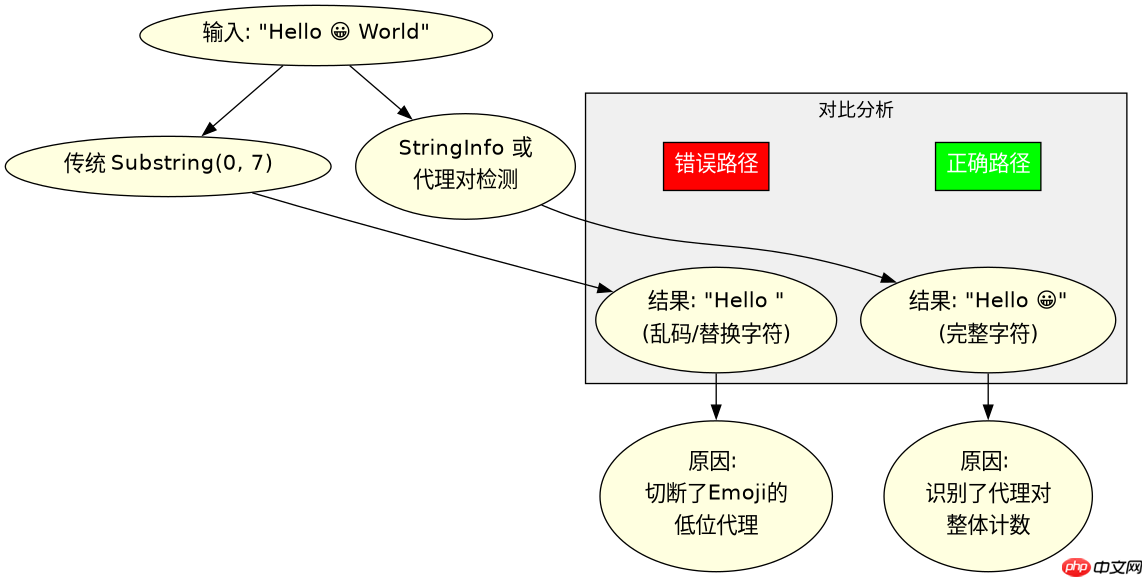
在c#中截取含表情符号的字符串出现乱码,是因为传统的基于`char`(utf-16编码单元)的截取方式无法正确处理由多个`char`组成的代理对(surrogate pairs),例如emoji。要解决这个问题,必须使用基于unicode标量值(scalar values)或`stringinfo`类的方法进行截断,确保不会切断一个字符的一半。核心做法是遍历字符串中的每个文本元素(text element),统计其数量而非字符数,当达到目标长度时直接返回子串。

为什么传统Substring会破坏Emoji?
传统方法如`str.Substring(0, 5)`操作的是`char`数组的下标。大多数Emoji(如?、?)在UTF-16中占用两个`char`(即一个高位代理和一个低位代理)。如果截取位置恰好落在高位代理之后、低位代理之前,或者只取了一半,解码器就会遇到无效的代理对,从而输出替换字符()或乱码。因此,不能简单地按`char`计数,而应按“可见字符”或“Unicode标量值”计数。

using System;
using System.Globalization;

public class Program
{
    public static void Main()
    {
        string text = "Hello ? World";
        // 错误做法:按char截取,可能切断Emoji
        // string bad = text.Substring(0, 7);

        // 正确做法:使用StringInfo处理文本元素
        StringInfo si = new StringInfo(text);
        int targetLength = 7; // 想要前7个可见字符

        if (si.LengthInTextElements <= targetLength)
        {
            Console.WriteLine(si.ToString());
        }
        else
        {
            // GetSubstringByCharacterIndex 需要计算字符索引
            // 更简单的做法是手动遍历或使用正则,但这里演示StringInfo的正确用法
            // StringInfo没有直接的Length属性用于截断,需结合IndexOfElementByCharIndex
            int charIndex = si.GetNextTextElementIndex(0);
            int count = 0;
            int startIndex = 0;
            while (count < targetLength && charIndex < text.Length)
            {
                count++;
                startIndex = charIndex;
                charIndex = si.GetNextTextElementIndex(charIndex);
            }
            string result = text.Substring(0, startIndex);
            Console.WriteLine(result);
        }
    }
}
使用Regex或Span的高效替代方案
除了`StringInfo`,对于高性能场景,可以使用`Regex`匹配单个Unicode字符类别,或者在.NET Core / .NET 5+中使用`Span

using System;

public class SafeTruncator
{
    /// <summary>
    /// 安全截取字符串,按Unicode标量值(Visible Characters)计数
    /// </summary>
    /// <param name="source">源字符串</param>
    /// <param name="length">要保留的字符数(非char数)</param>
    /// <returns>截断后的字符串</returns>
    public static string TruncateByCharacters(string source, int length)
    {
        if (string.IsNullOrEmpty(source)) return source;
        if (length <= 0) return string.Empty;

        int charCount = 0;
        int endIndex = 0;

        for (int i = 0; i < source.Length; i++)
        {
            char c = source[i];
            // 检查是否是高位代理(High Surrogate)
            // 如果是,说明这是一个代理对的一部分,占据两个char,但算一个字符
            if (char.IsHighSurrogate(c))
            {
                charCount++;
                endIndex = i + 2; // 跳过下一个char(低位代理)
            }
            else if (char.IsLowSurrogate(c))
            {
                // 低位代理单独出现通常是非法的,但在某些数据中可能存在
                // 这里我们假设输入合法,或者将其视为一个独立字符处理(视需求而定)
                // 为简单起见,若遇到孤立低位代理,通常也计为一个字符,但不增加endIndex到i+2
                charCount++;
                endIndex = i + 1;
            }
            else
            {
                // 普通字符
                charCount++;
                endIndex = i + 1;
            }

            if (charCount == length)
            {
                return source.Substring(0, endIndex);
            }
        }

        return source;
    }
}

// 测试代码
public class Test
{
    public static void Run()
    {
        string input = "A?B";
        // A(1) + ?(1) + B(1) = 3 chars
        // 截取2个字符应为 "A?"
        string result = SafeTruncator.TruncateByCharacters(input, 2);
        Console.WriteLine($"Result: '{result}'"); // 输出: 'A?'
        Console.WriteLine($"Length: {result.Length}"); // 输出: 3 (chars), 因为Emoji占2个char
    }
}
基于程序中某个输入、条件或结果的具体问题
在上述`SafeTruncator`实现中,如果输入字符串包含孤立的低位代理(Low Surrogate)而没有对应的高位代理,程序会将其视为一个普通字符处理,`endIndex`仅加1。这可能导致在某些严格校验的场景下,截断后的字符串仍包含无效的UTF-16序列。为了验证这一点,我们可以构造一个包含非法代理对的输入,观察`TruncateByCharacters`的行为。在实际开发中,建议先对输入进行规范化(Normalization)或使用`System.Text.RegularExpressions.Regex`的``过滤,以确保数据完整性。此外,如果目标是显示在UI上,还需考虑某些Emoji是组合字符(如国旗emoji由两个区域指示符组成),上述简单代理对检测可能不足以完全覆盖所有边缘情况,此时应回归使用`StringInfo`或专门的Unicode库。