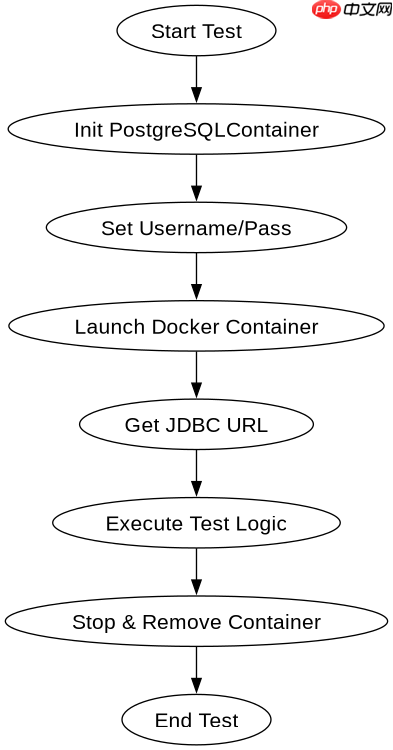
junit 连接容器数据库测试的核心做法是使用 testcontainers 库,通过声明式 api 启动临时 docker 容器并在测试生命周期内管理其状态。具体实现时,需引入 testcontainers 依赖,使用 @container 注解标记数据库实例(如 postgresql 或 mysql),并通过 getjdbcurl()、getusername() 和 getpassword() 方法动态获取连接参数注入到 spring 配置中。这样做能确保每个测试都在隔离的数据库中运行,避免环境干扰且无需手动维护本地数据库服务。

如何配置 JUnit 5 与 Testcontainers 集成
配置集成的关键在于正确添加 Maven 依赖并编写基础测试类。需要引入 org.testcontainers:testcontainers 作为主依赖,并根据目标数据库添加对应模块(如 postgresql)。在测试类中,使用 JUnit 5 的 @Testcontainers 注解启用容器支持,同时用 @Container 定义具体的数据库容器实例。通过调用容器的 getter 方法获取 JDBC URL 等凭证,即可在测试代码中建立连接。
import org.junit.jupiter.api.Test;
import org.junit.jupiter.api.extension.ExtendWith;
import org.testcontainers.containers.PostgreSQLContainer;
import org.testcontainers.junit.jupiter.Container;
import org.testcontainers.junit.jupiter.Testcontainers;

@Testcontainers
public class DatabaseIntegrationTest {

    @Container
    static PostgreSQLContainer<?> postgres = new PostgreSQLContainer<>("postgres:15")
            .withDatabaseName("testdb")
            .withUsername("user")
            .withPassword("pass");

    @Test
    void testConnection() {
        String url = postgres.getJdbcUrl();
        String user = postgres.getUsername();
        String pass = postgres.getPassword();
        System.out.println("Connecting to: " + url);
        // 此处可执行实际 SQL 验证
    }
}
上述代码展示了最简化的集成方式。运行测试时,Testcontainers 会自动拉取镜像并启动容器。测试结束后,容器会被自动销毁。这种方式消除了对本地数据库安装的依赖,特别适合 CI/CD 流水线。

UpdateStock MCP 服务技能 —— 通过 stdio 模式调用 UpdateStock 脚本, 提供 A 股 DuckDB 数据库管理功能:创建数据库、全量/增量更新股票数据、查询股票行情。 设计的数据库方案兼容 QuantAll(全A解析)计算引擎。 触发条件:用户提到"UpdateStock"、"创建股票数据库"、"更新股票数据"、"获取股票数据"等。
如何在 Spring Boot 应用中动态注入容器配置
在 Spring Boot 项目中,不能直接在 application.yml 中硬编码容器地址,因为容器 IP 是动态分配的。解决方案是利用 Spring 的 EnvironmentPostProcessor 或 @DynamicPropertySource 机制。推荐使用 @DynamicPropertySource,它在测试上下文初始化前执行,将容器的 JDBC URL 覆盖掉默认配置,使应用层无感知地使用容器数据库。

import org.springframework.boot.test.context.SpringBootTest;
import org.springframework.test.context.DynamicPropertyRegistry;
import org.springframework.test.context.DynamicPropertySource;
import org.testcontainers.containers.PostgreSQLContainer;
import org.testcontainers.junit.jupiter.Container;
import org.testcontainers.junit.jupiter.Testcontainers;

@SpringBootTest
@Testcontainers
public class SpringBootDbTest {

    @Container
    static PostgreSQLContainer<?> postgres = new PostgreSQLContainer<>("postgres:15")
            .withReuse(false); // 建议关闭复用以确保隔离

    @DynamicPropertySource
    static void registerProperties(DynamicPropertyRegistry registry) {
        registry.add("spring.datasource.url", postgres::getJdbcUrl);
        registry.add("spring.datasource.username", postgres::getUsername);
        registry.add("spring.datasource.password", postgres::getPassword);
    }

    @Autowired
    private DataSource dataSource;

    @Test
    void contextLoads() throws SQLException {
        // 验证连接池是否能成功连接到动态容器
        try (var conn = dataSource.getConnection()) {
            assert conn.isValid(1);
        }
    }
}
此方案解决了 Spring Boot 启动时无法预知容器地址的问题。通过 registry.add 方法,Spring 会在创建数据源之前读取这些属性,从而正确指向正在运行的容器。注意设置 withReuse(false) 可以避免不同测试间的数据污染,虽然这会牺牲少量性能,但保证了测试的确定性。
容器启动失败或端口冲突时如何处理
当遇到容器启动失败或端口冲突时,通常是因为宿主机端口被占用或 Docker 守护进程未运行。Testcontainers 默认会尝试绑定随机可用端口,但若显式指定了端口则可能冲突。处理方法是检查 DockerClient 的状态,并确保没有残留的旧容器。可以通过调用 postgres.stop() 强制清理,或在代码中捕获 ContainerLaunchException 进行诊断。此外,设置 withReuse(true) 可以复用已存在的容器实例,减少启动开销,但需确保该容器未被其他测试修改。