出现 invalid command rewriteengine 错误是因为 apache 没有加载 mod_rewrite 模块。解决方法是启用该模块并重启服务,具体操作取决于你的操作系统和包管理器。

Ubuntu/Debian 系统下如何启用 mod_rewrite
在 Ubuntu 或 Debian 系统中,使用 a2enmod 命令来启用模块是最直接的方式。执行 a2enmod rewrite 后,Apache 会在配置目录中创建符号链接,从而加载该模块。启用后必须重启 Apache 服务才能生效。
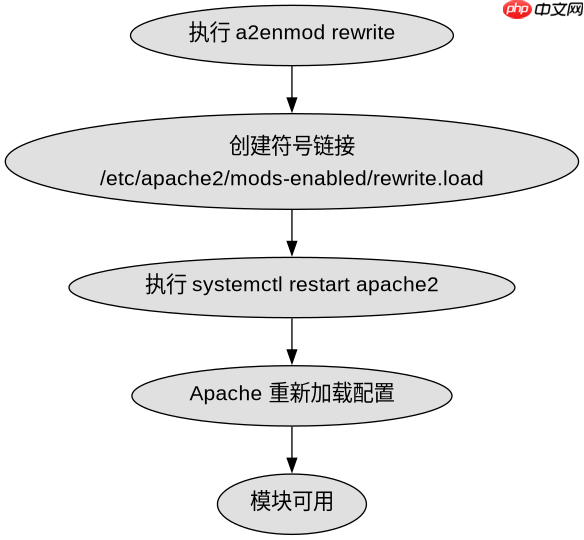
a2enmod rewrite
systemctl restart apache2
验证是否成功:运行 apache2ctl -M | grep rewrite,若输出包含 rewrite_module (shared),则说明模块已正确加载。

通过Apache Tika Server REST API从1400多种文件格式中提取文本和元数据。处理PDF、DOCX、PPTX、电子邮件归档以及带有MIME类型检测的嵌入式文档提取。
CentOS/RHEL 系统下如何启用 mod_rewrite
在 CentOS 或 RHEL 系统中,mod_rewrite 通常随 httpd 包一起安装,但可能未默认启用。你需要编辑 /etc/httpd/conf/httpd.conf 文件,找到 LoadModule rewrite_module modules/mod_rewrite.so 这一行,确保它没有被注释(即行首没有 #)。保存文件后,重启 httpd 服务。
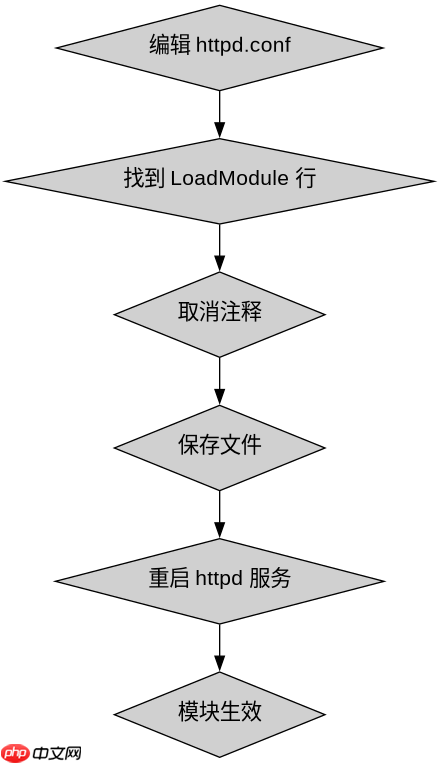
# 编辑配置文件
sudo vi /etc/httpd/conf/httpd.conf
# 确保以下行未被注释
LoadModule rewrite_module modules/mod_rewrite.so

# 重启服务
sudo systemctl restart httpd
如果找不到该行,可能需要先安装 mod_rewrite:yum install mod_rewrite 或 dnf install mod_rewrite,然后重复上述步骤。
基于 .htaccess 中 RewriteEngine On 的具体问题
即使模块已启用,如果在 .htaccess 文件中使用了 RewriteEngine On 仍然报错,通常是因为 Apache 不允许覆盖配置。需要在主配置文件中设置 AllowOverride All。例如,在 <directory></directory> 块中添加 AllowOverride All,然后重启 Apache。这样 Apache 才会读取并解析 .htaccess 中的重写规则。