安装 ubuntu 时选择软件源的核心原则是优先使用地理位置最近的镜像站,以解决下载慢和连接超时的问题。具体做法是在安装程序的“软件更新”或“下载自”界面中,取消勾选“主服务器”,并从下拉列表中选择一个国内镜像站点(如阿里云、腾讯云或清华大学 tuna)。如果网络环境特殊,也可以保持默认的主服务器设置,但在首次登录系统后必须立即通过命令行更换源并执行更新,以确保后续的软件包管理顺畅。

图形化安装界面如何切换源
在安装向导的“Software Updates”(软件更新)步骤中,直接操作即可改变源地址。将“Download from”(下载自)选项从默认的 “Main Server” 改为 “Other...”(其他),随后在弹出的列表中选择具体的镜像节点。这一步骤会直接将选定的源写入待安装系统的 /etc/apt/sources.list 文件中,省去了安装后的配置环节。

deb https://mirrors.aliyun.com/ubuntu/ jammy main restricted universe multiverse
deb-src https://mirrors.aliyun.com/ubuntu/ jammy main restricted universe multiverse

deb https://mirrors.aliyun.com/ubuntu/ jammy-updates main restricted universe multiverse
deb-src https://mirrors.aliyun.com/ubuntu/ jammy-updates main restricted universe multiverse

deb https://mirrors.aliyun.com/ubuntu/ jammy-backports main restricted universe multiverse
deb-src https://mirrors.aliyun.com/ubuntu/ jammy-backports main restricted universe multiverse

deb https://mirrors.aliyun.com/ubuntu/ jammy-security main restricted universe multiverse
deb-src https://mirrors.aliyun.com/ubuntu/ jammy-security main restricted universe multiverse
安装完成后如何通过命令行验证与修复
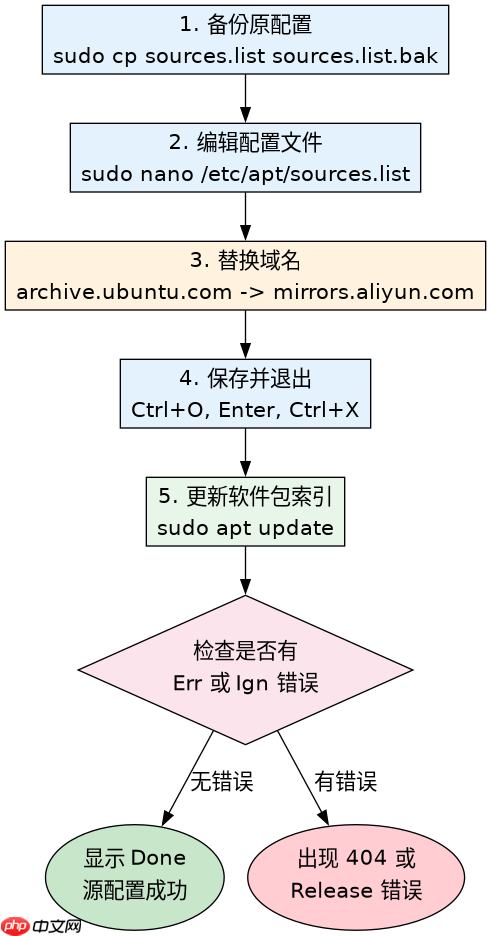
如果在安装过程中未修改源,或者安装后发现网络不通,需要在进入桌面或终端后立即进行修正。首先备份原有的源配置文件,然后使用文本编辑器替换为国内镜像的官方源地址。最后运行 apt update 命令刷新本地软件包索引,这是验证源是否生效的关键步骤。
sudo cp /etc/apt/sources.list /etc/apt/sources.list.bak
sudo sed -i 's/archive.ubuntu.com/mirrors.aliyun.com/g' /etc/apt/sources.list
sudo apt update
不同版本代号对源地址的影响
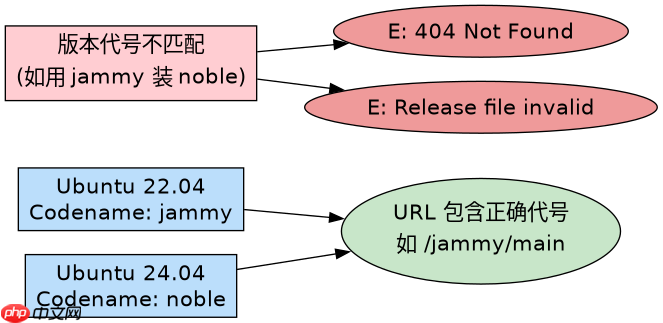
Ubuntu 的版本代号(Codename)直接决定了软件源的 URL 路径和可用软件包的集合。例如,Ubuntu 22.04 的代号为 jammy,而 Ubuntu 24.04 的代号为 noble。如果在配置源时混淆了版本号,会导致 E: Release file for ... is not valid yet 或 404 Not Found 等错误。因此,在编写源配置脚本或手动编辑文件时,必须确保源链接中的代号与当前安装的 Ubuntu 版本严格一致。