








FileChannel 的异步读写如何配置
使用 asynchronousfilechannel 配合 completionhandler 或 completablefuture 可以显著提升吞吐量。核心做法是调用 asynchronousfilechannel.open() 获取通道实例,并指定 standardopenoption 进行读写操作。通过提交任务到线程池或使用回调,可以在等待 i/o 完成时执行其他逻辑,从而避免阻塞主线程。

import java.nio.channels.AsynchronousFileChannel;
import java.nio.file.Path;
import java.nio.file.Paths;
import java.nio.file.StandardOpenOption;
import java.util.concurrent.CompletableFuture;

public class AsyncIOExample {
    public static void main(String[] args) throws Exception {
        Path path = Paths.get("test.txt");
        // 打开异步文件通道
        AsynchronousFileChannel channel = AsynchronousFileChannel.open(
            path, StandardOpenOption.READ, StandardOpenOption.WRITE);

        // 异步读取示例
        CompletableFuture<Integer> readFuture = new CompletableFuture<>();
        byte[] buffer = new byte[1024];
        channel.read(buffer, 0, null, new CompletionHandler<>() {
            @Override
            public void completed(Integer result, Object attachment) {
                readFuture.complete(result);
            }
            @Override
            public void failed(Throwable exc, Object attachment) {
                readFuture.completeExceptionally(exc);
            }
        });

        System.out.println("Read bytes: " + readFuture.join());
    }
}上述代码展示了基本的异步读取流程。实际运行时,read 方法会立即返回,而不会阻塞当前线程。当数据准备好时,回调方法会被触发。这种方式适合高并发场景,能够充分利用多核 CPU 和磁盘 I/O 能力。
缓冲区管理对性能的影响
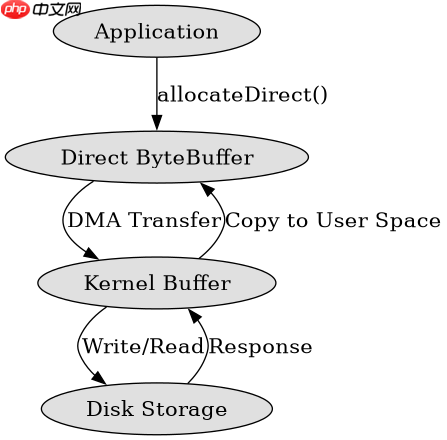
合理设置缓冲区大小和复用策略是关键。直接使用 ByteBuffer.allocateDirect() 可以减少 JVM 堆内存的压力,并提高内核与用户空间之间的数据传输效率。同时,避免频繁创建新缓冲区对象有助于降低 GC 频率。

FilePond 灵活的 JavaScript 文件上传库
下载
FilePond 是一个 JavaScript 文件上传库,支持通过拖拽、粘贴和 API 方式处理文件、目录、URL 和 Data URI。它包含内置的图像优化功能、异步分块上传功能,并提供了适用于 React、Vue、Angular 和 Svelte 的适配器。
立即学习“Java免费学习笔记(深入)”;
import java.nio.ByteBuffer;
import java.nio.channels.AsynchronousFileChannel;
import java.nio.file.Path;
import java.nio.file.Paths;
import java.nio.file.StandardOpenOption;
import java.util.concurrent.CompletionStage;

public class BufferOptimization {
    public static void main(String[] args) throws Exception {
        Path path = Paths.get("large_file.bin");
        AsynchronousFileChannel channel = AsynchronousFileChannel.open(
            path, StandardOpenOption.READ);

        // 分配直接缓冲区
        ByteBuffer buffer = ByteBuffer.allocateDirect(65536); // 64KB

        CompletionStage<Integer> future = channel.readAsync(buffer, 0);
        future.thenAccept(bytesRead -> {
            System.out.println("Read " + bytesRead + " bytes");
            buffer.flip(); // 准备读取数据
        }).exceptionally(ex -> {
            ex.printStackTrace();
            return null;
        });
    }
}
在上面的例子中,我们使用了 64KB 的直接缓冲区。这种大小的选择通常能在大多数系统上取得较好的平衡。如果文件非常大,可以考虑分块读取,每块都使用独立的缓冲区,并通过链式调用来处理后续块。
如何处理大文件的分段读取
对于超大文件,建议采用分段读取的方式。将文件划分为多个固定大小的片段,每个片段独立发起异步请求。这样可以更好地利用并行处理能力,并且便于错误恢复和进度跟踪。
import java.nio.channels.AsynchronousFileChannel;
import java.nio.file.Path;
import java.nio.file.Paths;
import java.nio.file.StandardOpenOption;
import java.util.ArrayList;
import java.util.List;
import java.util.concurrent.CompletableFuture;

public class ChunkedReading {
    private static final int CHUNK_SIZE = 1024 * 1024; // 1MB

    public static void main(String[] args) throws Exception {
        Path path = Paths.get("huge_file.dat");
        long fileSize = java.nio.file.Files.size(path);
        List<CompletableFuture<byte[]>> futures = new ArrayList<>();

        for (long offset = 0; offset < fileSize; offset += CHUNK_SIZE) {
            final long currentOffset = offset;
            final int size = (int) Math.min(CHUNK_SIZE, fileSize - offset);

            CompletableFuture<byte[]> chunkFuture = new CompletableFuture<>();
            AsynchronousFileChannel channel = AsynchronousFileChannel.open(
                path, StandardOpenOption.READ);

            ByteBuffer buffer = ByteBuffer.allocateDirect(size);
            channel.read(buffer, currentOffset, null, new java.nio.channels.CompletionHandler<>() {
                @Override
                public void completed(Integer result, Object attachment) {
                    buffer.flip();
                    byte[] data = new byte[result];
                    buffer.get(data);
                    chunkFuture.complete(data);
                }
                @Override
                public void failed(Throwable exc, Object attachment) {
                    chunkFuture.completeExceptionally(exc);
                }
            });
            futures.add(chunkFuture);
        }

        // 等待所有分片完成
        CompletableFuture.allOf(futures.toArray(new CompletableFuture[0])).join();
        System.out.println("All chunks processed.");
    }
} 

















