








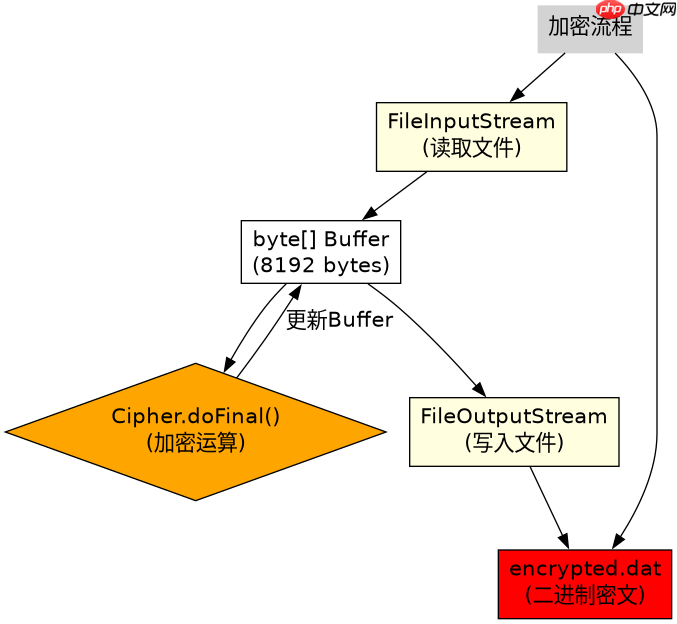
java 中处理加密数据必须使用字节流(如 inputstream),因为加密算法操作的是原始二进制字节,而字符流会进行编码转换导致数据损坏。具体做法是将加密后的密文直接写入 fileoutputstream,或在解密时从 fileinputstream 读取,严禁将密文包装在 inputstreamreader 或 outputstreamwriter 中。

为什么字符流不能用于加密数据
字符流的设计初衷是处理文本,它在底层会自动根据指定的字符集(如 UTF-8)将字节转换为字符,或将字符转换回字节。加密产生的密文通常是随机的二进制序列,并不符合任何文本编码规范。如果强行使用字符流,Java 的编码/解码机制会将无效的字节序列替换为占位符(如 "?")或直接抛出异常,导致解密时数据不一致。因此,所有涉及 Cipher 的输出和输入都必须保持字节层面的原样。
import javax.crypto.Cipher;
import javax.crypto.KeyGenerator;
import javax.crypto.SecretKey;
import java.io.FileInputStream;
import java.io.FileOutputStream;
import java.security.SecureRandom;

public class CryptoStreamDemo {
    public static void main(String[] args) throws Exception {
        // 1. 生成密钥
        KeyGenerator keyGen = KeyGenerator.getInstance("AES");
        keyGen.init(128, new SecureRandom());
        SecretKey secretKey = keyGen.generateKey();

        // 2. 初始化 Cipher
        Cipher cipher = Cipher.getInstance("AES");

        // 3. 加密:使用字节流
        byte[] plaintext = "Secret Data".getBytes();
        cipher.init(Cipher.ENCRYPT_MODE, secretKey);
        byte[] ciphertext = cipher.doFinal(plaintext);

        // 4. 写入文件:直接使用 FileOutputStream (字节流)
        try (FileOutputStream fos = new FileOutputStream("encrypted.dat")) {
            fos.write(ciphertext); // 直接写入二进制密文
        }

        // 5. 解密:使用字节流
        byte[] fileData;
        try (FileInputStream fis = new FileInputStream("encrypted.dat")) {
            fileData = fis.readAllBytes(); // 读取原始字节
        }

        cipher.init(Cipher.DECRYPT_MODE, secretKey);
        byte[] decrypted = cipher.doFinal(fileData);
        System.out.println(new String(decrypted)); // 输出: Secret Data
    }
}
上述代码展示了标准的加密流程。关键点在于 fos.write(ciphertext) 和 fis.readAllBytes()。这里没有经过任何字符集的转换。如果使用 new OutputStreamWriter(fos, "UTF-8") 来包装 fos,再调用 write() 方法传入字节数组,编译器会报错或需要手动转换,且逻辑上是错误的,因为 Writer 期望的是字符数据。即使通过 new String(ciphertext, StandardCharsets.ISO_8859_1) 这种 hack 方式绕过编译,也会因为编码映射的不确定性引入风险。正确的做法始终是直接在字节层面操作。
立即学习“Java免费学习笔记(深入)”;

FilePond 是一个 JavaScript 文件上传库,支持通过拖拽、粘贴和 API 方式处理文件、目录、URL 和 Data URI。它包含内置的图像优化功能、异步分块上传功能,并提供了适用于 React、Vue、Angular 和 Svelte 的适配器。
如何处理大文件的加密流式处理
对于大文件,一次性加载到内存是不现实的,需要使用流式处理。Java 的 CipherInputStream 和 CipherOutputStream 类专门为此设计,它们继承自 FilterInputStream 和 FilterOutputStream,能够在读写过程中自动调用 Cipher 进行加解密。这些类同样只接受字节流作为参数,确保了数据的完整性。
import javax.crypto.Cipher;
import javax.crypto.CipherInputStream;
import javax.crypto.CipherOutputStream;
import javax.crypto.KeyGenerator;
import javax.crypto.SecretKey;
import java.io.*;
import java.security.SecureRandom;

public class StreamCryptoDemo {
    public static void main(String[] args) throws Exception {
        KeyGenerator keyGen = KeyGenerator.getInstance("AES");
        keyGen.init(128, new SecureRandom());
        SecretKey secretKey = keyGen.generateKey();

        Cipher encryptCipher = Cipher.getInstance("AES");
        encryptCipher.init(Cipher.ENCRYPT_MODE, secretKey);

        Cipher decryptCipher = Cipher.getInstance("AES");
        decryptCipher.init(Cipher.DECRYPT_MODE, secretKey);

        // 加密大文件
        try (FileInputStream fis = new FileInputStream("large_file.txt");
             CipherInputStream cis = new CipherInputStream(fis, encryptCipher);
             FileOutputStream fos = new FileOutputStream("large_file.enc")) {

            byte[] buffer = new byte[8192];
            int len;
            while ((len = cis.read(buffer)) != -1) {
                fos.write(buffer, 0, len);
            }
        }

        // 解密大文件
        try (FileInputStream fis = new FileInputStream("large_file.enc");
             CipherInputStream cis = new CipherInputStream(fis, decryptCipher);
             FileOutputStream fos = new FileOutputStream("large_file_dec.txt")) {

            byte[] buffer = new byte[8192];
            int len;
            while ((len = cis.read(buffer)) != -1) {
                fos.write(buffer, 0, len);
            }
        }
    }
}
在这个示例中,CipherInputStream 包裹了原始的 FileInputStream。当调用 cis.read(buffer) 时,它内部会从底层流读取字节,然后立即用 Cipher 进行处理,最后返回处理后的字节。这个过程完全在字节层面完成,没有任何字符编码介入。同理,CipherOutputStream 在写入时也会自动对字节进行加密。这种模式适用于任何大小的文件,且保证了加密前后的数据比特级一致。
IV(初始化向量)在流中的处理方式
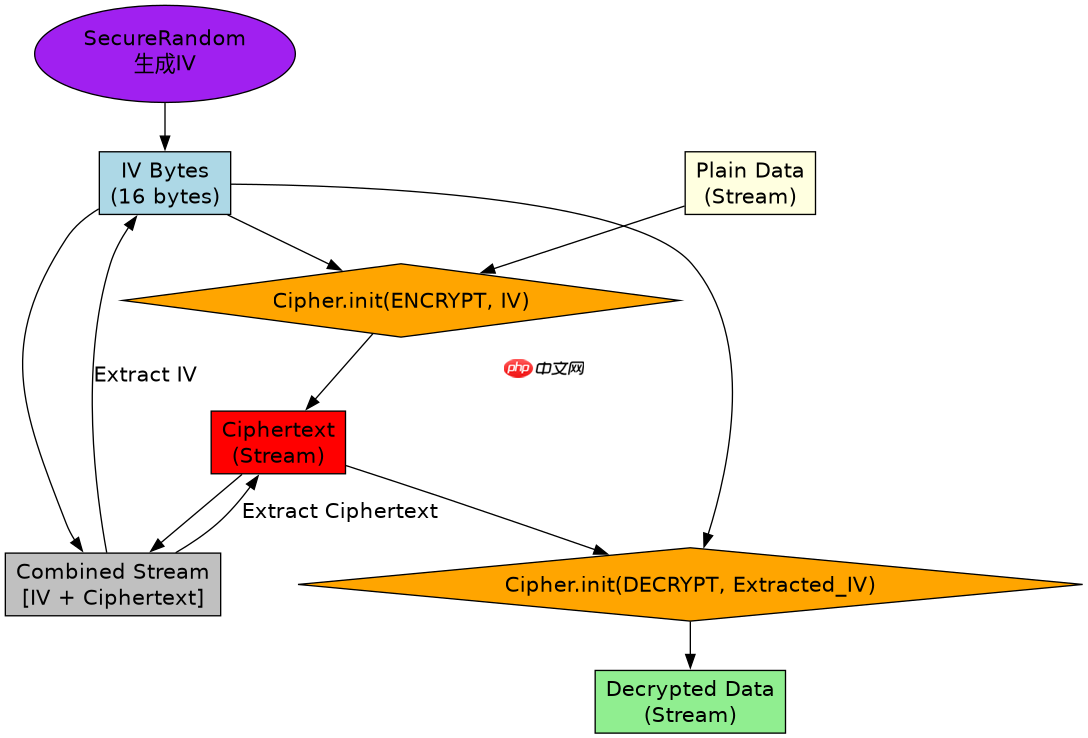
在使用 CBC 等需要 IV 的模式时,IV 必须是随机的且每次加密都不同。IV 本身不需要保密,但必须与密文一起存储以便解密。在流式处理中,通常的做法是先写入固定长度的 IV 字节,然后再写入密文。解密时,先读取相同长度的 IV,初始化解密 Cipher,再读取剩余部分。
import javax.crypto.Cipher;
import javax.crypto.spec.IvParameterSpec;
import javax.crypto.spec.SecretKeySpec;
import java.io.*;
import java.security.SecureRandom;

public class IvHandlingDemo {
    public static void main(String[] args) throws Exception {
        // 模拟密钥
        byte[] keyBytes = new byte[16];
        new SecureRandom().nextBytes(keyBytes);
        SecretKeySpec keySpec = new SecretKeySpec(keyBytes, "AES");

        // 加密过程
        Cipher encryptCipher = Cipher.getInstance("AES/CBC/PKCS5Padding");
        byte[] iv = new byte[16];
        new SecureRandom().nextBytes(iv);
        encryptCipher.init(Cipher.ENCRYPT_MODE, keySpec, new IvParameterSpec(iv));

        byte[] data = "Test Data".getBytes();
        byte[] encrypted = encryptCipher.doFinal(data);

        // 组合 IV 和密文: [IV (16 bytes)] + [Ciphertext]
        ByteArrayOutputStream baos = new ByteArrayOutputStream();
        baos.write(iv);
        baos.write(encrypted);
        byte[] combined = baos.toByteArray();

        // 解密过程
        // 1. 提取 IV
        byte[] extractedIv = new byte[16];
        System.arraycopy(combined, 0, extractedIv, 0, 16);

        // 2. 提取密文
        byte[] extractedCipherText = new byte[combined.length - 16];
        System.arraycopy(combined, 16, extractedCipherText, 0, extractedCipherText.length);

        Cipher decryptCipher = Cipher.getInstance("AES/CBC/PKCS5Padding");
        decryptCipher.init(Cipher.DECRYPT_MODE, keySpec, new IvParameterSpec(extractedIv));
        byte[] decrypted = decryptCipher.doFinal(extractedCipherText);
        System.out.println(new String(decrypted)); // Output: Test Data
    }
}
这段代码展示了如何在字节流中嵌入 IV。首先创建一个随机 IV,然后用它初始化加密 Cipher。加密完成后,将 IV 字节和密文字节连接起来。在解密端,先从流的开头读取 16 个字节作为 IV,再用剩余的字节作为密文。这种处理方式确保了 IV 的正确传递,同时保持了整个过程的字节流特性,避免了任何字符编码带来的问题。


















