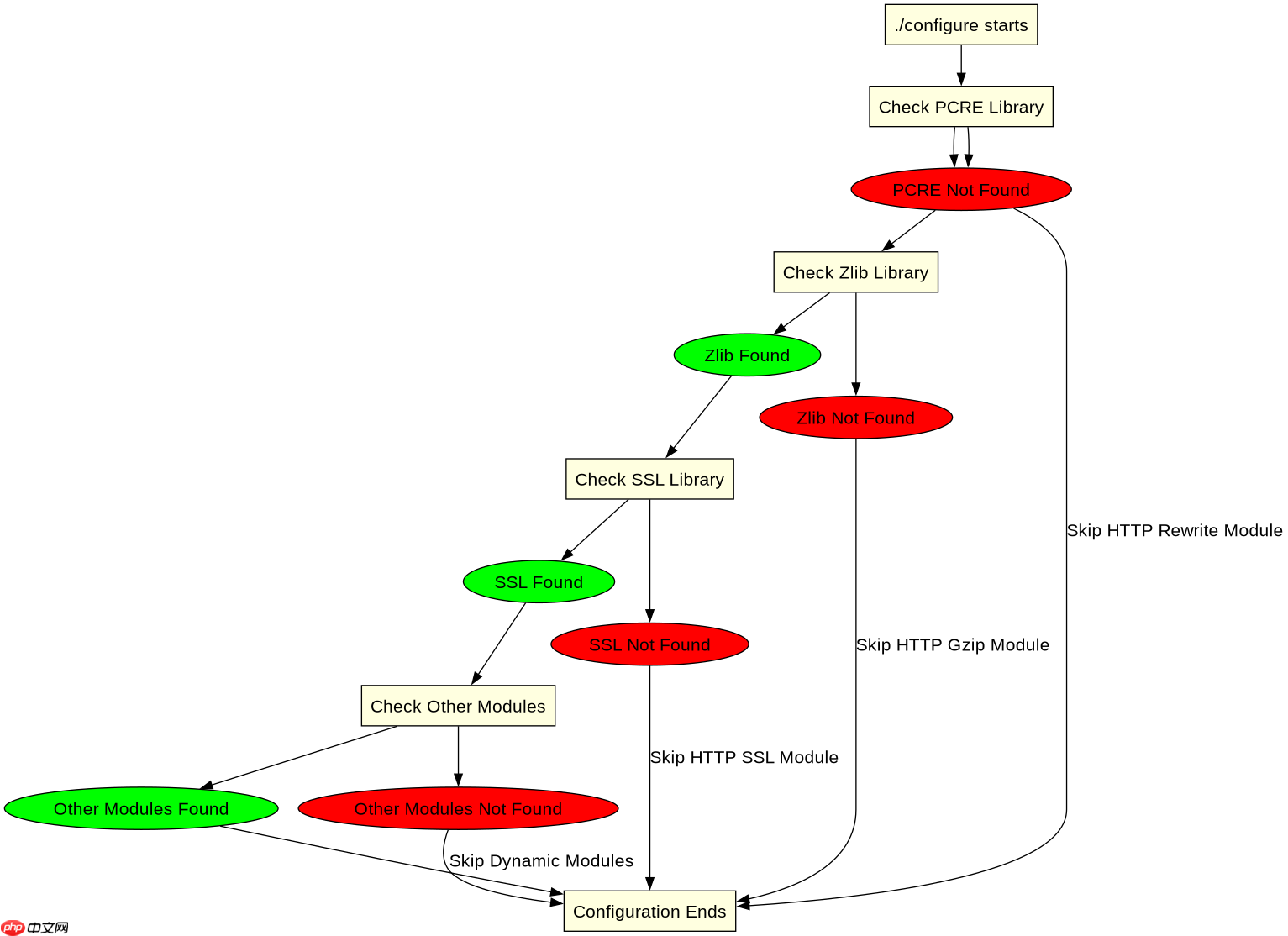
排查 nginx 源码编译缺包依赖,最直接的办法是运行 ./configure 脚本并观察其输出日志。如果缺少核心库(如 pcre、zlib),配置会直接报错退出;如果缺少可选模块的库(如 ssl、geoip),配置通常会给出警告并自动跳过该模块。要获取完整的缺失信息,可以结合 --with-debug 参数开启详细日志,或者在 auto/lib/ 目录下查看对应模块的 make 文件来确认具体的头文件和库文件路径要求。

如何确定具体缺少哪个库导致配置失败
当 ./configure 执行失败时,终端输出的错误信息通常指向了具体的库或头文件。例如,若提示 ./configure: error: the HTTP rewrite module requires the PCRE library,则明确说明缺少 PCRE 开发包。此时应安装对应的 -dev 或 -devel 包,然后重新运行配置命令。对于非致命错误,Nginx 会在日志中列出所有被禁用的模块及其原因,通过检查 objs/autoconf.err 文件可以一次性查看所有被跳过的模块和对应的缺失依赖。
# 假设当前目录为 nginx-1.24.0
# 1. 清理之前的构建状态
make clean

# 2. 运行 configure 并指定调试模式以获取更多信息
./configure --with-debug \
    --prefix=/etc/nginx \
    --sbin-path=/usr/sbin/nginx \
    --modules-path=/usr/lib64/nginx/modules \
    --conf-path=/etc/nginx/nginx.conf \
    --error-log-path=/var/log/nginx/error.log \
    --http-log-path=/var/log/nginx/access.log \
    --pid-path=/var/run/nginx.pid \
    --lock-path=/var/run/nginx.lock \
    --user=nginx \
    --group=nginx \
    --with-http_ssl_module \
    --with-http_v2_module \
    --with-http_realip_module \
    --with-http_addition_module \
    --with-http_sub_module \
    --with-http_dav_module \
    --with-http_flv_module \
    --with-http_mp4_module \
    --with-http_gunzip_module \
    --with-http_gzip_static_module \
    --with-http_random_index_module \
    --with-http_secure_link_module \
    --with-http_stub_status_module \
    --with-http_auth_request_module \
    --with-http_xslt_module=dynamic \
    --with-http_image_filter_module=dynamic \
    --with-http_geoip_module=dynamic \
    --with-http_perl_module=dynamic \
    --with-mail=dynamic \
    --with-stream=dynamic \
    --with-stream_ssl_module \
    --with-stream_ssl_preread_module \
    --with-stream_realip_module \
    --with-stream_geoip_module=dynamic \
    --with-pcre-jit \
    --with-zlib=/path/to/zlib-source \
    --with-openssl=/path/to/openssl-source \
    --with-openssl-opt='enable-tls1_3' \
    --with-cc-opt='-g -O2 -fstack-protector-strong -Wformat -Werror=format-security' \
    --with-ld-opt='-Wl,-Bsymbolic-functions -Wl,-z,relro'

# 3. 如果配置成功,开始编译
make

# 4. 安装
sudo make install
上述代码展示了标准的编译流程。如果在第二步 ./configure 中遇到错误,请根据错误提示安装相应的开发包。例如,对于 Ubuntu/Debian 系统,通常需要安装 libpcre3-dev, zlib1g-dev, libssl-dev 等。对于 CentOS/RHEL 系统,则需要安装 pcre-devel, zlib-devel, openssl-devel 等。安装完依赖后,再次运行 ./configure 即可。

如何处理自定义路径下的依赖库
有时依赖库安装在非标准路径下,./configure 可能无法自动找到它们。这时需要使用 --with-xxx=PATH 参数显式指定库的路径。例如,如果 PCRE 库安装在 /opt/pcre 目录下,可以使用 --with-pcre=/opt/pcre。同样,对于 Zlib 和 OpenSSL,也可以使用类似的参数指定路径。此外,还可以使用 --with-cc-opt 和 --with-ld-opt 来添加额外的编译器和链接器选项,以便指定头文件和库文件的搜索路径。

# 假设 PCRE 和 Zlib 安装在 /opt/libs 目录下
./configure \
    --with-pcre=/opt/libs/pcre \
    --with-zlib=/opt/libs/zlib \
    --with-openssl=/opt/libs/openssl \
    --with-cc-opt="-I/opt/libs/include" \
    --with-ld-opt="-L/opt/libs/lib"
这段代码演示了如何指定自定义路径下的依赖库。通过 --with-pcre, --with-zlib, --with-openssl 参数分别指定这三个库的安装根目录。同时,使用 --with-cc-opt 添加头文件搜索路径 -I/opt/libs/include,使用 --with-ld-opt 添加库文件搜索路径 -L/opt/libs/lib。这样可以确保编译器能够找到所需的头文件和链接器能够找到所需的库文件。
编译完成后如何验证已启用的模块
编译并安装 Nginx 后,可以通过运行 nginx -V 命令来查看当前 Nginx 版本所启用的所有模块及其配置参数。这将显示完整的 ./configure 命令行参数,包括所有启用的模块。如果某个模块未出现在输出中,说明它在编译时被禁用或未能正确链接。此外,还可以通过 nginx -T 命令查看最终的配置文件树,确认模块是否被正确加载。对于动态模块,还需要确保在 nginx.conf 中使用 load_module 指令加载它们。