








在php中生成注册场景专用的验证码,核心做法是结合session存储与gd库或第三方服务生成图形,并通过api接口返回。具体实现时,需调用`session_start()`初始化会话,使用`imagecreatetruecolor`等函数绘制干扰元素和字符,将验证码文本存入`$_session`,最后输出图像流。这样做能确保每次请求都生成唯一且可验证的验证码,防止机器人批量注册。

如何封装一个通用的验证码类
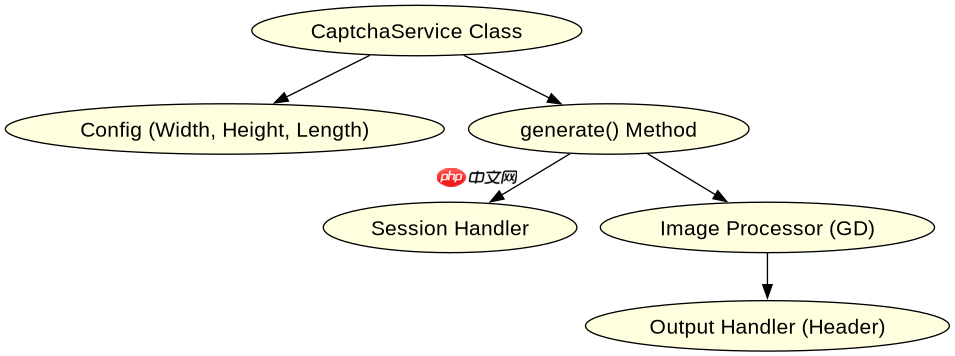
封装验证码类的关键在于将配置、生成逻辑和输出分离,提供一个静态方法供全局调用。通常定义一个`CaptchaService`类,包含`generate()`方法,该方法内部处理随机字符选择、字体加载、背景绘制及噪点添加,最终通过`header('Content-Type: image/png')`输出图片。这种封装方式使得业务代码无需关心底层绘图细节,只需获取图片URL或Base64即可。
<?php
class CaptchaService {
    private $width = 100;
    private $height = 40;
    private $length = 4;

    public function generate() {
        session_start();
        $code = $this->generateCode();
        $_SESSION['captcha'] = $code;

        $img = imagecreatetruecolor($this->width, $this->height);
        $bgColor = imagecolorallocate($img, 255, 255, 255);
        imagefill($img, 0, 0, $bgColor);

        for ($i = 0; $i < $this->length; $i++) {
            $x = ($this->width / $this->length) * $i + 5;
            $y = rand(5, 10);
            $color = imagecolorallocate($img, rand(0, 100), rand(0, 100), rand(0, 100));
            imagestring($img, 5, $x, $y, $code[$i], $color);
        }

        // 添加噪点
        for ($i = 0; $i < 50; $i++) {
            imagesetpixel($img, rand(0, $this->width), rand(0, $this->height), imagecolorallocate($img, rand(0, 255), rand(0, 255), rand(0, 255)));
        }

        header('Content-Type: image/png');
        imagepng($img);
        imagedestroy($img);
    }

    private function generateCode() {
        $chars = 'abcdefghijklmnopqrstuvwxyzABCDEFGHIJKLMNOPQRSTUVWXYZ0123456789';
        $code = '';
        for ($i = 0; $i < $this->length; $i++) {
            $code .= $chars[rand(0, strlen($chars) - 1)];
        }
        return $code;
    }
}

// 使用示例
if ($_SERVER['REQUEST_METHOD'] === 'GET') {
    $service = new CaptchaService();
    $service->generate();
}
?>
如何在前端正确引用并验证验证码
前端引用验证码时,应将标签的src指向验证码生成接口,并在表单提交时将用户输入的验证码一同POST到后端。后端验证时需比对`$_POST['captcha']`与`$_SESSION['captcha']`,验证成功后务必销毁Session中的验证码以防止重放攻击。这种流程确保了验证码的一次性使用和安全性。

使用官方Model Context Protocol PHP SDK将PHP应用程序功能暴露为MCP工具、资源和提示,用于代理工作流。
立即学习“PHP免费学习笔记(深入)”;

<!DOCTYPE html>
<html lang="en">
<head>
    <meta charset="UTF-8">
    <title>Registration</title>
</head>
<body>
    <form method="POST" action="/register">
        <input type="text" name="username" placeholder="Username" required>
        <input type="email" name="email" placeholder="Email" required>
        <input type="password" name="password" placeholder="Password" required>
        <div>
            <input type="text" name="captcha" placeholder="Captcha" required>
            <img src="/captcha.php" alt="Captcha" id="captcha-img">
            <a href="#" onclick="document.getElementById('captcha-img').src='/captcha.php?t='+new Date().getTime()">Refresh</a>
        </div>
        <button type="submit">Register</button>
    </form>
</body>
</html>
当用户输入错误验证码时程序如何处理
当用户输入错误验证码时,程序应拒绝注册请求并返回明确的错误提示,同时刷新新的验证码。在代码实现中,后端验证逻辑会检查`$_POST['captcha'] !== $_SESSION['captcha']`,若为真则设置错误消息并重定向回注册页或返回JSON错误。这种做法既保护了系统安全,又提供了良好的用户体验,避免用户因一次错误而锁定账户。



















