








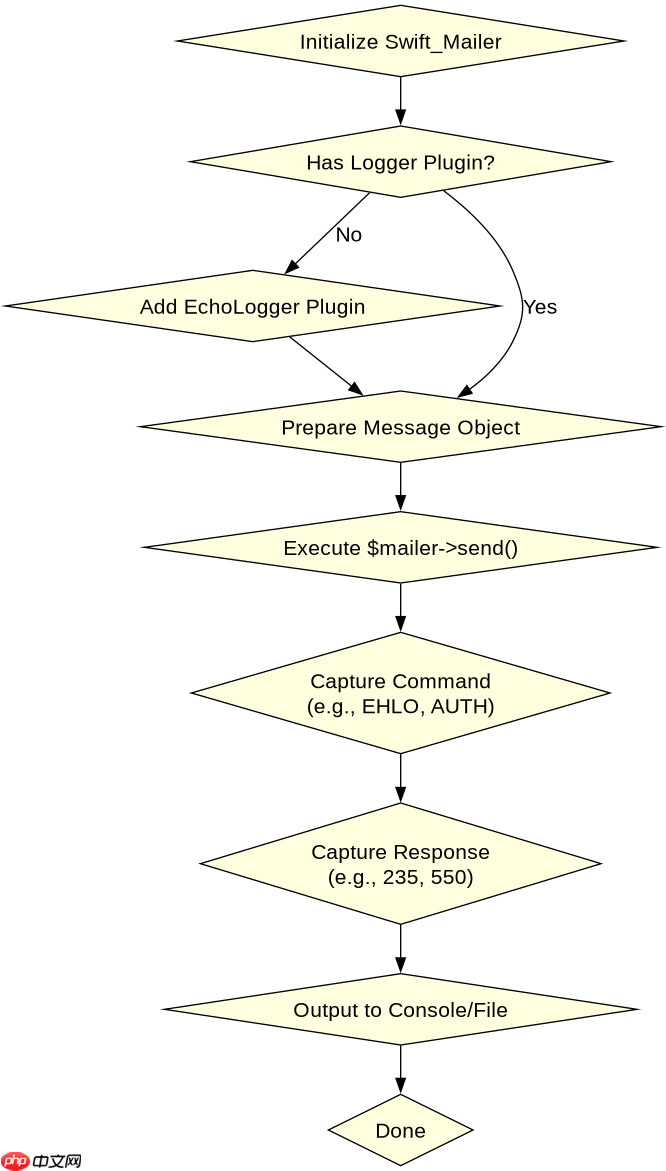
php连smtp只提示发送失败却无报错详情,开启debug抓日志最直接的办法是启用底层邮件库的调试模式并接管错误输出。以常用的swiftmailer为例,调用 $mailer->registerplugin(new \swift_plugins_loggers_echologger()) 即可在控制台打印完整的握手与命令交互过程;若使用原生 mail() 函数,则需通过配置 sendmail_path 将输出重定向到文件,或改用支持详细异常的第三方库如 phpmailer 并设置 $mail->smtpdebug = 2。这样能直接看到服务器返回的具体 smtp 状态码(如 535、421)及原因,从而定位是认证失败、网络超时还是端口被封。

如何查看 SMTP 握手过程中的具体指令与响应
要查看 SMTP 握手过程中的具体指令与响应,需要拦截邮件发送时的底层通信流。对于基于 SwiftMailer 的项目,可以通过注册一个 EchoLogger 插件来实现。该插件会捕获所有发送给 SMTP 服务器的命令(如 EHLO, AUTH LOGIN)以及服务器返回的状态码和消息。这种方法不需要修改核心逻辑,只需在实例化 Mailer 后添加一行代码即可生效。执行后,所有的交互细节都会直接输出到标准输出或 Web 页面,帮助开发者看清连接建立、身份验证和数据传输的每一步。
<?php
require_once 'lib/swift_required.php';

// 创建 Transport,替换为你的 SMTP 地址和端口
$transport = new Swift_SmtpTransport('smtp.example.com', 587, 'tls');
$transport->setUsername('user@example.com');
$transport->setPassword('secret_password');

// 创建 Mailer
$mailer = new Swift_Mailer($transport);

// 关键步骤:注册 EchoLogger 以捕获调试信息
$logger = new Swift_Plugins_Loggers_EchoLogger();
$mailer->registerPlugin(new Swift_Plugins_Loggers_ArrayLogger()); // 也可用 ArrayLogger 存入变量
$mailer->registerPlugin(new Swift_Plugins_LoggerPlugin($logger));

// 创建消息
$message = new Swift_Message('Test Subject')
  ->setFrom(['sender@example.com' => 'Sender'])
  ->setTo(['recipient@example.com' => 'Recipient'])
  ->setBody('This is a test message.');

try {
    $result = $mailer->send($message);
    echo "Email sent successfully. Result: $result\n";
} catch (Exception $e) {
    echo "Failed to send email. Error: " . $e->getMessage() . "\n";
}
?>
运行上述代码后,如果连接成功但发送失败,终端或浏览器会显示类似以下的日志:
立即学习“PHP免费学习笔记(深入)”;

使用官方Model Context Protocol PHP SDK将PHP应用程序功能暴露为MCP工具、资源和提示,用于代理工作流。
EHLO localhost
250-smtp.example.com Hello [192.168.1.1]
250-SIZE 10485760
250-AUTH LOGIN PLAIN
AUTH LOGIN
334 VXNlcm5hbWU6
base64_encoded_username
334 UGFzc3dvcmQ6
base64_encoded_password
235 Authentication successful
MAIL FROM:<sender@example.com>
250 Ok
RCPT TO:<recipient@example.com>
550 User unknown
Failed to send email.
从日志中可以清晰看到,认证阶段返回了 235 Authentication successful,说明账号密码正确,但在 RCPT TO 阶段收到了 550 User unknown,这表明收件人地址无效。这种详细的交互记录比单纯的“发送失败”要有用得多。
当使用原生 mail() 函数时如何获取更详细的错误信息
PHP 内置的 mail() 函数本身不提供任何调试选项,它只是将数据传递给系统上的 MTA(如 Sendmail 或 Postfix)。因此,无法直接在 PHP 代码中开启其 Debug 模式。要获取详细信息,必须从操作系统层面入手。一种方法是通过配置 php.ini 中的 sendmail_path 参数,将邮件处理程序的标准输出和错误输出重定向到一个日志文件中。例如,可以将 sendmail_path 设置为 /usr/sbin/sendmail -t -i &>/var/log/php_mail.log 2&>&1。这样,所有由 PHP 触发的邮件发送操作产生的系统级错误都会被记录在该文件中。另一种更推荐的方法是放弃 mail() 函数,改用像 PHPMailer 这样的库,因为它提供了原生的 SMTPDebug 属性,可以直接在代码中控制调试级别,无需依赖系统配置。

<?php
use PHPMailer\PHPMailer\PHPMailer;
use PHPMailer\PHPMailer\SMTP;
use PHPMailer\PHPMailer\Exception;

require 'vendor/autoload.php';

$mail = new PHPMailer(true);

try {
    // 开启详细调试,级别 2 表示显示客户端和服务器命令
    $mail->SMTPDebug = SMTP::DEBUG_SERVER;

    $mail->isSMTP();
    $mail->Host       = 'smtp.example.com';
    $mail->SMTPAuth   = true;
    $mail->Username   = 'user@example.com';
    $mail->Password   = 'secret_password';
    $mail->SMTPSecure = PHPMailer::ENCRYPTION_STARTTLS;
    $mail->Port       = 587;

    $mail->setFrom('sender@example.com', 'Sender');
    $mail->addAddress('recipient@example.com', 'Recipient');

    $mail->Subject = 'Test Subject';
    $mail->Body    = 'This is a test message.';

    $mail->send();
    echo 'Message has been sent';
} catch (Exception $e) {
    echo "Message could not be sent. Mailer Error: {$mail->ErrorInfo}";
}
?>
使用 PHPMailer 时,设置 $mail->SMTPDebug = 2 后,脚本执行时会直接打印出与 SMTP 服务器的完整对话记录。这包括连接建立、TLS 握手、身份验证挑战-响应以及最终的 DATA 传输过程。任何一步出错,都会在控制台清晰地展示出来,例如如果 SSL 证书验证失败,会明确提示 SSL handshake failed,从而快速定位问题根源。
如果 SMTP 连接超时或拒绝连接该如何排查
如果 SMTP 连接超时或拒绝连接,通常意味着网络层或防火墙策略阻止了通信。在开启 Debug 后,你会看到类似 Connection timed out 或 Connection refused 的错误。首先,检查服务器是否能 ping 通 SMTP 主机,并使用 telnet smtp.example.com 587 或 nc -vz smtp.example.com 587 测试端口连通性。如果端口不通,可能是云服务商的安全组规则或本地防火墙拦截了出站流量。其次,检查是否使用了正确的协议和端口,例如 TLS 加密通常使用 587 或 465 端口,而明文或 STARTTLS 可能使用 25 或 587。最后,确认 SMTP 服务是否正常运行,有时服务器端维护也会导致连接被拒。通过 Debug 日志中的时间戳,可以判断是在哪个阶段发生的超时,从而缩小排查范围。



















