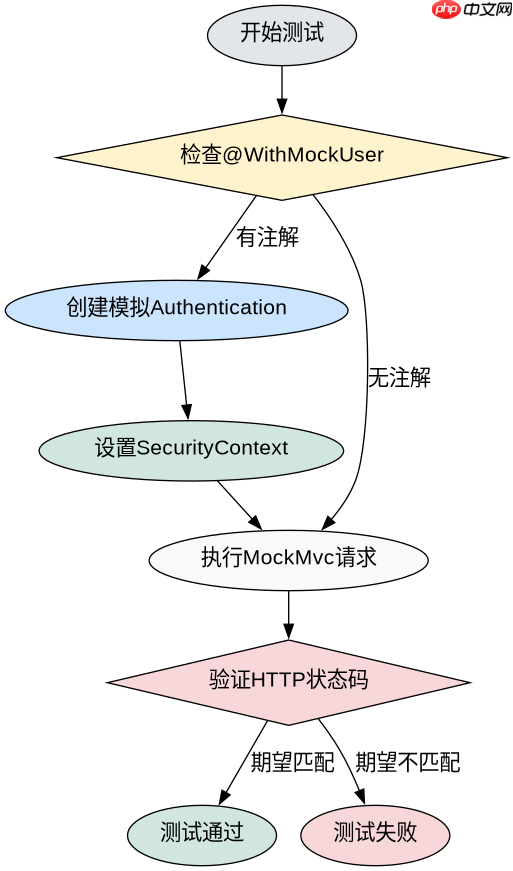
使用spring security的测试支持,通过`@withmockuser`注解或`securitytestexecutionlistener`模拟已认证用户,从而在junit中测试需要登录的接口。具体做法是在测试类上添加`@webmvctest`或`@autoconfiguremockmvc`,并在测试方法上使用`@withmockuser(username="user", roles="user")`来注入一个模拟的安全上下文,这样控制器就能识别出当前请求是已登录状态,进而返回正常数据而非重定向到登录页。

如何配置测试用的安全上下文
在Spring Boot集成测试中,默认情况下安全过滤器链可能未完全加载或用户上下文为空。为了验证受保护端点,必须显式提供认证信息。最简便的方式是使用`@WithMockUser`,它会在执行测试方法前自动构建一个包含指定用户名和角色的`Authentication`对象并存入`SecurityContext`。如果项目使用了自定义的用户详情服务,也可以实现`TestRestTemplate`配合`HttpBasic`认证头,或者编写自定义的`@WithSecurityContext`注解来处理更复杂的逻辑。关键在于确保测试环境中的`SecurityFilterChain`能够正确读取这些模拟凭证。
import org.junit.jupiter.api.Test;
import org.springframework.beans.factory.annotation.Autowired;
import org.springframework.boot.test.autoconfigure.web.servlet.WebMvcTest;
import org.springframework.boot.test.mock.mockito.MockBean;
import org.springframework.security.test.context.support.WithMockUser;
import org.springframework.test.web.servlet.MockMvc;

import static org.springframework.test.web.servlet.request.MockMvcRequestBuilders.get;
import static org.springframework.test.web.servlet.result.MockMvcResultMatchers.status;

@WebMvcTest(UserController.class)
public class UserControllerTest {

    @Autowired
    private MockMvc mockMvc;

    @MockBean
    private UserService userService;

    @Test
    @WithMockUser(username = "testUser", roles = {"ADMIN"})
    public void testGetUserProfile() throws Exception {
        // 模拟用户服务行为
        when(userService.getUser("testUser")).thenReturn(new User("testUser"));

        // 发起请求,因为@WithMockUser的存在,此请求被视为已登录
        mockMvc.perform(get("/api/user/profile"))
               .andExpect(status().isOk());
    }
}
如何处理多角色权限校验
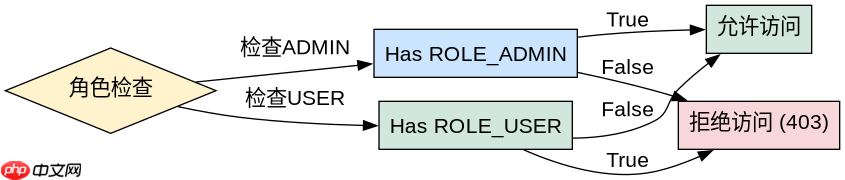
当接口不仅要求登录,还要求特定角色(如管理员)时,`@WithMockUser`同样适用。只需在注解的`roles`属性中指定所需角色数组即可。Spring Security会自动将这些角色转换为带有`ROLE_`前缀的权限字符串。例如,`roles = {"ADMIN", "USER"}`会生成`ROLE_ADMIN`和`ROLE_USER`两个权限。测试时,若接口使用`@PreAuthorize("hasRole('ADMIN')")`,则只有当模拟用户包含该角色时,请求才会成功通过权限检查并进入控制器逻辑。若角色不匹配,MockMvc将返回403 Forbidden状态码,这有助于验证权限控制逻辑的正确性。
import org.junit.jupiter.api.Test;
import org.springframework.security.test.context.support.WithMockUser;
import org.springframework.test.web.servlet.MvcResult;

import static org.springframework.test.web.servlet.request.MockMvcRequestBuilders.get;
import static org.springframework.test.web.servlet.result.MockMvcResultMatchers.status;

@Test
@WithMockUser(username = "adminUser", roles = {"ADMIN"})
public void testAdminEndpoint() throws Exception {
    // 拥有ADMIN角色,应返回200
    mockMvc.perform(get("/api/admin/dashboard"))
           .andExpect(status().isOk());
}

@Test
@WithMockUser(username = "regularUser", roles = {"USER"})
public void testAdminEndpointForbidden() throws Exception {
    // 仅有USER角色,无ADMIN权限,应返回403
    MvcResult result = mockMvc.perform(get("/api/admin/dashboard"))
                              .andExpect(status().isForbidden())
                              .andReturn();
    // 可进一步验证错误响应体内容
}
基于@WithMockUser注解的具体行为问题
在使用`@WithMockUser`时,一个常见的问题是默认密码是否生效。实际上,该注解创建的`Authentication`对象是一个模拟对象,其凭证(credentials)字段通常为空或占位符,不会触发实际的密码比对逻辑。因此,只要用户名和角色匹配,无论密码是什么,认证都会通过。这意味着在测试中无需关心密码复杂度或哈希算法,除非你正在测试具体的密码加密流程本身。此外,如果测试类上同时存在多个`@WithMockUser`注解,Spring Security会使用最近的一个,或者根据`order`属性决定优先级,但通常建议每个测试方法只使用一个明确的注解以避免混淆。