在junit中忽略大小写比较字符串,应使用hamcrest匹配器中的`equaltoignoringcase()`方法。只需将断言语句从标准的`assertequals`替换为`assertthat(actual, equaltoignoringcase(expected))`即可实现不区分大小写的校验。若需处理空值或自定义错误信息,可结合`nullvalue()`或提供第三个参数作为失败提示。

如何验证两个字符串内容相同但大小写不同
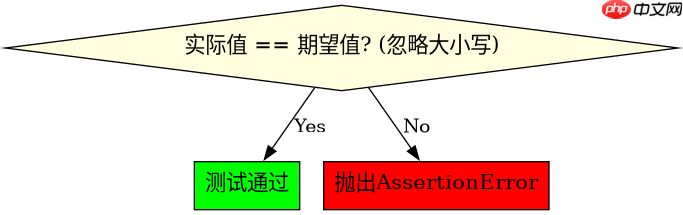
直接回答:使用`assertThat`配合`equalToIgnoringCase`匹配器可以验证两个字符串在忽略大小写后是否相等。该方法内部会调用`String.equalsIgnoreCase`逻辑,自动处理大小写转换对比。输入为实际值和期望值,结果为布尔判断,成功则测试通过,失败抛出`AssertionError`。
import org.junit.Test;
import static org.hamcrest.MatcherAssert.assertThat;
import static org.hamcrest.Matchers.equalToIgnoringCase;

public class CaseInsensitiveTest {
    @Test
    public void testIgnoreCase() {
        String actual = "Hello World";
        String expected = "hello world";
        assertThat(actual, equalToIgnoringCase(expected));
    }
}
运行上述代码,测试将通过。因为`"Hello World"`与`"hello world"`在忽略大小写后完全一致。若期望值为`"HELLO WORLD"`同样通过。若期望值为`"Hello World!"`则会失败,因为字符内容不同。
如何处理包含特殊字符或空值的忽略大小写断言
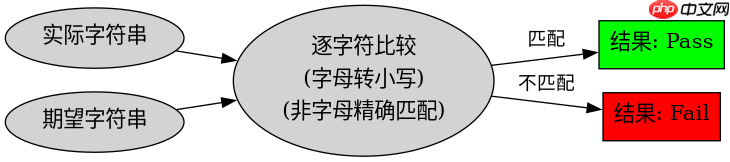
直接回答:当字符串包含非字母字符(如数字、标点)时,`equalToIgnoringCase`仅对字母部分进行大小写忽略,非字母字符必须完全匹配。对于空值情况,若实际值为`null`而期望值不为`null`,断言失败;若两者均为`null`,需使用`nullValue()`匹配器而非`equalToIgnoringCase`,因为后者不支持`null`输入。
import org.junit.Test;
import static org.hamcrest.MatcherAssert.assertThat;
import static org.hamcrest.Matchers.equalToIgnoringCase;
import static org.hamcrest.Matchers.nullValue;

public class EdgeCaseTest {
    @Test
    public void testSpecialChars() {
        String actual = "Test-123";
        String expected = "test-123";
        assertThat(actual, equalToIgnoringCase(expected));
    }

    @Test
    public void testNullHandling() {
        String actual = null;
        String expected = null;
        assertThat(actual, nullValue());
    }
}
第一段测试中,`"Test-123"`与`"test-123"`通过,因为连字符和数字不参与大小写比较,仅字母`T`与`t`被忽略差异。第二段测试中,两个`null`值使用`nullValue()`验证通过。若尝试用`equalToIgnoringCase(null)`传入非`null`实际值,将抛出`NullPointerException`,因此空值场景需单独处理。
基于程序中实际返回的JSON字段名进行忽略大小写断言
直接回答:当程序返回的JSON对象中包含键名为`"UserName"`,而测试期望匹配`"username"`时,可通过解析JSON后提取值并使用`equalToIgnoringCase`进行断言。此场景下,重点在于确保从JSON中提取的值是字符串类型,且未受其他序列化影响。
import com.fasterxml.jackson.databind.JsonNode;
import com.fasterxml.jackson.databind.ObjectMapper;
import org.junit.Test;
import static org.hamcrest.MatcherAssert.assertThat;
import static org.hamcrest.Matchers.equalToIgnoringCase;

public class JsonFieldTest {
    @Test
    public void testJsonFieldIgnoreCase() throws Exception {
        String json = "{\"UserName\":\"Alice\"}";
        ObjectMapper mapper = new ObjectMapper();
        JsonNode node = mapper.readTree(json);
        String actual = node.get("UserName").asText();
        assertThat(actual, equalToIgnoringCase("alice"));
    }
}
该测试中,JSON字符串包含键`"UserName"`,其值为`"Alice"`。解析后提取该值并与`"alice"`进行忽略大小写比较,测试通过。若JSON中键名为`"user_name"`,则`node.get("UserName")`将返回`null`,导致`asText()`返回空字符串,此时断言将失败。因此,需确保JSON结构与实际数据一致,再应用忽略大小写断言。