通过实现 icustomformatter 接口并重写 format 方法,可以在 string.format 或插值字符串中处理自定义日期格式。具体做法是创建一个类实现该接口,在 format 方法中解析格式提供程序中的格式字符串(如 "yyyy-mm"),并根据传入的对象类型进行转换。当调用 string.format(new dateformatter(), "{0:yyyy-mm}", date) 时,框架会自动调用你的 format 方法,从而返回符合自定义规则的字符串。

如何实现 ICustomFormatter 接口
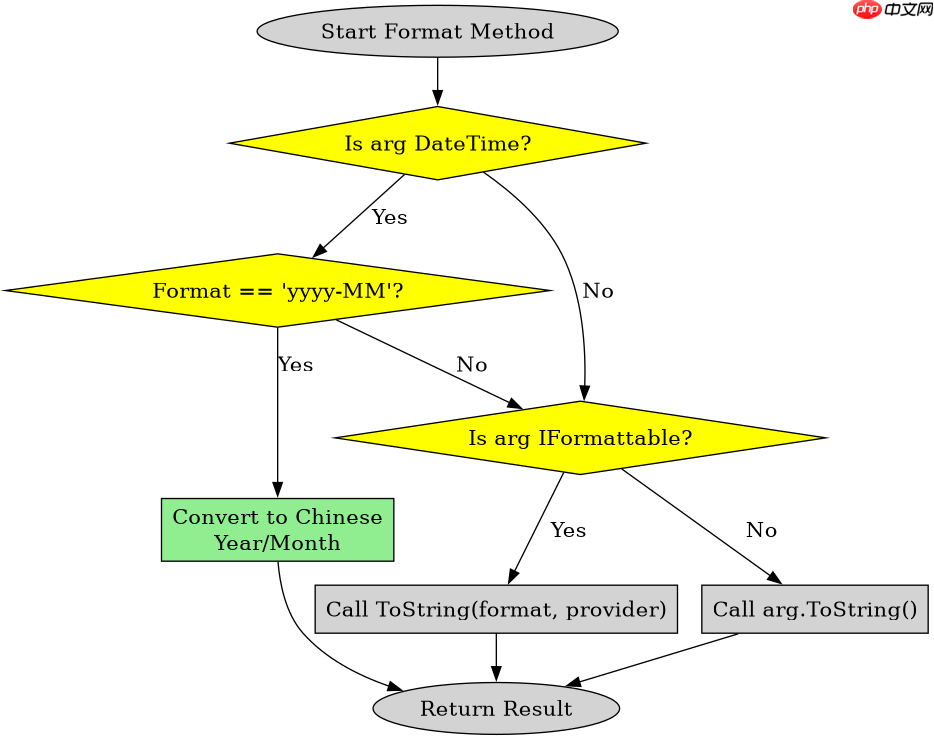
要实现自定义格式化,需要定义一个类并实现 System.IFormattable 或 System.ICustomFormatter。通常我们直接实现 ICustomFormatter 并将其作为 IFormatProvider 传递。核心逻辑在于 Format 方法:它接收格式字符串、参数和格式提供者。如果参数是 DateTime 且格式字符串匹配预期模式,则执行自定义转换;否则委托给默认格式化器。
using System;

public class CustomDateFormatter : IFormatProvider, ICustomFormatter
{
    public object GetFormat(Type formatType)
    {
        if (formatType == typeof(ICustomFormatter))
            return this;
        return null;
    }

    public string Format(string format, object arg, IFormatProvider provider)
    {
        if (arg is DateTime dt)
        {
            // 假设只支持 "yyyy-MM" 这种特定格式
            if (format == "yyyy-MM")
            {
                return dt.ToString("yyyy年MM月");
            }
        }
        // 其他情况使用默认格式化
        if (arg is IFormattable formattable)
        {
            return formattable.ToString(format, provider);
        }
        return arg?.ToString() ?? string.Empty;
    }
}
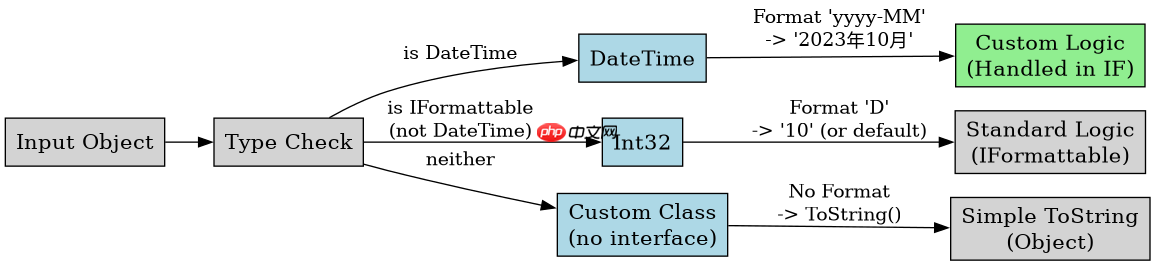
上述代码定义了一个 CustomDateFormatter。在 GetFormat 中返回自身以表明支持 ICustomFormatter。在 Format 中,检查输入是否为 DateTime 且格式为 "yyyy-MM",如果是,则将其转换为中文年月格式。否则,尝试将对象视为 IFormattable 并使用标准格式化逻辑,或者简单地调用 ToString()。
如何在 string.Format 中使用自定义格式化器
在使用层面,只需实例化自定义格式化器类,并将其作为第一个参数传递给 string.Format。占位符中的冒号后跟随自定义格式字符串。例如,string.Format(new CustomDateFormatter(), "当前时间: {0:yyyy-MM}", DateTime.Now) 会输出类似 "当前时间: 2023年10月" 的结果。如果不提供格式字符串,或者格式不匹配,它将回退到默认行为。

using System;

class Program
{
    static void Main()
    {
        var formatter = new CustomDateFormatter();
        DateTime now = new DateTime(2023, 10, 5);

        // 使用自定义格式
        string result1 = string.Format(formatter, "{0:yyyy-MM}", now);
        Console.WriteLine(result1); // 输出: 2023年10月

        // 使用默认格式(无自定义格式字符串)
        string result2 = string.Format(formatter, "{0}", now);
        Console.WriteLine(result2); // 输出: 10/5/2023 12:00:00 AM (取决于区域设置)
    }
}
运行上述 Main 方法,result1 将严格遵循 CustomDateFormatter 中定义的 "yyyy-MM" 映射规则,输出 "2023年10月"。result2 因为没有指定格式字符串,Format 方法中的 format 参数为空,不会进入 if (format == "yyyy-MM") 分支,而是进入 IFormattable 分支,调用 DateTime 的默认 ToString(null, provider),从而输出系统默认的区域性日期格式。
如何处理非 DateTime 类型的输入
当传入的对象不是 DateTime 类型时,CustomDateFormatter 必须确保不会抛出异常或返回错误结果。在 Format 方法的末尾,代码检查了 arg is IFormattable。如果对象实现了 IFormattable(如 int, double, DateTime 等),则调用其标准的 ToString(format, provider) 方法。这保证了即使自定义格式化器不支持某种类型,也能利用 .NET 内置的格式化能力进行处理。如果对象既不是 DateTime 也不是 IFormattable(例如自定义类未实现接口),则调用 arg?.ToString(),这提供了最基础的字符串表示,避免了 NullReferenceException。