不能直接转换。c# 中 int.parse() 和 convert.toint32() 遇到带小数点的字符串会抛出异常,因为整数类型无法表示小数部分。必须先将字符串转换为浮点类型(如 double),再强制转换为 int,或者使用 math.round() 进行四舍五入后再转换。

int.Parse() 遇到带小数点的字符串会返回什么
int.Parse() 遇到带小数点的字符串会抛出 FormatException。这是因为该方法期望输入是纯整数字符串,任何非整数的格式(包括小数点)都会导致解析失败。这是最直接且常见的错误来源。
using System;

class Program {
    static void Main() {
        string input = "12.5";
        try {
            int result = int.Parse(input);
            Console.WriteLine(result);
        } catch (FormatException) {
            Console.WriteLine("FormatException: 格式不正确");
        }
    }
}
预期结果:抛出 FormatException,控制台输出 “FormatException: 格式不正确”。
如何正确将带小数的字符串转为 int
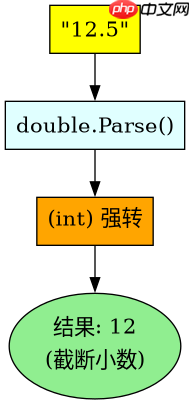
正确的做法是先转成 double 或 float,再强转为 int。例如 (int)double.Parse("12.5") 会得到 12,因为强转会截断小数部分。若需四舍五入,应使用 Math.Round(),如 (int)Math.Round(double.Parse("12.5")) 得到 13。

using System;

class Program {
    static void Main() {
        string input = "12.5";
        double d = double.Parse(input);
        int truncated = (int)d; // 截断
        int rounded = (int)Math.Round(d); // 四舍五入
        Console.WriteLine(truncated); // 12
        Console.WriteLine(rounded);   // 13
    }
}
预期结果:第一行输出 12,第二行输出 13。
当输入为 "12.5" 时,(int)double.Parse() 与 Math.Round() 的结果差异是什么
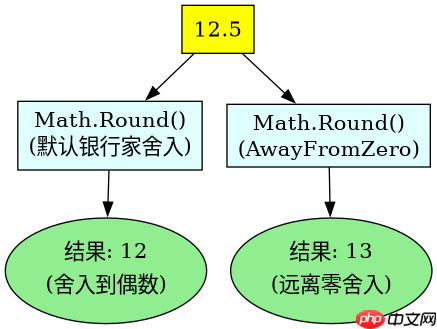
当输入为 "12.5" 时,(int)double.Parse("12.5") 结果为 12,而 (int)Math.Round(double.Parse("12.5")) 结果为 13。差异源于强转直接丢弃小数部分,而 Math.Round() 按四舍五入规则处理。注意 Math.Round() 默认采用“银行家舍入法”,即 0.5 舍入到最近的偶数,但 12.5 舍入后为 13(奇数),因为 12.5 距离 13 更近?不,12.5 正好在中间,银行家舍入法会舍入到偶数 12?让我们验证:Math.Round(12.5) 在 C# 中默认返回 12(偶数),所以 (int)Math.Round(12.5) 实际是 12。但若用 MidpointRounding.AwayFromZero,则返回 13。因此,行为取决于舍入模式。
using System;

class Program {
    static void Main() {
        double d = 12.5;
        int defaultRound = (int)Math.Round(d); // 12 (银行家舍入)
        int awayFromZero = (int)Math.Round(d, MidpointRounding.AwayFromZero); // 13
        Console.WriteLine(defaultRound);      // 12
        Console.WriteLine(awayFromZero);      // 13
    }
}
预期结果:第一行输出 12,第二行输出 13。这展示了舍入模式对最终整数值的影响。