WPF输入框绑定字符串如何校验不能为空
在wpf中,可以通过实现 inotifydataerrorinfo 接口来对绑定的字符串进行非空校验。具体做法是创建一个继承自 viewmodelbase 的视图模型类,在该类中重写 geterrors 方法,当属性值为 null 或空字符串时返回错误信息。这样,当用户输入无效内容时,wpf 会自动显示验证错误。

如何在XAML中配置TextBox以显示验证错误
要在XAML中显示验证错误,需要在 TextBox 的 Binding 元素中设置 NotifyOnValidationError 和 ValidatesOnNotifyDataErrors 属性为 true。同时,可以定义一个 ErrorTemplate 来自定义错误提示的外观,例如使用红色边框和工具提示来显示错误信息。

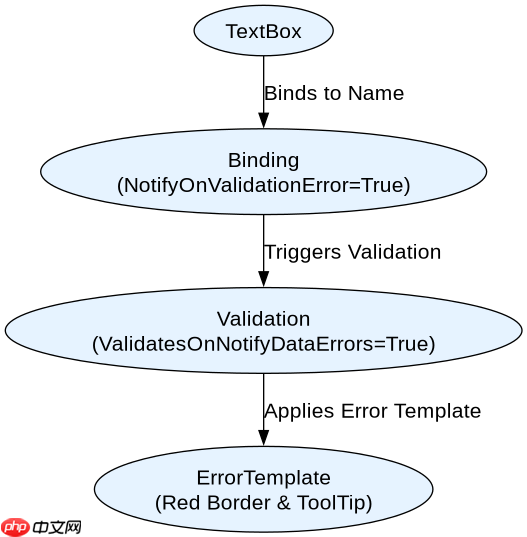
基于程序中某个输入、条件或结果的具体问题
当用户在输入框中输入空格时,上述校验逻辑会认为输入有效,因为空格不是 null 也不是空字符串。如果需要将空格也视为无效输入,可以在 GetErrors 方法中使用 string.IsNullOrWhiteSpace() 方法进行判断。
using System;
using System.Collections.Generic;
using System.ComponentModel;
using System.Runtime.CompilerServices;

public class ViewModelBase : INotifyPropertyChanged, INotifyDataErrorInfo
{
    private string _name;
    public string Name
    {
        get { return _name; }
        set
        {
            if (_name != value)
            {
                _name = value;
                OnPropertyChanged();
                OnPropertyValidate("Name");
            }
        }
    }

    private Dictionary<string, List<string>> _errors = new Dictionary<string, List<string>>();

    public event EventHandler<DataErrorsChangedEventArgs> ErrorsChanged;
    public event PropertyChangedEventHandler PropertyChanged;

    protected virtual void OnPropertyChanged([CallerMemberName] string propertyName = null)
    {
        PropertyChanged?.Invoke(this, new PropertyChangedEventArgs(propertyName));
    }

    protected void OnPropertyValidate(string propertyName)
    {
        var errors = GetErrors(propertyName);
        if (errors != null && errors.Count > 0)
        {
            _errors[propertyName] = errors;
        }
        else
        {
            _errors.Remove(propertyName);
        }
        ErrorsChanged?.Invoke(this, new DataErrorsChangedEventArgs(propertyName));
    }

    public IEnumerable GetErrors(string propertyName)
    {
        if (propertyName == "Name")
        {
            if (string.IsNullOrEmpty(Name))
            {
                return new List<string> { "Name cannot be null or empty." };
            }
        }
        return null;
    }

    public bool HasErrors => _errors.Count > 0;
}
<Window x:Class="WpfApp.MainWindow"
        xmlns="http://schemas.microsoft.com/winfx/2006/xaml/presentation"
        xmlns:x="http://schemas.microsoft.com/winfx/2006/xaml"
        Title="MainWindow" Height="350" Width="525">
    <StackPanel Margin="10">
        <TextBox Text="{Binding Name, NotifyOnValidationError=True, ValidatesOnNotifyDataErrors=True}">
            <TextBox.Style>
                <Style TargetType="TextBox">
                    <Setter Property="BorderBrush" Value="Black"/>
                    <Style.Triggers>
                        <Trigger Property="Validation.HasError" Value="True">
                            <Setter Property="BorderBrush" Value="Red"/>
                            <Setter Property="ToolTip" Value="{Binding RelativeSource={RelativeSource Self}, Path=(Validation.Errors)[0].ErrorContent}"/>
                        </Trigger>
                    </Style.Triggers>
                </Style>
            </TextBox.Style>
        </TextBox>
    </StackPanel>
</Window>