








在 nginx 中设置 map 变量映射,核心是在 http 块内定义一个映射表,将源变量(如 $http_user_agent)的值与目标值进行关联。通过指定 default 参数处理未匹配的情况,并在后续配置中使用该变量,即可实现基于请求特征的动态逻辑控制。

如何根据 User-Agent 区分移动端和桌面端
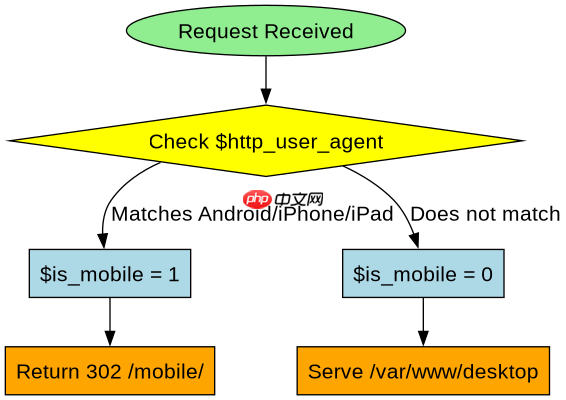
要区分移动端和桌面端,需创建一个名为 $is_mobile 的变量,并检查 $http_user_agent 是否包含特定的移动设备标识。当用户代理字符串匹配正则表达式时,变量被赋值为 1,否则保持默认值 0。这种映射允许在 location 块中直接引用 $is_mobile 来执行不同的配置逻辑。
http {
    map $http_user_agent $is_mobile {
        default         0;
        ~*Android       1;
        ~*iPhone        1;
        ~*iPad          1;
    }

    server {
        listen 80;
        server_name example.com;

        location / {
            if ($is_mobile) {
                return 302 /mobile/;
            }
            root /var/www/desktop;
        }

        location /mobile/ {
            root /var/www/mobile;
        }
    }
}
上述配置定义了 map 块,其中 $http_user_agent 是输入变量,$is_mobile 是输出变量。正则表达式 ~*Android 表示不区分大小写地匹配包含 "Android" 的字符串。如果请求来自 Android、iPhone 或 iPad,$is_mobile 将被设置为 1。在 location / 中,if 指令检查 $is_mobile 的值,若为真则重定向到移动端路径。预期结果是:桌面浏览器访问根路径时加载桌面内容,移动浏览器访问根路径时被重定向到 /mobile/。

如何根据请求 URI 路径设置缓存头
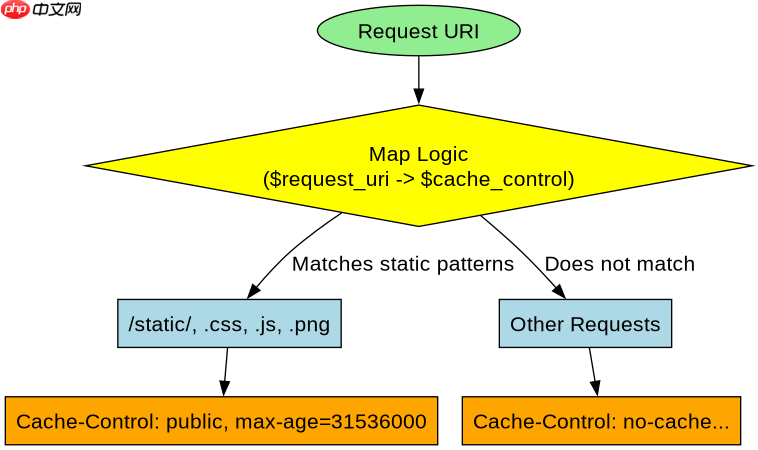
为了优化性能,可以根据请求的 URI 路径动态设置 Cache-Control 响应头。定义一个名为 $cache_control 的变量,根据 $request_uri 的不同前缀分配不同的缓存策略。例如,静态资源如图片和 CSS 文件设置较长的缓存时间,而 API 请求则禁止缓存。这种方法减少了不必要的网络请求,提高了页面加载速度。
http {
    map $request_uri $cache_control {
        default         "no-cache, no-store, must-revalidate";
        ~^/static/      "public, max-age=31536000";
        ~\.css$        "public, max-age=31536000";
        ~\.js$         "public, max-age=31536000";
        ~\.png$        "public, max-age=31536000";
    }

    server {
        listen 80;
        server_name example.com;

        location / {
            add_header Cache-Control $cache_control;
            root /var/www/html;
        }
    }
}此配置中,map 块根据 $request_uri 的值设置 $cache_control。正则表达式 ~^/static/ 匹配以 /static/ 开头的 URI,~\.css$ 匹配以 .css 结尾的 URI。对于匹配到的静态资源,Cache-Control 头被设置为长期缓存;对于其他请求,默认为不缓存。在 location / 中,add_header 指令将 $cache_control 的值添加到响应头中。预期结果是:访问 /static/style.css 时,响应头包含 Cache-Control: public, max-age=31536000;访问 /api/data 时,响应头包含 Cache-Control: no-cache, no-store, must-revalidate。
当 User-Agent 为空时会发生什么
当 User-Agent 请求头为空或未提供时,Nginx 的 map 模块会将其视为空字符串。由于空字符串通常不会匹配任何具体的正则表达式或精确字符串,因此 map 变量将返回 default 指定的值。在上述第一个示例中,如果 $http_user_agent 为空,$is_mobile 将被设置为 0,导致请求被视为非移动端流量,从而加载桌面版内容。这种行为确保了即使在没有明确标识的情况下,系统也能提供一个合理的默认行为,避免配置错误导致的意外结果。

















