








java jdbc 处理 callablestatement 存储过程的核心在于使用 connection.preparecall() 创建语句对象,并通过 registeroutparameter() 注册输出参数。调用 execute() 执行后,利用 getxxx() 系列方法获取返回值或结果集。若存储过程返回多个结果集,需通过 getmoreresults() 进行遍历。

如何正确注册并获取存储过程的输出参数
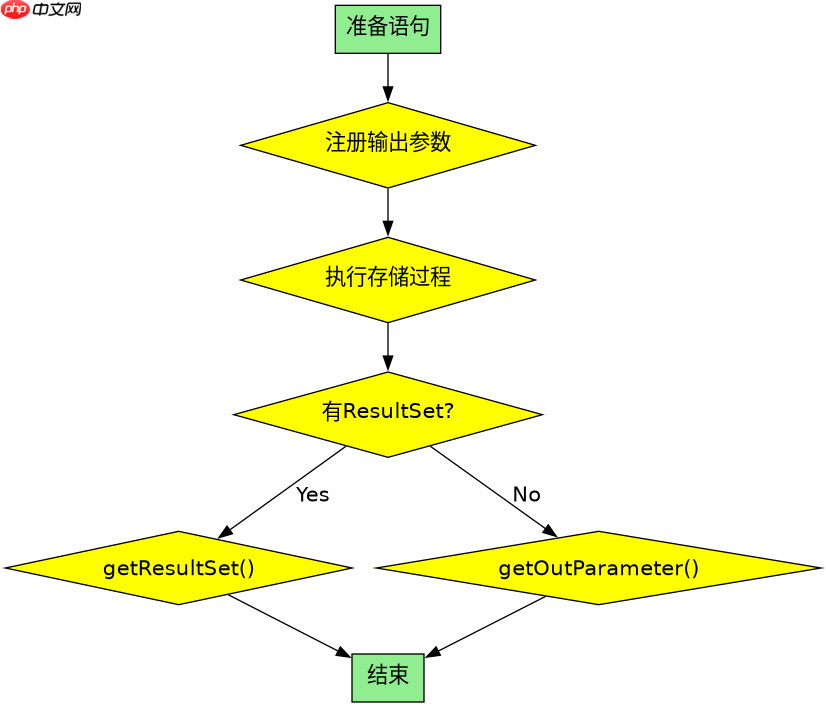
在调用带有输出参数的存储过程时,必须在执行前明确指定每个输出参数的 SQL 类型。这通过 CallableStatement.registerOutParameter(int parameterIndex, int sqlType) 完成。执行完毕后,根据注册的类型调用对应的 getXXX() 方法(如 getInt(), getString())提取值。如果未注册输出参数直接调用 getXXX(),通常会抛出 SQLException 或返回默认空值。
import java.sql.*;

public class OutParamExample {
    public static void main(String[] args) {
        String url = "jdbc:mysql://localhost:3306/testdb";
        String user = "root";
        String password = "password";

        // 假设存储过程为: CALL get_user_count(OUT count INT)
        String sql = "{call get_user_count(?)}";

        try (Connection conn = DriverManager.getConnection(url, user, password);
             CallableStatement cstmt = conn.prepareCall(sql)) {

            // 1. 注册输出参数:索引1,类型为INTEGER
            cstmt.registerOutParameter(1, Types.INTEGER);

            // 2. 执行存储过程
            cstmt.execute();

            // 3. 获取输出参数值
            int count = cstmt.getInt(1);
            System.out.println("User Count: " + count);

        } catch (SQLException e) {
            e.printStackTrace();
        }
    }
}
上述代码中,registerOutParameter(1, Types.INTEGER) 告诉驱动第一个参数是输出且为整型。执行后,cstmt.getInt(1) 安全地提取了该值。注意,输入参数(如果有)应在注册输出参数之前设置,例如使用 cstmt.setString(2, "value")。
立即学习“Java免费学习笔记(深入)”;

在代码库出现结构漂移之前,扫描JS或TS代码库中的禁止导入、循环依赖、孤立模块和其他依赖规则违规情况。
如何处理存储过程返回的多个结果集
当存储过程包含多条 SELECT 语句或混合返回结果集与更新计数时,CallableStatement 不会自动将所有结果一次性加载到内存。需要使用 getResultSet() 和 getUpdateCount() 配合 getMoreResults() 循环处理。每次调用 getMoreResults() 会推进到下一个结果,返回 true 表示当前有 ResultSet,false 表示是更新计数或无更多结果。

import java.sql.*;

public class MultiResultExample {
    public static void main(String[] args) {
        String url = "jdbc:mysql://localhost:3306/testdb";
        String user = "root";
        String password = "password";

        // 假设存储过程返回两个结果集
        String sql = "{call multi_select_proc()}";

        try (Connection conn = DriverManager.getConnection(url, user, password);
             CallableStatement cstmt = conn.prepareCall(sql)) {

            cstmt.execute();

            int resultNumber = 1;
            while (true) {
                ResultSet rs = cstmt.getResultSet();
                int updateCount = cstmt.getUpdateCount();

                if (rs != null) {
                    System.out.println("--- Result Set #" + resultNumber + " ---");
                    printResultSet(rs);
                    resultNumber++;
                } else if (updateCount != -1) {
                    System.out.println("Update Count: " + updateCount);
                } else {
                    break; // 没有更多结果
                }

                if (!cstmt.getMoreResults()) {
                    break;
                }
            }

        } catch (SQLException e) {
            e.printStackTrace();
        }
    }

    private static void printResultSet(ResultSet rs) throws SQLException {
        ResultSetMetaData meta = rs.getMetaData();
        int columnCount = meta.getColumnCount();

        while (rs.next()) {
            for (int i = 1; i <= columnCount; i++) {
                System.out.print(rs.getString(i) + "\t");
            }
            System.out.println();
        }
    }
}
在这个示例中,while(true) 循环持续检查是否有下一个结果。cstmt.getMoreResults() 是关键控制点,它决定何时停止。对于每个结果,先尝试获取 ResultSet,如果为空则检查是否为更新计数。这种模式确保了即使存储过程结构复杂,也能完整消费所有输出数据,避免资源泄漏或数据截断。
当存储过程抛出异常时如何捕获和处理
JDBC 将数据库层面的错误统一包装为 SQLException。当存储过程内部发生错误(如除零、约束违反)时,execute() 会立即抛出异常。此时,可以通过 SQLException.getSQLState() 和 getErrorCode() 区分错误类型。此外,部分驱动支持从 SQLException 链中获取原始数据库错误信息。建议在 catch 块中记录详细日志,并根据业务逻辑决定是否重试或回滚事务。
import java.sql.*;

public class ExceptionHandlingExample {
    public static void main(String[] args) {
        String url = "jdbc:mysql://localhost:3306/testdb";
        String user = "root";
        String password = "password";

        String sql = "{call risky_proc(?)}";

        try (Connection conn = DriverManager.getConnection(url, user, password)) {
            conn.setAutoCommit(false); // 开启事务
            try (CallableStatement cstmt = conn.prepareCall(sql)) {
                cstmt.setInt(1, 0); // 传入可能导致错误的参数
                cstmt.execute();
                conn.commit();
            } catch (SQLException e) {
                conn.rollback(); // 出错时回滚
                System.err.println("SQL State: " + e.getSQLState());
                System.err.println("Error Code: " + e.getErrorCode());
                System.err.println("Message: " + e.getMessage());
                // 根据SQLState判断是否可恢复
                if (e.getSQLState().startsWith("42")) {
                    System.out.println("Syntax or access error");
                }
            }
        } catch (SQLException e) {
            e.printStackTrace();
        }
    }
}
此代码展示了在事务环境中处理存储过程异常的典型模式。一旦 execute() 失败,立即触发 rollback() 保证数据一致性。通过检查 SQLState,可以针对性地处理不同类别的错误,例如以 "42" 开头的通常涉及语法或权限问题。这种方式比单纯捕获通用异常更精确,有助于构建健壮的数据库交互层。



















