








transferFrom()接收文件的基本用法
使用 transferfrom() 接收文件的核心做法是:创建一个 readablebytechannel(如 fileinputstream),再创建一个 writablebytechannel(如 fileoutputstream),然后调用后者的 transferfrom() 方法将数据从前者传输到当前文件指针位置。该方法利用操作系统的零拷贝机制(如 linux 的 sendfile),能显著提升大文件复制效率,避免用户态与内核态之间的频繁数据拷贝。

import java.io.FileInputStream;
import java.io.FileOutputStream;
import java.nio.channels.FileChannel;

public class TransferDemo {
    public static void main(String[] args) throws Exception {
        // 源文件输入流
        FileInputStream fis = new FileInputStream("source.txt");
        FileChannel sourceChannel = fis.getChannel();

        // 目标文件输出流
        FileOutputStream fos = new FileOutputStream("dest.txt");
        FileChannel destChannel = fos.getChannel();

        // 执行传输
        long transferred = destChannel.transferFrom(sourceChannel, 0, sourceChannel.size());
        System.out.println("Transferred: " + transferred + " bytes");

        // 关闭资源
        sourceChannel.close();
        destChannel.close();
    }
}
运行上述代码,若 source.txt 存在且包含内容,控制台将打印实际传输的字节数。注意 transferFrom()会从目标通道的当前文件指针开始写入,因此需确保 FileOutputStream 初始指针为 0,或使用 position() 调整。
如何处理传输过程中的部分读取或中断
当 transferFrom() 返回的值小于请求传输的字节数时,表示发生了部分传输,通常由信号中断、非阻塞模式或底层限制引起。此时需要循环调用直到完成全部传输,或在捕获异常后决定重试或回退。对于大多数同步阻塞场景,单次调用即可传输完整个文件,但为了健壮性,建议包裹在循环中处理返回值。

使用Atmosphere构建通过WebSocket、SSE、gRPC、WebTransport、MCP、A2A和AG-UI流传输的JVM代理网关,并带有治理钩子。
立即学习“Java免费学习笔记(深入)”;
import java.io.FileInputStream;
import java.io.FileOutputStream;
import java.nio.channels.FileChannel;

public class PartialTransferDemo {
    public static void main(String[] args) throws Exception {
        FileInputStream fis = new FileInputStream("source.txt");
        FileChannel sourceChannel = fis.getChannel();

        FileOutputStream fos = new FileOutputStream("dest_partial.txt");
        FileChannel destChannel = fos.getChannel();

        long totalSize = sourceChannel.size();
        long position = 0;
        long transferred = 0;

        // 循环处理部分传输
        while (transferred < totalSize) {
            long result = destChannel.transferFrom(sourceChannel, position, totalSize - transferred);
            if (result == -1) { // 源通道到达末尾
                break;
            }
            transferred += result;
            position += result;
        }

        System.out.println("Total transferred: " + transferred);
        sourceChannel.close();
        destChannel.close();
    }
}
该示例通过循环累加返回值,确保即使发生部分传输也能完整复制文件。若 transferFrom() 返回 -1,说明源通道无更多数据,应跳出循环。此逻辑适用于任何可能中断的传输场景。
基于 transferFrom() 返回值判断传输是否完整
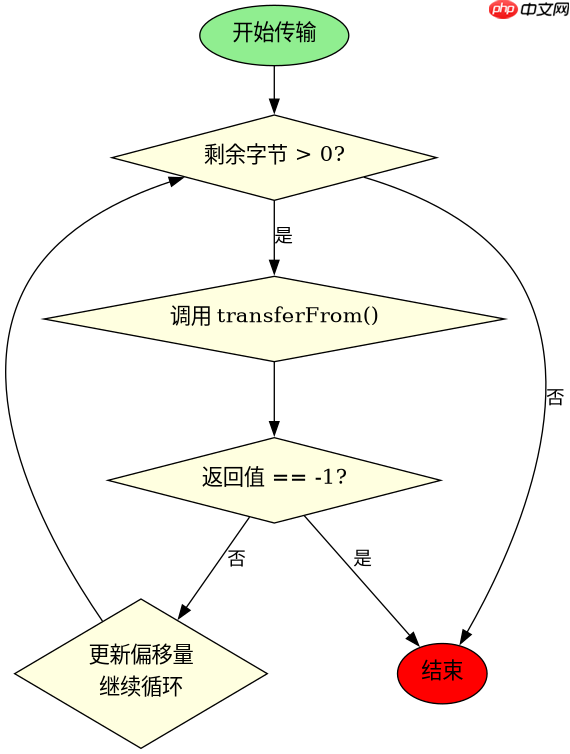
当 transferFrom() 返回 -1 时,表示源通道已到达文件末尾,没有更多数据可传输;若返回 0,表示当前无数据可传输(可能因非阻塞模式或缓冲区满);若返回正数,表示成功传输的字节数。开发者应根据返回值决定是否继续循环或终止传输。例如,在单线程同步场景中,若文件大小已知,可通过比较返回值与剩余大小来判断完整性。
import java.io.FileInputStream;
import java.io.FileOutputStream;
import java.nio.channels.FileChannel;

public class ReturnCheckDemo {
    public static void main(String[] args) throws Exception {
        FileInputStream fis = new FileInputStream("source.txt");
        FileChannel sourceChannel = fis.getChannel();

        FileOutputStream fos = new FileOutputStream("dest_check.txt");
        FileChannel destChannel = fos.getChannel();

        long remaining = sourceChannel.size();
        long offset = 0;

        while (remaining > 0) {
            long n = destChannel.transferFrom(sourceChannel, offset, remaining);
            if (n == -1) {
                System.out.println("Source channel ended.");
                break;
            } else if (n == 0) {
                System.out.println("No data transferred in this call.");
                // 在非阻塞模式下可能需要额外处理
                break;
            }
            remaining -= n;
            offset += n;
        }

        System.out.println("Final remaining: " + remaining);
        sourceChannel.close();
        destChannel.close();
    }
}
运行此代码,若 source.txt 正常,最终 remaining 应为 0,表示传输完整。若中途出错或源文件为空,remaining 将大于 0,提示未完全传输。开发者可根据此值进行日志记录或错误处理。


















