








在 docker compose 环境下,apache 代理 websocket 域名需通过 mod_proxy 和 mod_proxy_wstunnel 模块实现。配置核心是设置 proxypass 和 proxypassreverse 指令,并添加 upgrade 和 connection 头处理逻辑。这样 apache 能将 websocket 连接正确转发到后端容器服务。

如何启用必要的 Apache 模块
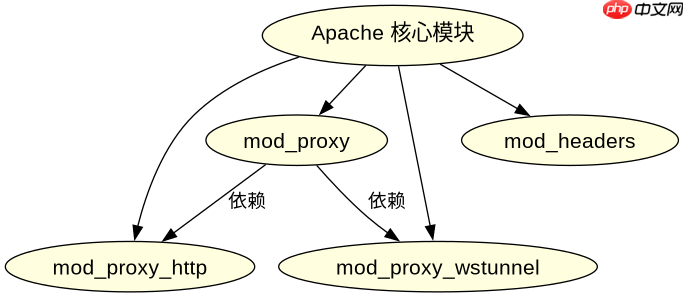
必须启用 proxy、proxy_http 和 proxy_wstunnel 模块。在 Debian/Ubuntu 系统中使用 a2enmod 命令,或在配置文件中加载对应模块。这是 WebSocket 代理的基础。
# Debian/Ubuntu 系统
sudo a2enmod proxy proxy_http proxy_wstunnel headers
# 重启 Apache
sudo systemctl restart apache2
启用后,Apache 具备处理 HTTP 升级请求的能力。若未启用 proxy_wstunnel,WebSocket 握手将失败。

如何在 VirtualHost 中配置域名代理
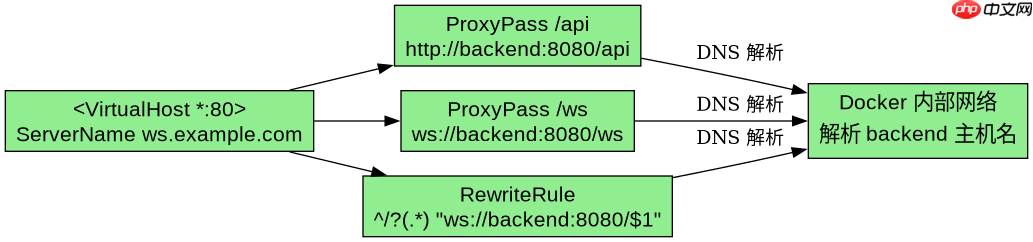
在 <virtualhost></virtualhost> 块中配置 ProxyPass 指向后端容器 IP 或 Docker 网络别名。需同时处理 HTTP 和 WebSocket 路径。使用 ProxyPass 的 ws:// 或 wss:// 协议前缀。
<VirtualHost *:80>
    ServerName ws.example.com

    # 普通 HTTP 代理
    ProxyPass /api http://backend:8080/api
    ProxyPassReverse /api http://backend:8080/api

    # WebSocket 代理
    ProxyPass /ws ws://backend:8080/ws
    ProxyPassReverse /ws ws://backend:8080/ws

    # 确保 Upgrade 和 Connection 头被传递
    RewriteEngine On
    RewriteCond %{HTTP:Upgrade} websocket [NC]
    RewriteCond %{HTTP:Connection} upgrade [NC]
    RewriteRule ^/?(.*) "ws://backend:8080/$1" [P,L]
</VirtualHost>
上述配置将 /ws 路径的请求转发到后端容器的 /ws 端点。Docker Compose 中后端服务名 backend 需与 docker-compose.yml 中的服务名一致。Apache 容器需加入同一 Docker 网络才能解析该主机名。
当后端容器重启时代理连接如何处理
后端容器重启会导致现有 WebSocket 连接断开。Apache 不会自动重连客户端。客户端需实现重连逻辑。Apache 仅负责转发当前活跃连接。若后端服务短暂不可用,Apache 返回 502 错误。建议在后端服务中加入健康检查,确保 Apache 仅在服务就绪时路由流量。

















