在 windows 服务中配置防火墙,最可靠的方式是调用 netsh advfirewall 命令并指定 profile=any。由于服务运行在 session 0 且通常没有交互式桌面,必须显式声明配置文件范围,否则规则可能不会按预期生效。通过构建包含完整语法的参数字符串并执行系统进程,可以确保防火墙策略被正确写入注册表。

如何为特定端口添加入站规则
要为服务监听的 TCP 端口添加允许入站的防火墙规则,需要调用 netsh advfirewall firewall add rule 命令。核心在于设置 dir=in 指定方向,action=allow 允许流量,并使用 profile=any 覆盖所有网络类型(域、专用、公用)。同时建议指定 enable=yes 确保规则立即激活,并通过 name 和 desc 提供清晰的标识以便后续管理。

using System;
using System.Diagnostics;

public class FirewallManager
{
    public static void AddInboundRule(int port, string serviceName)
    {
        string ruleName = $"Allow {serviceName} Port {port}";
        string desc = $"Firewall rule for {serviceName} on port {port}";

        // 构建 netsh 命令参数
        string args = $@"advfirewall firewall add rule name=""{ruleName}"" dir=in action=allow protocol=TCP localport={port} profile=any enable=yes desc=""{desc}""";

        ProcessStartInfo startInfo = new ProcessStartInfo
        {
            FileName = "netsh.exe",
            Arguments = args,
            Verb = "runas", // 请求管理员权限
            UseShellExecute = false,
            CreateNoWindow = true,
            WindowStyle = ProcessWindowStyle.Hidden
        };

        try
        {
            using (Process process = Process.Start(startInfo))
            {
                process.WaitForExit();
                if (process.ExitCode != 0)
                {
                    throw new Exception($"Failed to add firewall rule. Exit code: {process.ExitCode}");
                }
            }
        }
        catch (Exception ex)
        {
            Console.WriteLine($"Error configuring firewall: {ex.Message}");
            throw;
        }
    }

    public static void Main()
    {
        // 示例:为端口 8080 添加规则
        AddInboundRule(8080, "MyService");
        Console.WriteLine("Firewall rule added successfully.");
    }
}
上述代码演示了如何通过 C# 进程启动 netsh。关键点是 Verb = "runas" 会触发 UAC 提示或要求以管理员身份运行,因为修改防火墙需要高权限。如果服务本身是以 LocalSystem 或 Administrator 身份运行,可能需要处理权限继承问题,或者在服务安装阶段静默执行此逻辑。运行后,检查 Windows 防火墙高级安全控制台,应能看到名为 Allow MyService Port 8080 的新规则,状态为启用,作用于所有配置文件。
如何删除已存在的防火墙规则
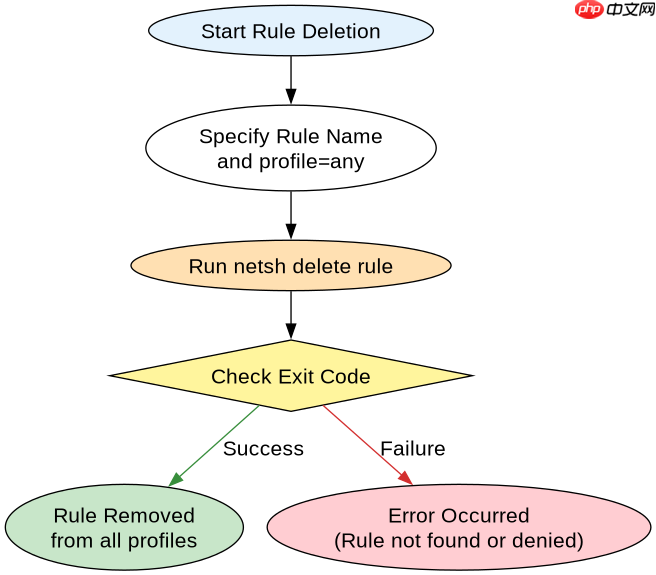
当服务卸载或需要重置配置时,必须能够移除之前添加的规则。使用 netsh advfirewall firewall delete rule 命令,并通过 name 参数精确匹配规则名称。与添加规则类似,必须再次指定 profile=any 以确保在所有网络配置文件中都找到并删除该规则。如果规则不存在,命令会返回错误,因此在实际应用中应先查询或捕获异常。

通过 Clawdos API 实现 Windows 自动化:屏幕捕获、鼠标/键盘输入、窗口管理、文件系统操作和 Shell 命令执行。独立版...
using System;
using System.Diagnostics;

public class FirewallManager
{
    public static void RemoveRule(string ruleName)
    {
        string args = $@"advfirewall firewall delete rule name=""{ruleName}"" profile=any";

        ProcessStartInfo startInfo = new ProcessStartInfo
        {
            FileName = "netsh.exe",
            Arguments = args,
            Verb = "runas",
            UseShellExecute = false,
            CreateNoWindow = true,
            WindowStyle = ProcessWindowStyle.Hidden
        };

        try
        {
            using (Process process = Process.Start(startInfo))
            {
                process.WaitForExit();
                if (process.ExitCode != 0)
                {
                    // 注意:即使规则不存在,netsh 也可能返回非零退出码
                    // 在实际生产中,建议先列出规则进行验证
                    Console.WriteLine($"Warning: Failed to delete rule '{ruleName}'. Exit code: {process.ExitCode}");
                }
                else
                {
                    Console.WriteLine($"Rule '{ruleName}' deleted successfully.");
                }
            }
        }
        catch (Exception ex)
        {
            Console.WriteLine($"Error deleting firewall rule: {ex.Message}");
            throw;
        }
    }

    public static void Main()
    {
        RemoveRule("Allow MyService Port 8080");
    }
}
这段代码展示了删除规则的逻辑。重点在于 delete rule 语法同样需要 profile=any 来确保跨配置文件的一致性。如果只指定 name 而不指定 profile,在某些系统配置下可能只会删除当前活动配置文件的规则,导致其他配置文件中的规则残留。因此,始终使用 profile=any 是最安全的做法。执行后,相应的防火墙规则将从系统中移除,端口将恢复默认拒绝状态(除非有其他规则允许)。
服务启动时如何验证防火墙规则是否生效
服务启动后,直接验证防火墙规则是否真正生效比添加或删除更重要。可以通过调用 netsh advfirewall firewall show rule name=all 或针对特定规则名进行查询,解析输出结果确认规则存在且状态为启用。另一种更编程化的方式是使用 .NET 的 System.Net.NetworkInformation.IPGlobalProperties 或尝试绑定端口,但最直接的方式仍是解析 netsh 的输出或使用 WMI 查询 Win32_FirewallRule。这里展示如何通过解析 netsh 输出来验证规则。
using System;
using System.Diagnostics;
using System.IO;
using System.Text.RegularExpressions;

public class FirewallVerifier
{
    public static bool IsRuleEnabled(string ruleName)
    {
        string args = $@"advfirewall firewall show rule name=""{ruleName}"" profile=any";

        ProcessStartInfo startInfo = new ProcessStartInfo
        {
            FileName = "netsh.exe",
            Arguments = args,
            Verb = "runas",
            UseShellExecute = false,
            RedirectStandardOutput = true,
            RedirectStandardError = true,
            CreateNoWindow = true,
            WindowStyle = ProcessWindowStyle.Hidden
        };

        try
        {
            using (Process process = Process.Start(startInfo))
            {
                string output = process.StandardOutput.ReadToEnd();
                process.WaitForExit();

                // 检查输出中是否包含 "Rule Name:" 和 "Yes" (表示启用)
                // 不同语言版本的 Windows 输出可能不同,这里假设英文环境
                // 更健壮的做法是使用 WMI 或 NetFwLib
                bool found = output.Contains(ruleName);
                bool enabled = output.Contains("Yes") || output.Contains("enabled");

                return found && enabled;
            }
        }
        catch (Exception ex)
        {
            Console.WriteLine($"Error verifying firewall rule: {ex.Message}");
            return false;
        }
    }

    public static void Main()
    {
        bool isEnabled = IsRuleEnabled("Allow MyService Port 8080");
        Console.WriteLine($"Rule is enabled: {isEnabled}");
    }
}
此代码片段展示了如何验证规则状态。虽然解析文本输出不够优雅且依赖本地化,但它提供了一种无需额外库的验证手段。在生产环境中,推荐使用 NetFwPolicy2 COM 对象或 WMI 类 Win32_FirewallRule 来获取结构化的规则信息,这样更可靠且不受语言环境影响。例如,通过 WMI 查询 Select * from Win32_FirewallRule where Name = 'Allow MyService Port 8080' 可以直接获取规则的 Enabled 属性。无论采用哪种方式,确保在服务的初始化阶段完成验证,可以在规则缺失时自动修复或记录日志,提高服务的鲁棒性。