junit 5 通过 @enabledifsystemproperty、@disabledifsystemproperty 等条件注解,结合系统属性(环境变量)实现测试的启用或禁用。只需在测试类或方法上添加对应注解并指定属性名和匹配值,即可根据运行时的环境配置动态控制测试执行。

如何根据系统属性启用特定测试?
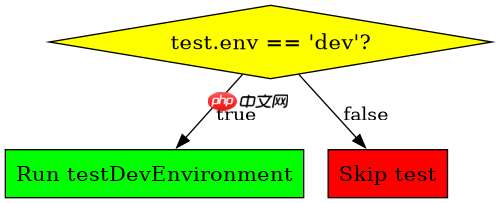
使用 @EnabledIfSystemProperty 注解可以确保只有当指定的系统属性存在且其值与预期匹配时,测试才会执行。例如,设置 -Dtest.env=dev 后,标注了该属性的测试将被激活。

dotenvx 安全环境变量管理器和加密器
下载
dotenvx 是由 dotenv 的创建者推出的_secure、跨平台环境变量管理器。它提供加密的 .env 文件、多环境支持,并通过其 CLI 运行器与任何编程语言或框架配合使用。
import org.junit.jupiter.api.Test;
import org.junit.jupiter.api.condition.EnabledIfSystemProperty;

public class DevTest {
    @Test
    @EnabledIfSystemProperty(named = "test.env", matches = "dev")
    public void testDevEnvironment() {
        System.out.println("Running in dev mode");
    }
}
如何根据系统属性禁用测试?
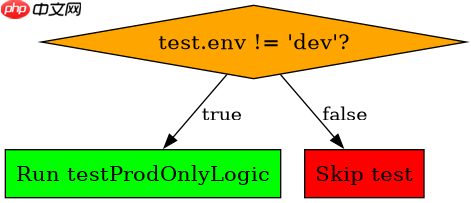
若希望某些测试在非特定环境下跳过,可使用 @DisabledIfSystemProperty。当系统属性不满足条件时,测试会被标记为 disabled,不会执行。这常用于排除非生产环境的测试逻辑。
import org.junit.jupiter.api.Test;
import org.junit.jupiter.api.condition.DisabledIfSystemProperty;

public class ProdOnlyTest {
    @Test
    @DisabledIfSystemProperty(named = "test.env", matches = "dev")
    public void testProdOnlyLogic() {
        System.out.println("This test runs only if env is not dev");
    }
}
如果未设置环境变量会怎样?
当未设置相关系统属性时,@EnabledIfSystemProperty 会导致测试被跳过,而 @DisabledIfSystemProperty 则可能使测试执行(取决于匹配逻辑)。建议始终提供默认值或使用 missing=false 明确行为。