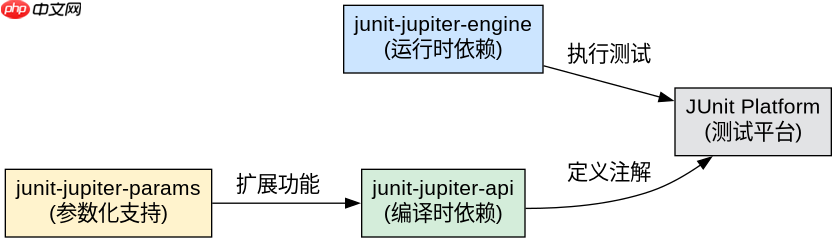
junit jupiter 的依赖主要由 junit-jupiter-api、junit-jupiter-engine 和 junit-jupiter-params 三个核心模块组成。其中 api 模块提供测试注解,引擎模块负责执行测试,参数化模块用于数据驱动测试。
API 与 Engine 模块的区别是什么
junit-jupiter-api 是编译时依赖,包含 @Test 等注解;junit-jupiter-engine 是运行时依赖,实现测试执行逻辑。两者必须同时存在才能运行测试。
<dependency>
    <groupId>org.junit.jupiter</groupId>
    <artifactId>junit-jupiter-api</artifactId>
    <version>5.10.0</version>
    <scope>test</scope>
</dependency>
<dependency>
    <groupId>org.junit.jupiter</groupId>
    <artifactId>junit-jupiter-engine</artifactId>
    <version>5.10.0</version>
    <scope>test</scope>
</dependency>
上述配置展示了标准的 Maven 依赖结构。API 模块定义了测试代码中使用的注解和方法签名,而引擎模块则在测试运行时加载并执行这些测试用例。如果缺少引擎模块,测试将无法被 JUnit Platform 发现和执行。
参数化模块的作用是什么
junit-jupiter-params 模块提供了 @ParameterizedTest 注解,支持通过不同输入数据多次运行同一个测试方法。它允许开发者使用 CSV、文件、枚举等多种来源提供测试数据。
<dependency>
    <groupId>org.junit.jupiter</groupId>
    <artifactId>junit-jupiter-params</artifactId>
    <version>5.10.0</version>
    <scope>test</scope>
</dependency>
该模块扩展了基础 API 的功能,使得编写数据驱动测试变得简单。开发者只需在测试方法上添加 @ParameterizedTest 注解,并使用相应的源注解(如 @ValueSource)即可实现多组数据的测试覆盖。
当使用 @ValueSource 时如何处理空值输入
@ValueSource 默认不支持 null 值,若需测试空值情况,应改用 @NullSource 或 @EmptySource 注解,或将它们组合使用。
@ParameterizedTest
@NullSource
@ValueSource(strings = {"test", "example"})
void testWithNullAndValues(String input) {
    assertNotNull(input); // 示例断言
}
上述代码展示了如何结合 @NullSource 和 @ValueSource 来测试包括 null 在内的多种输入情况。这种组合方式确保了测试能够覆盖边界条件,提高测试的健壮性。