遇到 classnotfoundexception 通常是因为测试运行时类路径中缺少依赖的 jar 包或编译后的 class 文件。解决方法是检查构建工具(如 maven 或 gradle)是否正确引入了依赖,并确保 ide 的运行配置指向了正确的输出目录和库路径。

Maven 项目中依赖未正确传递怎么办
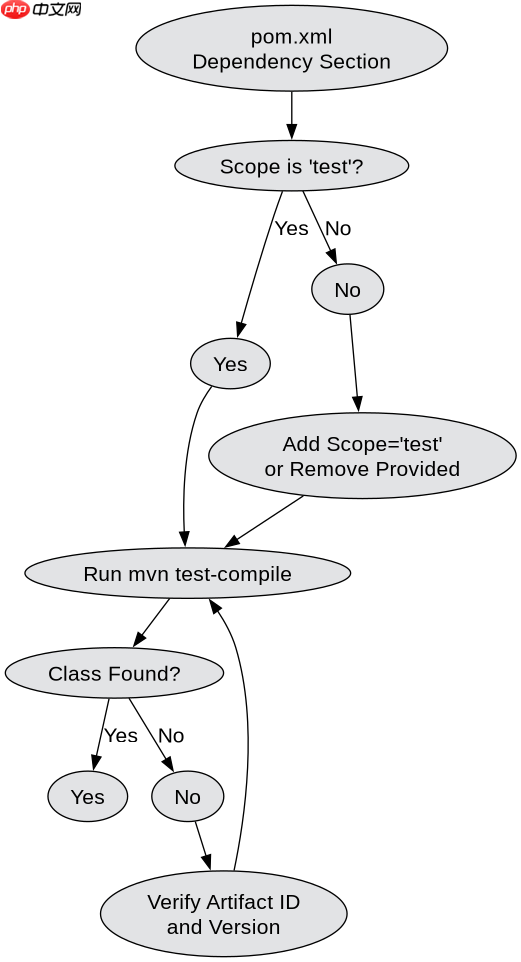
在 Maven 项目中,如果测试类引用了某个库但报错找不到类,往往是因为该库未被声明为 test 作用域,或者父 POM 中的依赖管理未正确覆盖。需要检查 pom.xml 中是否显式添加了缺失的依赖,并确认其 scope 不是 provided 或 system。
<dependency>
    <groupId>junit</groupId>
    <artifactId>junit</artifactId>
    <version>4.13.2</version>
    <scope>test</scope>
</dependency>
运行 mvn test-compile 后,检查 target/test-classes 目录下是否存在对应的类文件。若存在,则说明依赖已正确解析。
IDEA 运行配置中类路径错误怎么调整
在 IntelliJ IDEA 中,即使 Maven 配置正确,手动创建的 Run Configuration 也可能遗漏了 test-classes 目录或外部库。需要在 Edit Configurations 中检查 Classpath 选项卡,确保包含了 ${project.build.directory}/test-classes 和所有依赖 JAR 包。

// 示例测试类
import org.junit.Test;
import static org.junit.Assert.*;

public class SimpleTest {
    @Test
    public void testExample() {
        assertEquals(1, 1);
    }
}
在 IDEA 中右键运行该类,观察控制台输出的 Classpath 信息,确认是否包含所需的 JAR 包。若缺失,手动添加至 Classpath 列表中。
当测试类位于不同模块时如何确保可见性
在多模块项目中,如果测试类位于子模块 A,而依赖的类位于子模块 B,必须确保模块 A 的 pom.xml 中声明了对模块 B 的依赖。否则,即使模块 B 已编译,模块 A 的测试运行时也无法找到这些类。
检查模块 A 的依赖树,使用 mvn dependency:tree -Dincludes=group:artifact 查看是否包含模块 B 的输出。若未包含,添加如下依赖:
<dependency>
    <groupId>com.example</groupId>
    <artifactId>module-b</artifactId>
    <version>1.0-SNAPSHOT</version>
    <scope>test</scope>
</dependency>
重新执行 mvn clean test,验证是否能正常加载类。此方法适用于多模块结构下的类路径隔离问题。