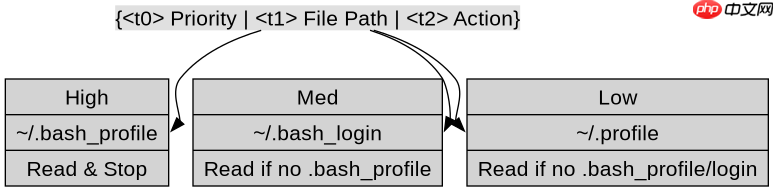
linux 环境变量配置文件的加载顺序取决于登录方式,核心规则是:交互式登录 shell 按 /etc/profile、/etc/profile.d/*.sh、~/.bash_profile(或 ~/.bash_login、~/.profile)的顺序执行,且一旦找到第一个存在的文件就停止读取后续同名文件;非交互式登录 shell 仅读取 /etc/bash.bashrc 和 ~/.bashrc。要区分它们,只需明确当前终端会话的类型,并检查对应路径下是否存在配置文件。

交互式登录 Shell 的加载优先级是什么
交互式登录 Shell 严格遵循“同名互斥”原则,即 ~/.bash_profile、~/.bash_login 和 ~/.profile 中只有优先级最高的那个会被读取,其余两个被忽略。系统级配置 /etc/profile 总是最先执行,它通常会调用 /etc/profile.d/ 目录下的所有脚本,从而加载如 lang.sh 或 java.sh 等特定环境设置。
#!/bin/bash
# 验证交互式登录 Shell 加载顺序
# 创建临时测试目录
TEST_DIR=$(mktemp -d)
cd "$TEST_DIR"

# 1. 模拟 /etc/profile 行为
echo 'echo "[System] Loading /etc/profile"' > /etc/profile.d/test_env.sh

# 2. 创建 ~/.bash_profile (最高优先级)
cat > ~/.bash_profile << 'EOF'
echo "[User] Loading ~/.bash_profile"
export USER_VAR="from_bash_profile"
EOF

# 3. 创建 ~/.profile (低优先级,应被忽略)
cat > ~/.profile << 'EOF'
echo "[User] Loading ~/.profile"
export USER_VAR="from_profile"
EOF

# 4. 执行交互式登录 Shell 模拟
# --login 参数模拟交互式登录
bash --login -c 'echo "USER_VAR is: $USER_VAR"'

# 清理
cd /
rm -rf "$TEST_DIR"
rm -f /etc/profile.d/test_env.sh
运行上述脚本后,输出将显示 [System] Loading /etc/profile 和 [User] Loading ~/.bash_profile,而不会显示 ~/.profile 的内容。这证实了 ~/.bash_profile 的存在导致 ~/.profile 被跳过。变量 USER_VAR 的值确认为 from_bash_profile。
非交互式 Shell 如何加载配置
非交互式 Shell(如在脚本中运行或在终端直接输入命令启动的新 shell)不读取 /etc/profile 系列文件,而是直接读取 /etc/bash.bashrc 和 ~/.bashrc。这种机制确保了普通命令执行时的环境一致性,同时避免了登录脚本中可能包含的耗时操作影响脚本执行速度。

当您希望在代码审查中而不是仅在托管UI中拥有代理定义时,请从本地文件初始化、验证和编辑ElevenLabs代理配置。

#!/bin/bash
# 验证非交互式 Shell 加载顺序
TEST_DIR=$(mktemp -d)
cd "$TEST_DIR"

# 1. 确保 /etc/bash.bashrc 存在并添加测试输出
if [ ! -f /etc/bash.bashrc ]; then
    touch /etc/bash.bashrc
fi
echo 'echo "[System] Loading /etc/bash.bashrc"' >> /etc/bash.bashrc

# 2. 创建 ~/.bashrc
cat > ~/.bashrc << 'EOF'
echo "[User] Loading ~/.bashrc"
export NON_INTERACTIVE_VAR="from_bashrc"
EOF

# 3. 执行非交互式 Shell
# 无 --login 参数,直接执行命令
bash -c 'echo "NON_INTERACTIVE_VAR is: $NON_INTERACTIVE_VAR"'

# 清理
cd /
# 恢复 /etc/bash.bashrc (移除最后一行)
sed -i '$ d' /etc/bash.bashrc
rm -rf "$TEST_DIR"
该脚本执行后,输出包含 [System] Loading /etc/bash.bashrc 和 [User] Loading ~/.bashrc,且 NON_INTERACTIVE_VAR 的值为 from_bashrc。这证明了非交互式环境下 ~/.bashrc 是用户级配置的主要入口,且系统级的 /etc/bash.bashrc 会优先于用户级文件加载。
当 ~/.bash_profile 不存在时会发生什么
如果 ~/.bash_profile 和 ~/.bash_login 都不存在,交互式登录 Shell 会自动回退到读取 ~/.profile。这是许多 Linux 发行版(如 Ubuntu)的默认行为,因为 ~/.profile 是 POSIX 标准推荐的用户级登录配置文件。此时,~/.bashrc 通常需要在 ~/.profile 中被显式 source 才能生效,否则交互式登录 Shell 中的别名和函数将无法使用。
#!/bin/bash
# 验证 ~/.bash_profile 缺失时的回退行为
TEST_DIR=$(mktemp -d)
cd "$TEST_DIR"

# 1. 确保没有 ~/.bash_profile 和 ~/.bash_login
rm -f ~/.bash_profile ~/.bash_login

# 2. 创建 ~/.profile
cat > ~/.profile << 'EOF'
echo "[User] Fallback to ~/.profile"
export FALLBACK_VAR="from_profile"
EOF

# 3. 执行交互式登录 Shell
bash --login -c 'echo "FALLBACK_VAR is: $FALLBACK_VAR"'

# 清理
cd /
rm -rf "$TEST_DIR"
脚本输出将显示 [User] Fallback to ~/.profile 和 FALLBACK_VAR is: from_profile。这表明在缺少高优先级文件时,~/.profile 成功接管了用户环境变量的初始化工作,保证了登录过程的完整性。