java 字符流 reader 通过内部缓冲区和编码转换机制读取文本字符,开发者只需调用 read() 方法即可获取单个字符的整数值或将其读入字符数组。具体做法是实例化如 filereader 的子类,指定文件路径后循环读取直到返回 -1,或者使用 try-with-resources 语法自动关闭资源。若遇到非 utf-8 编码的文件,需显式指定编码格式以避免乱码。
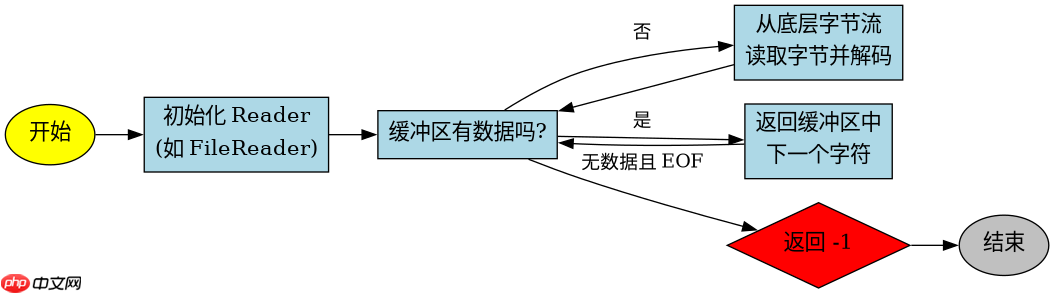
Reader 读取单个字符的具体流程是怎样的
Reader 读取单个字符时,底层会先检查缓冲区是否有剩余数据,若无则从底层字节流中读取一批字节并按指定编码解码为字符存入缓冲区,随后返回缓冲区中的下一个字符。这个过程对开发者透明,但理解它有助于处理大文件时的性能优化。主要涉及 read() 方法的内部逻辑,即从 char[] 缓冲区中逐个取出字符。
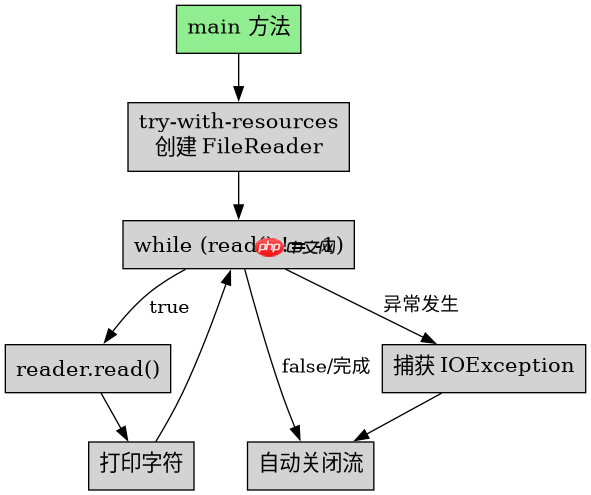
import java.io.FileReader;
import java.io.IOException;

public class SingleCharRead {
    public static void main(String[] args) {
        // 假设文件 content.txt 包含 "AB"
        String filePath = "content.txt";
        try (FileReader reader = new FileReader(filePath)) {
            int charData;
            while ((charData = reader.read()) != -1) {
                System.out.println((char) charData);
            }
        } catch (IOException e) {
            e.printStackTrace();
        }
    }
}
预期输出: A B
如何批量读取字符到数组中
批量读取使用 read(char[] cbuf) 方法,该方法尝试将最多 cbuf.length 个字符读入数组,并返回实际读取的字符数。这比逐个读取效率更高,适合处理较大文本块。返回值是已填充的字符数量,若到达文件末尾则返回 -1。开发者需根据返回值判断是否读完或是否需要扩容数组。

使用 Husky 在 JavaScript 仓库中强制执行本地 Git 钩子检查
下载
使用 Husky 将 pre-commit、pre-push 和 commit-msg 检查集成到仓库中,以便代理和开发人员在更改离开工作站之前运行相同的本地防护措施。
立即学习“Java免费学习笔记(深入)”;
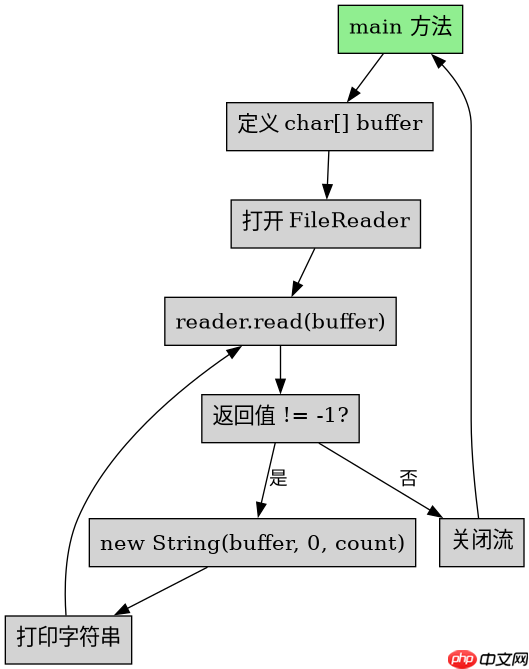
import java.io.FileReader;
import java.io.IOException;

public class BatchCharRead {
    public static void main(String[] args) {
        String filePath = "content.txt";
        char[] buffer = new char[1024];
        try (FileReader reader = new FileReader(filePath)) {
            int bytesRead;
            while ((bytesRead = reader.read(buffer)) != -1) {
                System.out.println(new String(buffer, 0, bytesRead));
            }
        } catch (IOException e) {
            e.printStackTrace();
        }
    }
}
预期输出: AB
当读取到文件末尾时 read() 返回什么值
当 Reader 读取到文件末尾(EOF)时,read() 方法返回 -1。这是 Java IO 流的标准约定,用于指示没有更多数据可读。开发者必须在循环条件中检查此返回值,否则会导致无限循环或异常。对于 read(char[] cbuf),同样在无法读取任何字符且到达末尾时返回 -1。