java nio 中实现非阻塞通信的核心是调用 socketchannel.configureblocking(false),将通道切换为非阻塞模式,并配合 selector 进行事件轮询。具体做法是在创建 socketchannel 后禁用阻塞,注册到选择器上监听 op_connect、op_read 和 op_write 事件,当有事件就绪时再执行实际的读写操作。

如何配置 SocketChannel 为非阻塞模式
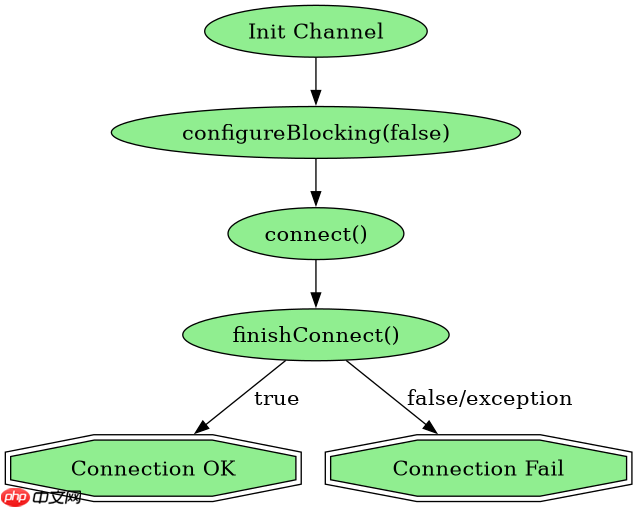
要启用非阻塞模式,必须在连接服务器之前调用 configureBlocking(false)。如果先连接再设置,可能会抛出 IllegalBlockingModeException。配置完成后,connect() 方法会立即返回,即使连接尚未建立,此时需要检查 finishConnect() 的状态。
import java.io.IOException;
import java.net.InetSocketAddress;
import java.nio.channels.SelectionKey;
import java.nio.channels.Selector;
import java.nio.channels.SocketChannel;

public class NonBlockingClient {
    public static void main(String[] args) throws IOException {
        // 1. 打开 SocketChannel
        SocketChannel channel = SocketChannel.open();

        // 2. 设置为非阻塞模式
        channel.configureBlocking(false);

        // 3. 连接到服务器(立即返回)
        channel.connect(new InetSocketAddress("localhost", 8080));

        // 4. 注册 Selector
        Selector selector = Selector.open();
        channel.register(selector, SelectionKey.OP_CONNECT);

        System.out.println("Client started in non-blocking mode.");
    }
}
如何处理连接完成后的读写事件
在非阻塞模式下,连接建立、数据读取和写入都需要通过 Selector.select() 来触发。当 SelectionKey.isConnectable() 为真时,必须调用 finishConnect() 来完成 TCP 三次握手。之后注册 OP_READ 和 OP_WRITE 以处理业务数据。如果缓冲区空间不足或网络暂时不可用,读写操作可能返回 0,需要重新注册或稍后重试。

使用 Husky 将 pre-commit、pre-push 和 commit-msg 检查集成到仓库中,以便代理和开发人员在更改离开工作站之前运行相同的本地防护措施。
立即学习“Java免费学习笔记(深入)”;

import java.io.IOException;
import java.nio.ByteBuffer;
import java.nio.channels.SelectionKey;
import java.nio.channels.Selector;
import java.nio.channels.SocketChannel;
import java.util.Iterator;
import java.util.Set;

public class NonBlockingClientLoop {
    private SocketChannel channel;
    private Selector selector;

    public NonBlockingClientLoop() throws IOException {
        channel = SocketChannel.open();
        channel.configureBlocking(false);
        selector = Selector.open();
        channel.connect(new InetSocketAddress("localhost", 8080));
        channel.register(selector, SelectionKey.OP_CONNECT);
    }

    public void process() throws IOException {
        while (selector.select() > 0) {
            Set<SelectionKey> selectedKeys = selector.selectedKeys();
            Iterator<SelectionKey> iterator = selectedKeys.iterator();
            while (iterator.hasNext()) {
                SelectionKey key = iterator.next();
                iterator.remove();

                if (key.isConnectable()) {
                    handleConnect(key);
                } else if (key.isReadable()) {
                    handleRead(key);
                } else if (key.isWritable()) {
                    handleWrite(key);
                }
            }
        }
    }

    private void handleConnect(SelectionKey key) throws IOException {
        SocketChannel ch = (SocketChannel) key.channel();
        if (ch.finishConnect()) {
            ch.register(selector, SelectionKey.OP_READ | SelectionKey.OP_WRITE);
            System.out.println("Connected successfully.");
        }
    }

    private void handleRead(SelectionKey key) throws IOException {
        SocketChannel ch = (SocketChannel) key.channel();
        ByteBuffer buffer = ByteBuffer.allocate(1024);
        int bytesRead = ch.read(buffer);
        if (bytesRead > 0) {
            buffer.flip();
            byte[] data = new byte[buffer.remaining()];
            buffer.get(data);
            System.out.println("Received: " + new String(data));
        } else if (bytesRead == -1) {
            ch.close();
        }
    }

    private void handleWrite(SelectionKey key) throws IOException {
        SocketChannel ch = (SocketChannel) key.channel();
        String msg = "Hello Server";
        ByteBuffer buffer = ByteBuffer.wrap(msg.getBytes());
        ch.write(buffer);
        if (buffer.hasRemaining()) {
            key.interestOps(SelectionKey.OP_WRITE);
        } else {
            key.interestOps(SelectionKey.OP_READ);
        }
    }
}
当 read() 返回 0 时应该如何处理
在 read() 方法返回 0 时,表示当前没有数据可读,但连接仍然有效。这通常发生在对端发送了空包或网络延迟导致数据尚未到达时。此时不应关闭连接,而应继续等待下一次 select() 事件。如果反复出现返回 0 的情况,可能是应用层协议问题或需要调整缓冲策略。