








使用 fetch 发起请求后,通过链式调用 .then() 解析响应数据,并在回调函数中利用数组的 filter() 方法对返回的 json 对象或数组进行条件筛选。具体做法是先获取 response.json(),然后传入过滤逻辑,最终得到仅包含符合条件数据的变量。

如何根据状态码过滤接口返回的数据
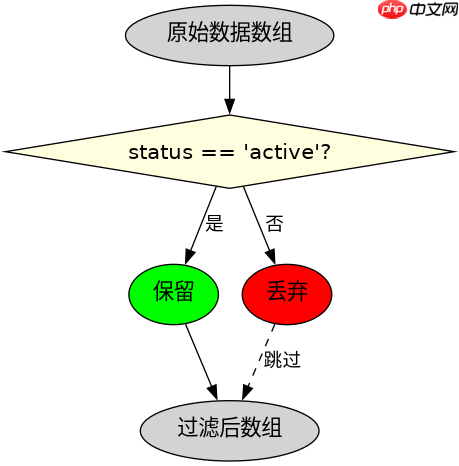
在接收到接口返回的列表数据后,可以通过检查数据项中的特定字段(如 status)来过滤掉不符合条件的记录。例如,只保留 status 为 active 的用户信息。这种做法能确保前端只处理有效数据,减少后续渲染的压力。
const url = 'https://api.example.com/users';

fetch(url)
  .then(response => {
    if (!response.ok) {
      throw new Error('Network response was not ok');
    }
    return response.json();
  })
  .then(data => {
    // 假设 data 是一个数组
    const activeUsers = data.filter(user => user.status === 'active');
    console.log(activeUsers);
    return activeUsers;
  })
  .catch(error => {
    console.error('Fetch error:', error);
  });
如何处理嵌套结构中的数据过滤
当接口返回的数据是嵌套结构时,需要先定位到目标数组,再进行过滤。例如,如果返回的是包含多个订单的对象,每个订单下有商品列表,可以提取所有订单中的商品并过滤出价格低于 100 的商品。这需要遍历外层结构,再对内层数组应用 filter。

使用 Husky 在 JavaScript 仓库中强制执行本地 Git 钩子检查
下载
使用 Husky 将 pre-commit、pre-push 和 commit-msg 检查集成到仓库中,以便代理和开发人员在更改离开工作站之前运行相同的本地防护措施。
立即学习“Java免费学习笔记(深入)”;

const ordersUrl = 'https://api.example.com/orders';

fetch(ordersUrl)
  .then(res => res.json())
  .then(ordersData => {
    // 假设 ordersData 是 { orders: [...] }
    const allItems = [];
    ordersData.orders.forEach(order => {
      if (order.items) {
        allItems.push(...order.items);
      }
    });

    const cheapItems = allItems.filter(item => item.price < 100);
    console.log(cheapItems);
    return cheapItems;
  })
  .catch(err => console.error(err));
基于程序中某个输入、条件或结果的具体问题
在上述代码中,如果接口返回的 data 不是数组而是单个对象,直接调用 filter 会报错。因此,在实际开发中,必须先判断数据类型。若 data 是对象,可将其转为单元素数组或直接处理;若是数组,则正常过滤。这种类型检查能避免运行时错误,确保程序健壮性。

















