








JavaScript 中 undefined 和 null 怎么判断
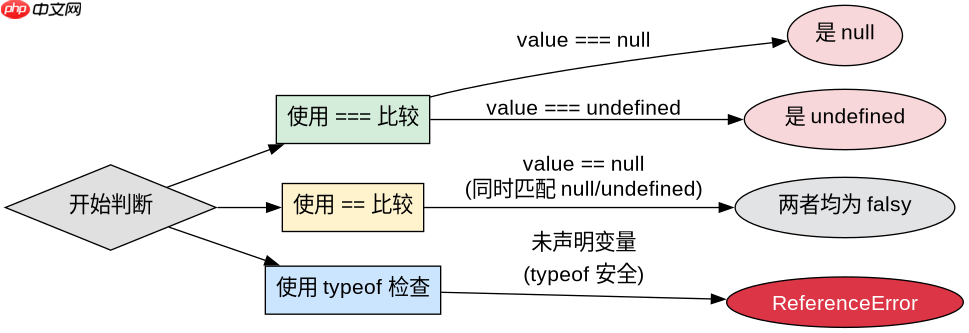
在 javascript 中,判断 undefined 和 null 主要依赖严格相等运算符 ===。要区分两者,需分别使用 value === undefined 和 value === null;若只需判断变量是否“未赋值”或“空值”,可使用宽松相等 == 或逻辑非 ! 进行合并检查。
如何准确识别未声明或初始化的变量
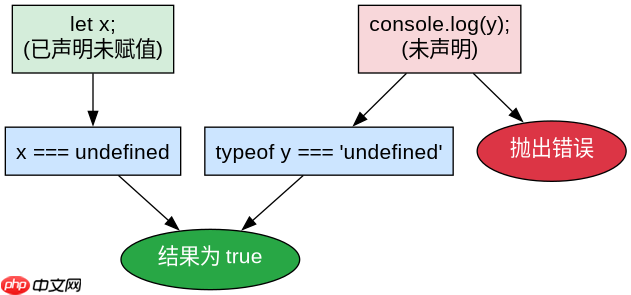
当变量未被声明时,直接访问会抛出 ReferenceError,因此必须结合 typeof 操作符进行安全判断。对于已声明但未赋值的变量,其值为 undefined,可直接通过 === 比较确认。
function checkVariable() {
  let declaredUndefined;
  // console.log(notDeclared); // 这会抛出 ReferenceError

  const isNull = declaredUndefined === null;
  const isUndefined = declaredUndefined === undefined;
  const typeCheck = typeof notDeclared === 'undefined';

  console.log('IsNull:', isNull);
  console.log('IsUndefined:', isUndefined);
  console.log('TypeCheck (notDeclared):', typeCheck);
}
checkVariable();
如何处理 API 返回的空对象属性
在实际开发中,API 经常返回 null 表示数据缺失,而前端初始化对象时可能包含 undefined。需要针对具体场景选择判断策略,例如在渲染列表前过滤掉无效数据。

使用 Husky 在 JavaScript 仓库中强制执行本地 Git 钩子检查
下载
使用 Husky 将 pre-commit、pre-push 和 commit-msg 检查集成到仓库中,以便代理和开发人员在更改离开工作站之前运行相同的本地防护措施。
立即学习“Java免费学习笔记(深入)”;

const apiResponse = { id: 1, name: 'Alice', address: null };
const localState = { id: 2, name: 'Bob', address: undefined };

function processAddress(data) {
  if (data.address === null) {
    return '地址信息为空(服务器明确返回)';
  }
  if (data.address === undefined) {
    return '地址字段未定义(本地状态缺失)';
  }
  return data.address;
}

console.log(processAddress(apiResponse));
console.log(processAddress(localState));
基于程序中某个输入、条件或结果的具体问题
当程序中使用 if (!value) 进行 falsy 检查时,undefined 和 null 都会被判定为真,导致无法区分来源。这种写法适用于只需要知道“是否有值”的场景,但不适用于需要精确调试数据来源的情况。

















