








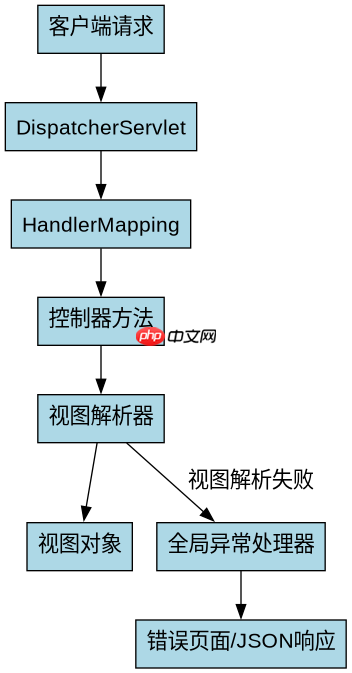
spring boot 全局异常处理可以通过实现 handlerexceptionresolver 接口或添加 @controlleradvice 配合 @exceptionhandler 来捕获视图解析异常。推荐使用 @controlleradvice 方式,因为它更简洁且与 spring mvc 集成更好。当视图解析器无法找到对应的视图时,会抛出 nosuchbeandefinitionexception 或 viewresolutionexception,这些异常可以在全局异常处理器中被捕获并返回自定义的错误页面或 json 响应。
如何配置全局异常处理器以捕获视图解析异常?
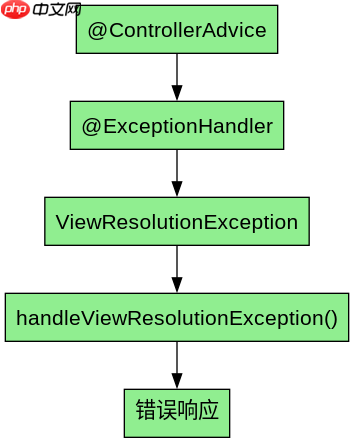
要配置全局异常处理器,需要创建一个带有 @ControllerAdvice 注解的类,并在其中定义一个带有 @ExceptionHandler 注解的方法,该方法可以捕获特定的异常类型。对于视图解析异常,可以捕获 ViewResolutionException 或 NoSuchBeanDefinitionException。在方法内部,可以根据异常类型返回自定义的错误页面或 JSON 响应。
import org.springframework.web.bind.annotation.ControllerAdvice;
import org.springframework.web.bind.annotation.ExceptionHandler;
import org.springframework.web.servlet.ViewResolutionException;
import org.springframework.http.HttpStatus;
import org.springframework.http.ResponseEntity;
import java.util.HashMap;
import java.util.Map;

@ControllerAdvice
public class GlobalExceptionHandler {

    @ExceptionHandler(ViewResolutionException.class)
    public ResponseEntity<Map<String, String>> handleViewResolutionException(ViewResolutionException ex) {
        Map<String, String> errorResponse = new HashMap<>();
        errorResponse.put("error", "View resolution failed");
        errorResponse.put("message", ex.getMessage());
        return new ResponseEntity<>(errorResponse, HttpStatus.INTERNAL_SERVER_ERROR);
    }
}
上述代码定义了一个全局异常处理器,当发生 ViewResolutionException 时,会返回一个包含错误信息的 JSON 响应。你可以根据实际需求调整返回的内容和状态码。
如何处理不同类型的视图解析异常?
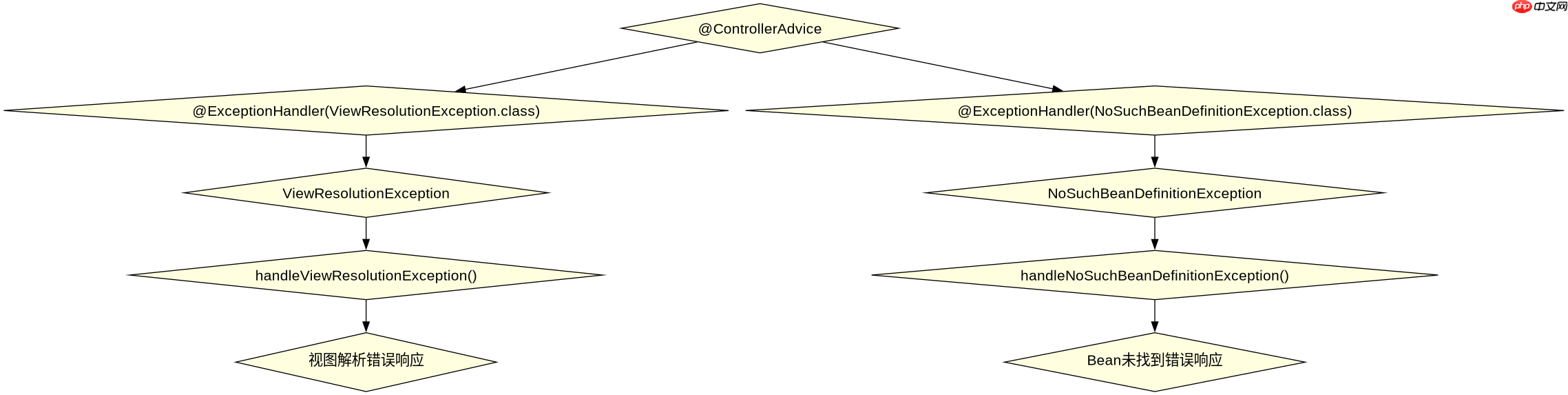
在处理不同类型的视图解析异常时,可以为每种异常类型定义单独的异常处理方法。例如,可以分别处理 ViewResolutionException 和 NoSuchBeanDefinitionException。这样可以更精细地控制每个异常的处理逻辑。

import org.springframework.web.bind.annotation.ControllerAdvice;
import org.springframework.web.bind.annotation.ExceptionHandler;
import org.springframework.web.servlet.ViewResolutionException;
import org.springframework.beans.factory.NoSuchBeanDefinitionException;
import org.springframework.http.HttpStatus;
import org.springframework.http.ResponseEntity;
import java.util.HashMap;
import java.util.Map;

@ControllerAdvice
public class GlobalExceptionHandler {

    @ExceptionHandler(ViewResolutionException.class)
    public ResponseEntity<Map<String, String>> handleViewResolutionException(ViewResolutionException ex) {
        Map<String, String> errorResponse = new HashMap<>();
        errorResponse.put("error", "View resolution failed");
        errorResponse.put("message", ex.getMessage());
        return new ResponseEntity<>(errorResponse, HttpStatus.INTERNAL_SERVER_ERROR);
    }

    @ExceptionHandler(NoSuchBeanDefinitionException.class)
    public ResponseEntity<Map<String, String>> handleNoSuchBeanDefinitionException(NoSuchBeanDefinitionException ex) {
        Map<String, String> errorResponse = new HashMap<>();
        errorResponse.put("error", "Bean not found");
        errorResponse.put("message", ex.getMessage());
        return new ResponseEntity<>(errorResponse, HttpStatus.NOT_FOUND);
    }
}
上述代码展示了如何为 ViewResolutionException 和 NoSuchBeanDefinitionException 分别定义异常处理方法。每个方法都返回一个包含错误信息的 JSON 响应,但使用了不同的 HTTP 状态码。
当视图解析失败时,如何返回自定义的错误页面?
当视图解析失败时,除了返回 JSON 响应外,还可以选择返回自定义的错误页面。这可以通过在异常处理方法中返回一个 ModelAndView 对象来实现。你需要确保错误页面存在于项目的资源目录中,并且路径正确。
import org.springframework.web.bind.annotation.ControllerAdvice;
import org.springframework.web.bind.annotation.ExceptionHandler;
import org.springframework.web.servlet.ViewResolutionException;
import org.springframework.web.servlet.ModelAndView;
import org.springframework.http.HttpStatus;

@ControllerAdvice
public class GlobalExceptionHandler {

    @ExceptionHandler(ViewResolutionException.class)
    public ModelAndView handleViewResolutionException(ViewResolutionException ex) {
        ModelAndView modelAndView = new ModelAndView("error");
        modelAndView.addObject("errorMessage", ex.getMessage());
        modelAndView.setStatus(HttpStatus.INTERNAL_SERVER_ERROR);
        return modelAndView;
    }
}
上述代码定义了一个异常处理方法,当发生 ViewResolutionException 时,会返回一个名为 error 的视图。你可以在 src/main/resources/templates 目录下创建一个名为 error.html 的文件,并在其中显示错误信息。


















