








在 javascript 中,`string()` 是全局函数,能安全地将 `null` 和 `undefined` 转换为字符串 "null" 和 "undefined",而不会报错;`tostring()` 则是对象方法,调用前必须确保对象不为空,否则对 `null` 或 `undefined` 调用会抛出 typeerror。若需处理可能为空的变量,优先使用 `string()`;若确定对象存在且需自定义逻辑,可使用 `tostring()`。

String() 如何处理 null 和 undefined
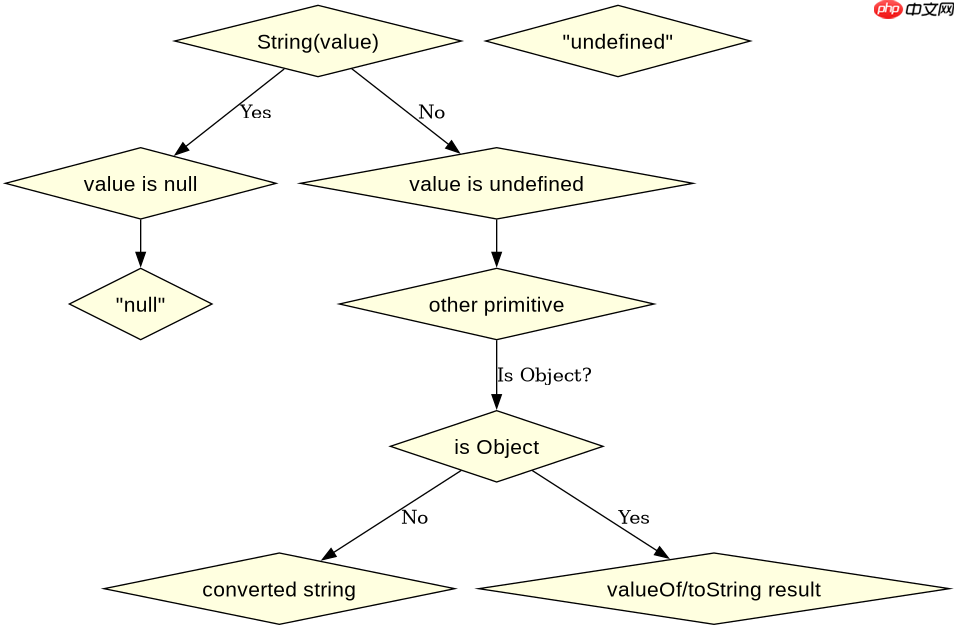
`String()` 函数在处理原始值时直接返回对应字符串,遇到 `null` 返回 "null",遇到 `undefined` 返回 "undefined",这是它最显著的安全特性。
console.log(String(null)); // "null"
console.log(String(undefined)); // "undefined"
console.log(String(123)); // "123"
console.log(String(true)); // "true"
以上代码展示了 `String()` 对各种原始类型的转换结果。对于对象,它会尝试调用对象的 `valueOf()` 或 `toString()` 方法进行转换。这种一致性使得 `String()` 成为类型转换的首选,特别是在不确定变量是否为空时。
立即学习“Java免费学习笔记(深入)”;

FilePond 是一个 JavaScript 文件上传库,支持通过拖拽、粘贴和 API 方式处理文件、目录、URL 和 Data URI。它包含内置的图像优化功能、异步分块上传功能,并提供了适用于 React、Vue、Angular 和 Svelte 的适配器。
toString() 的自定义与局限性
`toString()` 是 `Object.prototype` 上的方法,所有继承自 Object 的对象都拥有此方法。它可以被重写以提供自定义的字符串表示,但前提是调用者不能是 `null` 或 `undefined`。

const obj = { value: 42 };
console.log(obj.toString()); // "[object Object]"

// 自定义 toString
const customObj = {
  toString: function() {
    return "Custom Value: " + this.value;
  }
};
console.log(customObj.toString()); // "Custom Value: 42"

// 错误示例
// null.toString(); // TypeError: Cannot read properties of null (reading 'toString')
上述代码演示了默认 `toString()` 的行为以及自定义后的效果。注意最后一段注释掉的代码,如果尝试对 `null` 调用 `toString()`,程序会崩溃。因此,在使用 `toString()` 前,务必进行非空检查,例如 `if (obj != null) obj.toString()`。
基于 Number 对象输入的具体问题
当输入为 `Number` 包装对象时,`String()` 和 `toString()` 的行为有何不同?实际上,两者都会正确地将数字转换为字符串,因为 `Number.prototype.toString()` 会被自动调用。但如果输入是原始数字,`toString()` 无法直接调用,必须通过原型链或显式访问。
const num = 10;
console.log(String(num)); // "10"
console.log(num.toString()); // "10"

const numObj = new Number(10);
console.log(String(numObj)); // "10"
console.log(numObj.toString()); // "10"
从输出看,两者结果一致。但在实际开发中,如果变量可能是原始值也可能是对象,`String()` 更加通用,因为它不需要考虑调用者的类型。而 `toString()` 更适合在类或对象内部实现特定的序列化逻辑。

















