








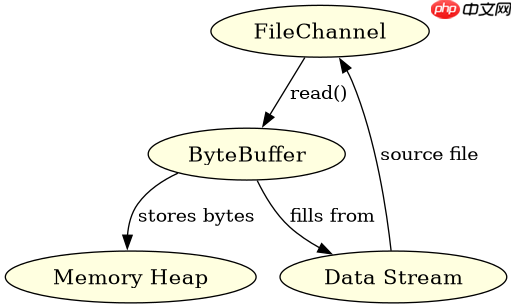
java nio 中 filechannel 的 read 方法用于从文件通道读取数据到缓冲区。调用时需提供 bytebuffer 实例,该方法会返回实际读取的字节数,若到达文件末尾则返回 -1。使用时无需手动管理文件指针,通道会自动推进位置。

FileChannel 读取数据的基本流程是什么
基本流程是创建通道、分配缓冲区、循环调用 read 直到返回 -1。每次调用都会尝试填充缓冲区,并更新缓冲区的 position。处理完数据后需调用 flip() 以便后续写入或处理。
import java.io.FileInputStream;
import java.nio.ByteBuffer;
import java.nio.channels.FileChannel;

public class ReadExample {
    public static void main(String[] args) throws Exception {
        FileInputStream fis = new FileInputStream("test.txt");
        FileChannel channel = fis.getChannel();
        ByteBuffer buffer = ByteBuffer.allocate(1024);
        int bytesRead;
        while ((bytesRead = channel.read(buffer)) != -1) {
            buffer.flip();
            // 处理 buffer 中的数据
            buffer.clear();
        }
        channel.close();
        fis.close();
    }
}
预期结果:程序将 test.txt 的内容分块读入 buffer,每次循环处理一块数据,直到文件结束。
立即学习“Java免费学习笔记(深入)”;

FilePond 灵活的 JavaScript 文件上传库
下载
FilePond 是一个 JavaScript 文件上传库,支持通过拖拽、粘贴和 API 方式处理文件、目录、URL 和 Data URI。它包含内置的图像优化功能、异步分块上传功能,并提供了适用于 React、Vue、Angular 和 Svelte 的适配器。
如何处理 read 返回的非完整数据
当 read 返回的值小于请求的缓冲区大小时,表示本次读取未填满缓冲区。这通常发生在接近文件末尾或网络 I/O(对于 SocketChannel)时。开发者应检查返回值,仅处理已读取的部分,并在下次循环中继续读取剩余数据。

import java.io.FileInputStream;
import java.nio.ByteBuffer;
import java.nio.channels.FileChannel;

public class PartialReadExample {
    public static void main(String[] args) throws Exception {
        FileInputStream fis = new FileInputStream("small.txt");
        FileChannel channel = fis.getChannel();
        ByteBuffer buffer = ByteBuffer.allocate(1024); // 假设缓冲区很大
        int bytesRead = channel.read(buffer);
        if (bytesRead > 0) {
            buffer.flip();
            // 只处理 bytesRead 长度的数据
            byte[] data = new byte[bytesRead];
            buffer.get(data);
            System.out.println(new String(data));
        } else if (bytesRead == -1) {
            System.out.println("File is empty");
        }
        channel.close();
        fis.close();
    }
}
预期结果:如果 small.txt 内容少于 1024 字节,程序仍能正确读取并打印全部内容,不会抛出异常或等待更多数据。
在多线程环境下共享 FileChannel 读取是否安全
在多线程环境下,多个线程同时调用同一个 FileChannel 的 read 方法是不安全的,因为通道的内部状态(如文件指针)会被并发修改,导致数据错乱或覆盖。必须通过外部同步机制(如 synchronized 或 ReentrantLock)来保护对通道的访问,或者每个线程使用独立的通道实例。


















