








使用 fetch 获取接口数据后,通过调用 response.arraybuffer() 方法将响应体转换为二进制缓冲区,随后利用 protobuf 库(如 protobufjs)的 decode 方法解析该缓冲区。此流程能确保二进制数据不被 json 序列化破坏,从而正确还原为 javascript 对象。

如何配置 Fetch 请求以接收二进制流
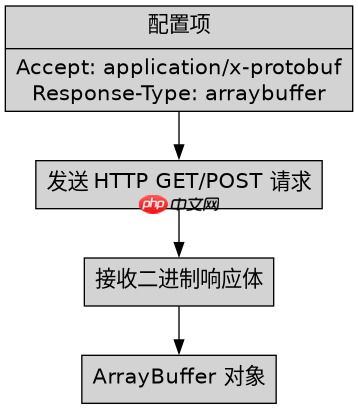
在发起请求时,必须设置 Accept 头为 application/x-protobuf 或 application/octet-stream,并指定 responseType 为 arraybuffer。这样浏览器不会尝试将响应解析为文本或 JSON,而是直接提供原始字节流供后续处理。
const fetchProtobuf = async (url, protoPath) => {
  const response = await fetch(url, {
    method: 'GET',
    headers: {
      'Accept': 'application/x-protobuf'
    }
  });

  if (!response.ok) {
    throw new Error(`HTTP error! status: ${response.status}`);
  }

  // 关键步骤:获取 ArrayBuffer
  const buffer = await response.arrayBuffer();
  return buffer;
};

// 假设已加载 protobuf 定义
// const root = protobuf.loadSync('message.proto');
// const Message = root.lookupType('Message');
如何将 ArrayBuffer 解码为 Protobuf 对象
拿到 ArrayBuffer 后,需将其转换为 Uint8Array,然后调用 Protobuf 库的 decode 静态方法。该方法需要两个参数:一个是包含消息定义的 Type 对象,另一个是包含二进制数据的 Uint8Array。解码成功后,返回一个标准的 JavaScript 对象,其属性名与 Protobuf 定义中的字段名一致。

FilePond 是一个 JavaScript 文件上传库,支持通过拖拽、粘贴和 API 方式处理文件、目录、URL 和 Data URI。它包含内置的图像优化功能、异步分块上传功能,并提供了适用于 React、Vue、Angular 和 Svelte 的适配器。
立即学习“Java免费学习笔记(深入)”;

const decodeProtobuf = (buffer, messageType) => {
  // 将 ArrayBuffer 转为 Uint8Array
  const uint8Array = new Uint8Array(buffer);

  // 使用 protobuf.js 进行解码
  // messageType 是通过 protobuf.load 或 protobuf.Root 获取的类型实例
  const decodedMessage = messageType.decode(uint8Array);

  // 转换为普通 JS 对象以便操作
  return messageType.toObject(decodedMessage);
};

// 完整调用示例
async function main() {
  try {
    const buffer = await fetchProtobuf('/api/data');
    const data = decodeProtobuf(buffer, Message);
    console.log(data.fieldName); // 访问具体字段
  } catch (error) {
    console.error('Decoding failed:', error);
  }
}
如何处理解码后的嵌套对象和枚举值
Protobuf 解码后的对象中,嵌套消息会自动转换为子对象,枚举值会转换为对应的数字或字符串(取决于 toObject 的配置)。对于重复字段(repeated),它们会被转换为数组。开发者可以直接访问这些属性,无需额外转换。若需处理默认值,toObject 方法允许配置是否包含未设置的字段,默认情况下不包含,可通过设置 defaults: true 来强制输出所有字段及其默认值。

















