








JavaScript 流程控制中错误重试队列怎么实现
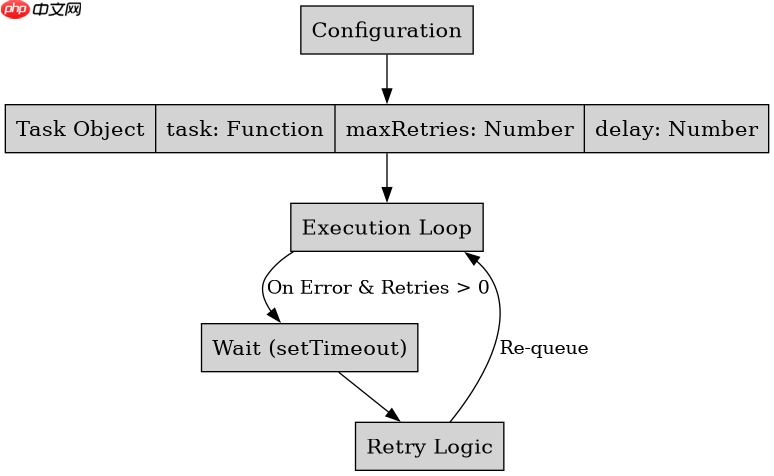
通过维护一个包含任务函数的数组作为队列,配合异步执行器逐个处理并捕获异常来实现。核心做法是定义一个执行函数,从队列头部取出任务调用,若成功则移除该任务,若失败则根据配置决定是否将任务重新推入队尾或进行其他处理。

如何配置重试次数与间隔策略
在任务对象中增加 maxRetries 和 delay 属性来控制行为。每次重试时递减剩余次数,并根据设定的延迟时间使用 setTimeout 或 async/await 暂停执行流,避免频繁请求。
如何处理队列中的并发限制
引入信号量机制限制同时运行的任务数量。当队列中有多个待处理任务时,只有获得许可的任务才会被提交执行,其余任务保持等待状态,直到有正在执行的任务完成并释放许可。

FilePond 灵活的 JavaScript 文件上传库
下载
FilePond 是一个 JavaScript 文件上传库,支持通过拖拽、粘贴和 API 方式处理文件、目录、URL 和 Data URI。它包含内置的图像优化功能、异步分块上传功能,并提供了适用于 React、Vue、Angular 和 Svelte 的适配器。
立即学习“Java免费学习笔记(深入)”;

下面是一个完整的实现示例,展示了基础的重试队列逻辑:
class RetryQueue {
  constructor() {
    this.queue = [];
    this.running = false;
  }

  async addTask(task, maxRetries = 3, delay = 1000) {
    this.queue.push({ task, maxRetries, delay });
    if (!this.running) {
      this.running = true;
      await this.process();
    }
  }

  async process() {
    while (this.queue.length > 0) {
      const { task, maxRetries, delay } = this.queue.shift();
      let retries = maxRetries;

      try {
        await task();
      } catch (error) {
        retries--;
        if (retries > 0) {
          console.log(`Retry after ${delay}ms`);
          await new Promise(r => setTimeout(r, delay));
          // Re-add to queue for retry logic or handle inline
          // For simplicity, we re-push to end of queue
          this.queue.push({ task, maxRetries: retries, delay });
        } else {
          console.error('Max retries exceeded', error);
        }
      }
    }
    this.running = false;
  }
}

// Usage
const q = new RetryQueue();
q.addTask(async () => {
  throw new Error('Network fail');
}, 2, 500); 

















