








使用 throw 语句可以立即中断当前代码块的执行,并将控制权转移给最近的 try...catch 块中的 catch 部分;若未捕获则程序终止。具体做法是在检测到非法状态或错误条件时抛出异常对象,随后在 try 块中包裹可能出错的逻辑,并在 catch 中处理恢复或日志记录。

如何验证 throw 后的代码不再执行
通过观察控制台输出顺序可以确认,throw 之后的同步代码行会被直接跳过。以下程序展示了抛出异常后后续语句未被执行的情况。
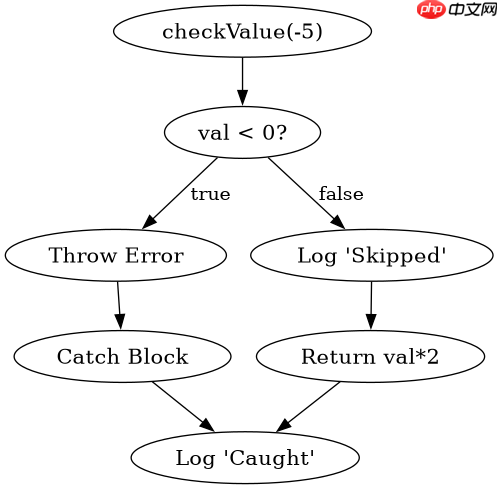
function checkValue(val) {
  if (val < 0) {
    throw new Error('Negative value not allowed');
  }
  console.log('This line is skipped if error thrown');
  return val * 2;
}

try {
  const result = checkValue(-5);
  console.log('Result:', result);
} catch (e) {
  console.log('Caught error:', e.message);
}
console.log('Program continues here');
预期结果:
Caught error: Negative value not allowed
Program continues here
立即学习“Java免费学习笔记(深入)”;

FilePond 灵活的 JavaScript 文件上传库
下载
FilePond 是一个 JavaScript 文件上传库,支持通过拖拽、粘贴和 API 方式处理文件、目录、URL 和 Data URI。它包含内置的图像优化功能、异步分块上传功能,并提供了适用于 React、Vue、Angular 和 Svelte 的适配器。
如何在 catch 块中重新抛出异常
在 catch 块中可以使用 throw 再次抛出异常,从而将错误向上传递。这允许在局部处理后继续传播错误信号。

function processInput(data) {
  try {
    if (!data) {
      throw new TypeError('Data is required');
    }
    return data.toUpperCase();
  } catch (err) {
    console.log('Processing failed, rethrowing');
    throw err;
  }
}

try {
  processInput(null);
} catch (e) {
  console.log('Final handler:', e.constructor.name);
}
预期结果:
Processing failed, rethrowing
Final handler: TypeError
基于输入为空时的具体行为问题
当输入参数为 null 或 undefined 时,程序会触发类型错误或自定义错误,并进入 catch 分支。此时返回值被中断,转而执行错误处理逻辑。这种机制确保了无效输入不会导致静默失败,而是明确报错。

















