








使用 gzipinputstream 解压数据需要将其包裹在 bufferedinputstream 中,并配合 bytearrayoutputstream 或文件输出流进行读取。核心做法是实例化 gzipinputstream 传入压缩数据的输入源,通过循环调用 read() 方法将解压后的字节写入目标缓冲区,最后关闭流以释放资源。

如何从 InputStream 获取解压后的完整字节数组
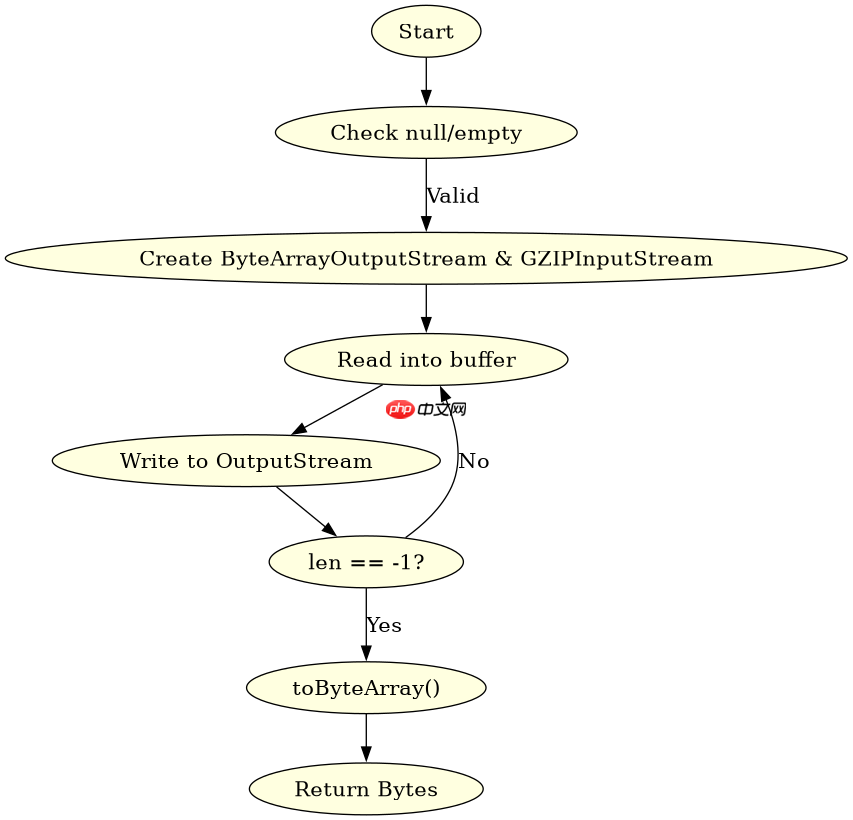
直接回答:通过创建一个足够大的 ByteArrayOutputStream 作为中转站,可以一次性获取解压后的所有字节。具体做法是将 GZIPInputStream 的读取结果不断追加到该输出流中,直到 read() 返回 -1 表示结束,最后调用 toByteArray() 即可得到完整的解压数据。这种方法适用于内存足以容纳解压后内容的场景。
import java.io.*;
import java.util.zip.GZIPInputStream;

public class GzipDecompressor {
    public static byte[] decompress(byte[] compressedData) throws IOException {
        if (compressedData == null || compressedData.length == 0) {
            return new byte[0];
        }

        try (ByteArrayOutputStream outputStream = new ByteArrayOutputStream();
             GZIPInputStream gzipInputStream = new GZIPInputStream(new ByteArrayInputStream(compressedData))) {

            byte[] buffer = new byte[4096];
            int len;
            while ((len = gzipInputStream.read(buffer)) != -1) {
                outputStream.write(buffer, 0, len);
            }
            return outputStream.toByteArray();
        }
    }

    public static void main(String[] args) throws IOException {
        // 模拟一个压缩数据(实际使用中通常来自文件或网络)
        // 这里为了演示,先压缩再解压
        String originalText = "Hello, GZIP Compression!";
        byte[] compressed = compress(originalText.getBytes());
        byte[] decompressed = decompress(compressed);
        System.out.println(new String(decompressed));
    }

    private static byte[] compress(byte[] data) throws IOException {
        try (ByteArrayOutputStream bos = new ByteArrayOutputStream();
             GZIPOutputStream gzipOS = new GZIPOutputStream(bos)) {
            gzipOS.write(data);
            return bos.toByteArray();
        }
    }
}
上述代码展示了完整的解压流程。首先检查输入是否为空,避免无效操作。接着使用 try-with-resources 确保流自动关闭。内部使用 4KB 的缓冲区进行高效读取,每次读取到的有效长度由 len 决定,必须精确写入 outputStream。最终返回的字节数组即为原始未压缩数据。预期输出为控制台打印出 "Hello, GZIP Compression!"。
立即学习“Java免费学习笔记(深入)”;

FilePond 是一个 JavaScript 文件上传库,支持通过拖拽、粘贴和 API 方式处理文件、目录、URL 和 Data URI。它包含内置的图像优化功能、异步分块上传功能,并提供了适用于 React、Vue、Angular 和 Svelte 的适配器。
如何将解压数据直接写入文件
直接回答:将 GZIPInputStream 的读取端连接到压缩文件,将写入端连接到 FileOutputStream。具体做法是创建 GZIPInputStream 包装压缩文件的输入流,同时创建 FileOutputStream 指向目标解压文件,通过循环读取和写入实现数据转移。这种方式适合处理大文件,因为不需要将整个解压内容加载到内存中。

import java.io.*;
import java.util.zip.GZIPInputStream;

public class GzipToFileDecompressor {
    public static void decompressToFile(String sourcePath, String destPath) throws IOException {
        try (GZIPInputStream gzipInputStream = new GZIPInputStream(new FileInputStream(sourcePath));
             FileOutputStream fileOutputStream = new FileOutputStream(destPath)) {

            byte[] buffer = new byte[4096];
            int len;
            while ((len = gzipInputStream.read(buffer)) != -1) {
                fileOutputStream.write(buffer, 0, len);
            }
        }
    }

    public static void main(String[] args) throws IOException {
        // 假设已有一个名为 data.gz 的压缩文件
        // 解压到 current_dir/output.txt
        decompressToFile("data.gz", "output.txt");
        System.out.println("Decompression completed.");
    }
}
此段代码专注于文件级别的解压操作。它同样使用了 try-with-resources 来管理资源,防止文件句柄泄露。读取循环与内存解压类似,但写入目标是磁盘上的文件。这种模式避免了内存溢出风险,适合处理 GB 级别的日志文件或备份数据。运行后,指定的 destPath 文件将被创建并填充解压后的内容。
如果压缩数据损坏或格式错误会抛出什么异常
直接回答:当 GZIPInputStream 遇到损坏的数据、非 GZIP 格式的头部或校验和不匹配时,会抛出 java.util.zip.ZipException 或 java.io.IOException。具体表现为在 read() 调用过程中中断,程序需捕获这些异常以防止崩溃。这是验证数据完整性的关键机制。
import java.io.*;
import java.util.zip.GZIPInputStream;
import java.util.zip.ZipException;

public class GzipErrorHandling {
    public static void handleCorruptedData() {
        byte[] corruptedData = "This is not a valid GZIP stream".getBytes();
        try (GZIPInputStream gzipInputStream = new GZIPInputStream(new ByteArrayInputStream(corruptedData))) {
            byte[] buffer = new byte[1024];
            gzipInputStream.read(buffer); // 尝试读取
        } catch (ZipException e) {
            System.err.println("Invalid GZIP format: " + e.getMessage());
        } catch (IOException e) {
            System.err.println("IO Error during decompression: " + e.getMessage());
        }
    }

    public static void main(String[] args) {
        handleCorruptedData();
    }
}
这段代码演示了错误处理逻辑。故意传入非 GZIP 格式的数据,触发 ZipException。在实际应用中,应区分 ZipException(格式问题)和一般的 IOException(如磁盘读写失败)。捕获这些异常后,可以根据业务需求记录日志、重试或通知用户。预期输出为控制台打印出 "Invalid GZIP format: Not in GZIP format" 类似的错误信息。



















