








在spring boot中处理文件下载,最直接的方式是利用`responseentity`配合`httpheaders`构建响应头,将文件流作为响应体返回。开发者只需在controller方法中读取目标文件为`inputstream`或`byte[]`,设置`content-disposition`为`attachment`并指定文件名,同时声明正确的`content-type`,即可触发浏览器的下载行为。若需支持断点续传或大文件流式传输,可进一步配置`accept-ranges`及`content-length`。
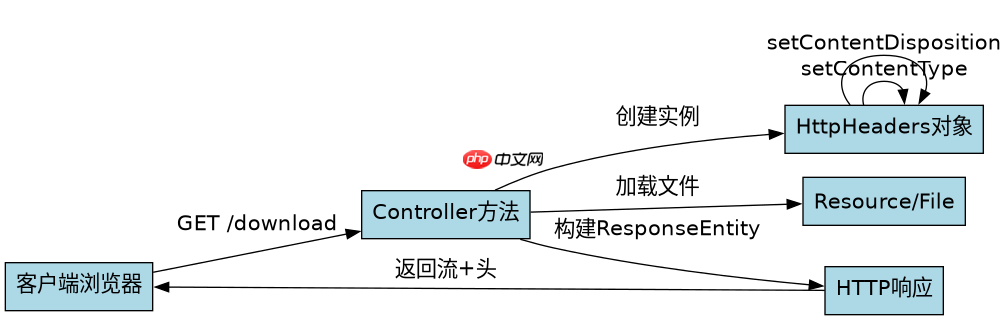
ResponseEntity如何构建标准下载响应
使用ResponseEntity可以精确控制HTTP状态码、响应头和实体内容。核心在于调用HttpHeaders的setContentType和setContentDispositionAttachment方法。前者告知浏览器文件类型,后者强制浏览器以附件形式保存而非直接预览。通过Resource接口封装文件,能自动处理字符编码和MIME类型检测,简化开发流程。
import org.springframework.core.io.ClassPathResource;
import org.springframework.core.io.Resource;
import org.springframework.http.HttpHeaders;
import org.springframework.http.MediaType;
import org.springframework.http.ResponseEntity;
import org.springframework.web.bind.annotation.GetMapping;
import org.springframework.web.bind.annotation.RestController;

import java.io.IOException;

@RestController
public class FileDownloadController {

    @GetMapping("/download")
    public ResponseEntity<Resource> downloadFile() throws IOException {
        // 假设文件位于classpath下
        Resource resource = new ClassPathResource("sample.pdf");

        return ResponseEntity.ok()
                .contentType(MediaType.APPLICATION_PDF)
                .header(HttpHeaders.CONTENT_DISPOSITION, "attachment; filename=\"sample.pdf\"")
                .body(resource);
    }
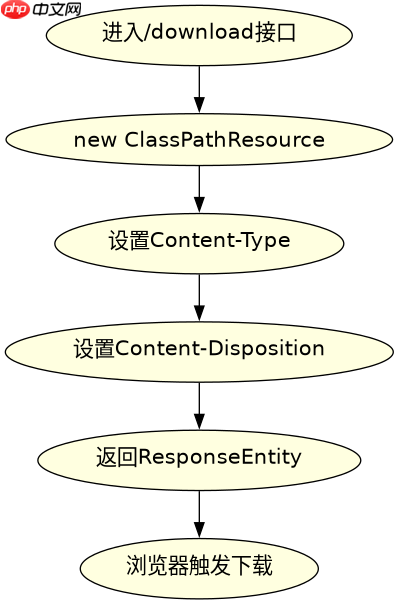
}预期结果:浏览器收到响应后,弹出“另存为”对话框,文件名显示为sample.pdf,类型为PDF文档。若文件不存在,ClassPathResource会抛出异常,需配合全局异常处理器返回404。

如何支持大文件的流式传输以避免内存溢出
对于大文件,直接加载到byte[]会导致堆内存溢出。应使用StreamingResponseBody或InputStreamResource(已废弃,推荐自定义Resource)进行流式写入。Spring MVC会自动将输出流绑定到Servlet的OutputStream,数据边读边写,内存占用恒定。关键在于确保输入流正确关闭,通常由Spring容器管理,但需保证底层资源可复用或正确释放。

import org.springframework.core.io.InputStreamResource;
import org.springframework.http.HttpHeaders;
import org.springframework.http.MediaType;
import org.springframework.http.ResponseEntity;
import org.springframework.web.bind.annotation.GetMapping;
import org.springframework.web.bind.annotation.RestController;

import java.io.FileInputStream;
import java.io.IOException;
import java.io.InputStream;

@RestController
public class LargeFileDownloadController {

    @GetMapping("/download/large")
    public ResponseEntity<InputStreamResource> downloadLargeFile() throws IOException {
        String filePath = "/path/to/large/file.zip";
        InputStream inputStream = new FileInputStream(filePath);
        InputStreamResource resource = new InputStreamResource(inputStream);

        return ResponseEntity.ok()
                .contentLength(new java.io.File(filePath).length())
                .contentType(MediaType.APPLICATION_OCTET_STREAM)
                .header(HttpHeaders.CONTENT_DISPOSITION, "attachment; filename=\"large_file.zip\"")
                .body(resource);
    }
}预期结果:服务器不一次性加载整个文件到内存,而是通过管道将数据发送给客户端。客户端开始接收数据后即可保存,适合GB级文件。需注意contentLength必须准确设置,否则部分浏览器可能无法显示进度条。
当请求头缺少Accept时默认返回什么格式
如果客户端请求中未包含Accept头,或包含通配符*/*,Spring Boot会根据RequestMappingHandlerAdapter的默认消息转换器链尝试匹配。对于文件下载接口,若未显式指定produces属性,且返回类型为Resource或byte[],通常会回退到ApplicationJsonHttpMessageConverter失败后,再尝试ByteArrayHttpMessageConverter。最终结果取决于具体的Resource实现和Spring版本,但最稳妥的做法是始终显式声明produces或使用MediaType枚举固定类型,避免因环境差异导致返回JSON错误信息而非文件流。
















