








在 javascript 主线程中,通过 worklet.addmodule() 方法将包含 layoutworklet 逻辑的独立脚本注册到布局工作台中。你需要在该脚本中使用 registerlayout() 定义一个继承自 layoutclass 的类,并实现 layout()、inputproperties() 和 inputsnapshots() 等静态方法,最后在主线程将该类名绑定到 css 规则上。

如何定义 LayoutWorklet 的核心类结构
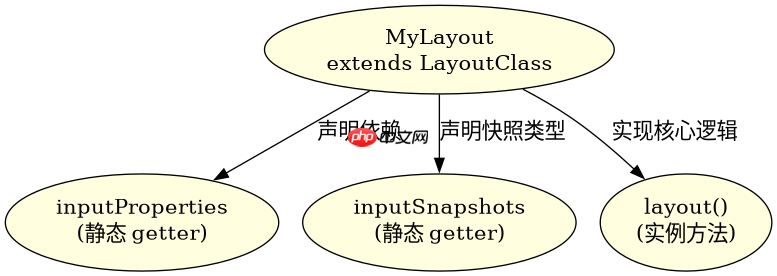
核心类必须继承自 LayoutClass,并在静态属性中声明依赖的 CSS 属性。主线程通过 CSS.layoutWorklet.register() 将类名暴露给样式表,从而让浏览器在布局阶段调用该类实例。
// layout-worklet.js
const { LayoutClass } = globalThis;
class MyLayout extends LayoutClass {
  static get inputProperties() {
    return ['--my-width'];
  }
  static get inputSnapshots() {
    return [{ property: '--my-width', type: 'length' }];
  }
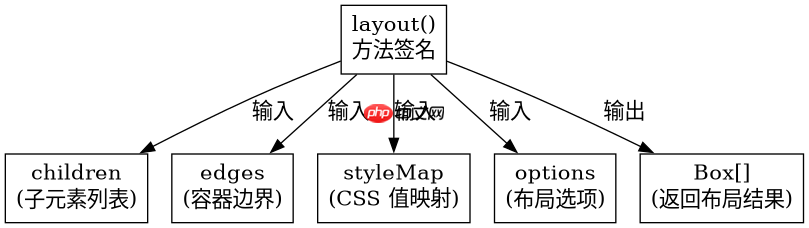
  layout(children, edges, styleMap, options) {
    // 布局逻辑
  }
}
globalThis.registerLayout('my-layout', MyLayout);
如何获取子元素尺寸与边缘信息
在 layout() 方法中,children 参数提供了子元素的几何信息,edges 参数提供了父容器的边界约束。开发者需遍历 children 计算位置,并通过 edges 确定可用空间,最终返回 Box 对象数组。

立即学习“Java免费学习笔记(深入)”;
// layout-worklet.js (续)
  layout(children, edges, styleMap, options) {
    const results = [];
    let currentY = 0;
    for (const child of children) {
      const width = child.inlineSize;
      const height = child.blockSize;
      if (currentY + height > edges.blockSize) {
        currentY = 0; // 换行逻辑
      }
      results.push(new Box({
        inlineSize: width,
        blockSize: height,
        logicalTop: currentY,
        logicalLeft: 0
      }));
      currentY += height;
    }
    return results;
  }
当子元素尺寸动态变化时布局如何响应
当子元素内容改变导致 inlineSize 或 blockSize 变化时,浏览器会自动重新触发 layout() 方法。此时 children 数组中的每个对象都会反映最新的几何状态,无需手动刷新,只需确保 inputProperties 覆盖了所有影响布局的 CSS 变量即可。
















