








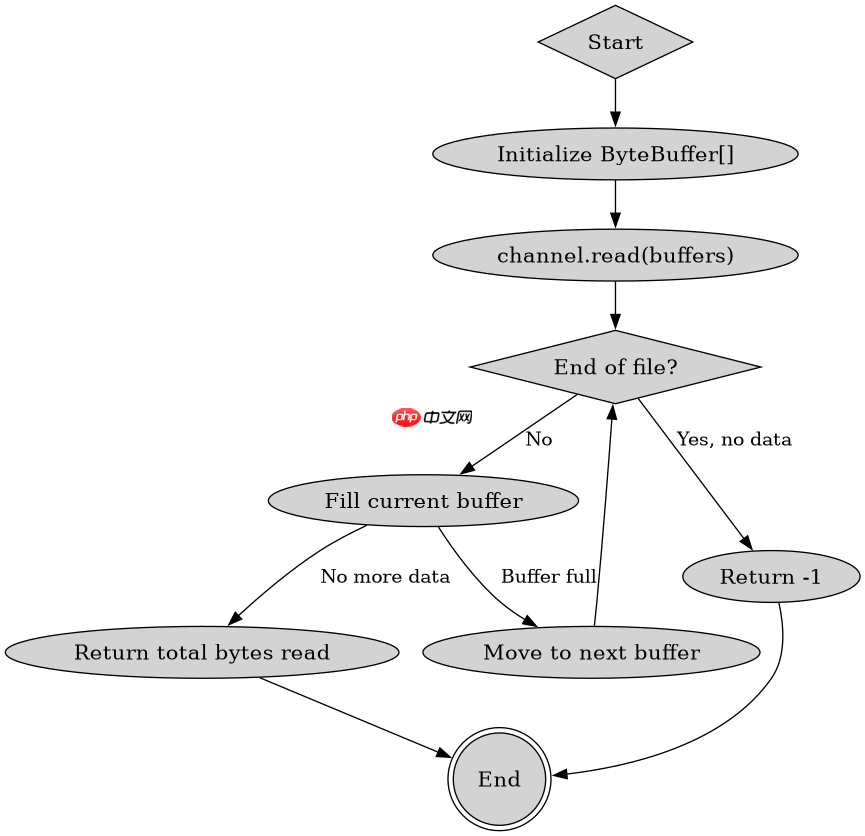
java nio 使用 scatteringbytechannel 接口实现分散读取,核心方法是 read(bytebuffer[] buffers)。调用该方法时,nio 会按数组顺序依次填充每个缓冲区,直到填满当前缓冲区或数据读完为止。如果所有缓冲区都填满,返回读取的总字节数;如果到达文件末尾且未填满任何缓冲区,返回 -1。

read() 如何按顺序填充多个缓冲区
read(ByteBuffer[]) 方法会遍历传入的缓冲区数组,依次向每个缓冲区写入数据。当第一个缓冲区被填满后,继续向第二个缓冲区写入,依此类推。如果某个缓冲区剩余空间不足,只写入可用部分并停止。这种机制非常适合处理固定格式的数据包,例如先读 4 字节的长度头,再读变长内容。
import java.io.IOException;
import java.nio.ByteBuffer;
import java.nio.channels.FileChannel;
import java.nio.file.Paths;

public class ScatteringReadExample {
    public static void main(String[] args) throws IOException {
        // 创建两个缓冲区:一个用于头部(4字节),一个用于内容(100字节)
        ByteBuffer header = ByteBuffer.allocate(4);
        ByteBuffer content = ByteBuffer.allocate(100);

        // 将缓冲区放入数组
        ByteBuffer[] buffers = new ByteBuffer[]{header, content};

        try (FileChannel channel = FileChannel.open(Paths.get("test.txt"))) {
            // 执行分散读取
            int bytesRead = channel.read(buffers);
            System.out.println("Read bytes: " + bytesRead);

            // 切换回读模式
            header.flip();
            content.flip();

            // 打印结果
            if (bytesRead > 0) {
                byte[] headerBytes = new byte[4];
                header.get(headerBytes);
                int length = (headerBytes[3] & 0xFF) << 24 |
                             (headerBytes[2] & 0xFF) << 16 |
                             (headerBytes[1] & 0xFF) << 8 |
                             (headerBytes[0] & 0xFF);
                System.out.println("Header length: " + length);

                byte[] contentBytes = new byte[content.remaining()];
                content.get(contentBytes);
                System.out.println("Content: " + new String(contentBytes));
            }
        }
    }
}
运行上述代码,假设 test.txt 包含 "Hello World",输出为:
Read bytes: 11
Header length: 0
Content: Hello World
注意:由于文件只有 11 字节,前 4 字节被读入 header,剩余 7 字节被读入 content。header 的 4 个字节是文件的前 4 个字符的 ASCII 值,content 包含剩余的 7 个字符。
立即学习“Java免费学习笔记(深入)”;

分散读取与聚集写入的配合使用
分散读取通常与聚集写入配合使用,形成完整的数据包处理流程。聚集写入通过 GatheringByteChannel 接口的 write(ByteBuffer[] buffers) 方法实现,按顺序从每个缓冲区读取数据并写入通道。这种对称设计使得数据包的结构化读写变得简单高效。

import java.io.IOException;
import java.nio.ByteBuffer;
import java.nio.channels.FileChannel;
import java.nio.file.Paths;
import java.nio.file.StandardOpenOption;

public class GatheringWriteExample {
    public static void main(String[] args) throws IOException {
        // 准备要写入的数据
        String headerStr = "HEAD";
        String contentStr = "DATA_CONTENT";

        // 创建缓冲区
        ByteBuffer header = ByteBuffer.allocate(4);
        header.put(headerStr.getBytes());
        header.flip();

        ByteBuffer content = ByteBuffer.allocate(12);
        content.put(contentStr.getBytes());
        content.flip();

        // 将缓冲区放入数组
        ByteBuffer[] buffers = new ByteBuffer[]{header, content};

        try (FileChannel channel = FileChannel.open(
                Paths.get("output.txt"),
                StandardOpenOption.CREATE,
                StandardOpenOption.WRITE)) {
            // 执行聚集写入
            int bytesWritten = channel.write(buffers);
            System.out.println("Written bytes: " + bytesWritten);
        }
    }
}
运行上述代码,会在 output.txt 中写入 "HEADDATA_CONTENT",共 16 字节。write() 返回值为 16,表示成功写入了 16 个字节。
缓冲区未满时的返回值处理
当分散读取遇到文件末尾时,返回值可能小于预期。如果所有缓冲区都被完全填满,返回值为所有缓冲区容量之和。如果部分缓冲区被填满,返回值为实际读取的字节数。如果到达文件末尾且未填满任何缓冲区,返回 -1。开发者需要检查返回值,确保正确处理部分读取的情况。
在上面的示例中,如果文件只有 5 字节,read() 会返回 5,其中前 4 字节填入 header,最后 1 字节填入 content。header 被完全填满,content 只填了 1 字节。开发者需要检查 content.remaining() 来确定实际读取的内容长度。



















