








在 nginx 源码编译后配置 systemd 服务,核心做法是编写一个符合 freedesktop 规范的 .service 文件并放置于 /etc/systemd/system/ 目录,随后通过 systemctl daemon-reload 重载配置并使用 systemctl start nginx 启动。具体步骤包括创建用户、指定编译安装路径(如 /usr/local/nginx)、编写包含 [unit]、[service] 和 [install] 段的配置文件,最后启用该服务以实现开机自启。

如何编写 Nginx 的 systemd 服务单元文件
编写 .service 文件需要明确执行路径、工作目录以及运行用户。通常建议创建一个专用的非特权用户(如 nginx)来运行服务,以提高安全性。文件内容需定义 ExecStart 指向编译后的 nginx 二进制文件,并设置 Restart=on-failure 以保证服务异常退出时能自动恢复。
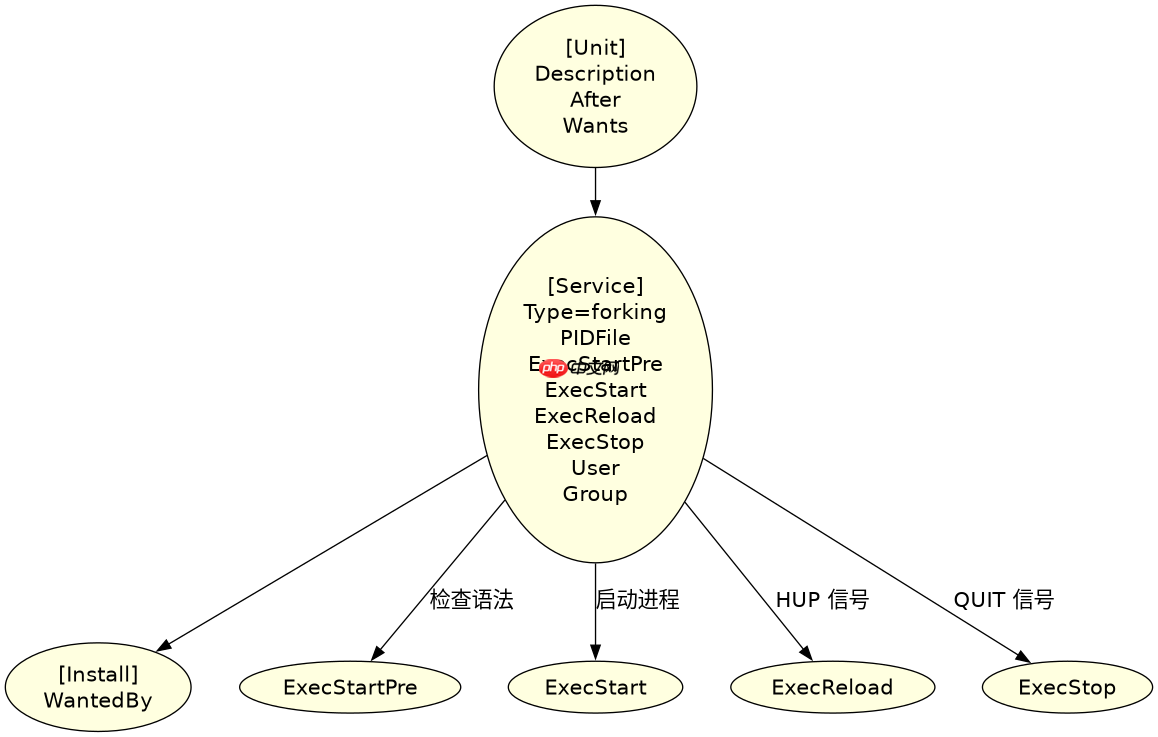
# /etc/systemd/system/nginx.service
[Unit]
Description=The NGINX HTTP and reverse proxy server
After=syslog.target network-online.target remote-fs.target nss-lookup.target
Wants=network-online.target

[Service]
Type=forking
PIDFile=/usr/local/nginx/logs/nginx.pid
ExecStartPre=/usr/local/nginx/sbin/nginx -t
ExecStart=/usr/local/nginx/sbin/nginx
ExecReload=/bin/kill -s HUP $MAINPID
ExecStop=/bin/kill -s QUIT $MAINPID
PrivateTmp=true
User=nginx
Group=nginx

[Install]
WantedBy=multi-user.target
上述配置中,ExecStartPre 用于在启动前检查配置文件语法是否正确,避免启动失败。ExecReload 使用 HUP 信号实现平滑重启,而 ExecStop 使用 QUIT 信号优雅关闭进程。这些路径假设 Nginx 编译时使用了默认前缀 --prefix=/usr/local/nginx,若自定义了路径,需相应修改 ExecStart 和 PIDFile 的路径。
如何验证并启用新配置的 systemd 服务
完成服务文件编写后,必须通知 systemd 重新加载配置单元,然后才能启动或启用服务。验证过程包括检查服务状态、查看日志输出以及测试配置文件的语法正确性。启用服务后,系统将在启动时自动拉起 Nginx。


# 重载 systemd 配置
sudo systemctl daemon-reload

# 启动 Nginx 服务
sudo systemctl start nginx

# 检查服务状态
sudo systemctl status nginx

# 启用开机自启
sudo systemctl enable nginx

# 测试配置文件语法(可选,手动执行)
/usr/local/nginx/sbin/nginx -t
执行 systemctl daemon-reload 后,systemd 会读取新的 .service 文件。通过 systemctl status nginx 可以查看服务的当前状态,包括是否正在运行、主进程 ID 以及最近的日志摘要。如果服务启动失败,可以通过 journalctl -u nginx -xe 查看详细错误信息。确保 nginx 用户存在且具有对日志目录和网站根目录的写入权限,否则服务可能因权限问题无法启动。
当 Nginx 配置文件存在语法错误时 systemd 如何处理
如果在 ExecStartPre 阶段检测到配置文件语法错误,Nginx 将拒绝启动,systemd 会记录失败状态并将服务标记为 failed。此时 ExecStart 不会执行,服务保持停止状态。这种机制防止了错误配置导致的服务不可用或静默失败。
# 模拟错误配置后的状态检查
sudo systemctl status nginx
# 输出示例:
# ● nginx.service - The NGINX HTTP and reverse proxy server
#    Loaded: loaded (/etc/systemd/system/nginx.service; enabled)
#    Active: failed (Result: exit-code) since ...
#   Process: 12345 ExecStartPre=/usr/local/nginx/sbin/nginx -t (code=exited, status=1/FAILURE)
在上述场景中,nginx -t 命令返回非零退出码,导致 ExecStartPre 失败。systemd 根据 [Service] 中的默认行为,终止启动流程。开发者需要修正 /usr/local/nginx/conf/nginx.conf 中的语法错误,例如缺失的分号或不匹配的括号,然后再次尝试启动。这种预检机制确保了只有有效的配置才能触发服务启动,提升了系统的稳定性。

















